5 Best UPS Battery Backups for Home (November 2026)
The best home UPS battery backups include the CyberPower CP1500PFCLCD PFC Sinewave UPS Battery Backup for desktop computers, the APC BE600M1 UPS Battery Backup & Surge for a home office desk, and the APC BE425M UPS Battery Backup and Surge for a router and modem.
On this page (11 sections)
- How we chose home UPS battery backups
- Which home UPS battery backup fits each setup?
- How much UPS capacity should you choose for home electronics?
- How many battery backup outlets does a home UPS need?
- How long will a home UPS keep devices running?
- What does surge protection add to a home UPS?
- How does a UPS switch to battery power?
- Does a UPS work during a power outage?
- Should you choose sine wave or simulated sine wave output?
- When is a portable solar panel or power station a better fit?
- Which home UPS battery backup should you choose?
The best UPS battery backup for home use is the CyberPower CP1500PFCLCD for a desktop setup that needs sine wave output and 1,000W capacity. For a router or modem, the smaller APC BE425M can cover essential network gear, while the APC BE600M1 offers more capacity for a home office.
A UPS is for keeping selected electronics powered through a short interruption or giving you time to save work and shut down. For computer-focused options, see APC UPS systems for computers.
Match the wattage, outlet count and runtime to the equipment you want backed up.
Our picks at a glance
-
1
 Best for desktop computers
CyberPower CP1500PFCLCD PFC Sinewave UPS Battery Backup
9.7/10 our score
See it on Amazon -
2
 Best for a home office desk
APC BE600M1 UPS Battery Backup & Surge
9.6/10 our score
See it on Amazon -
3
 Best for a router and modem
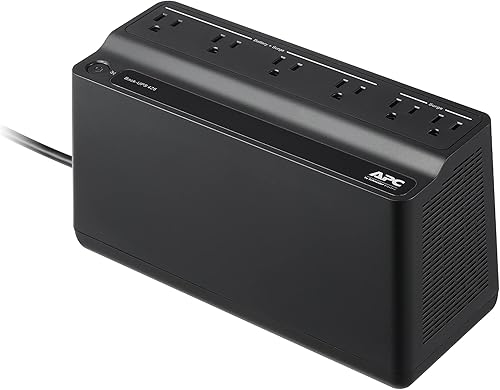
APC BE425M UPS Battery Backup and Surge
9.5/10 our score
See it on Amazon
- 4
 Check it
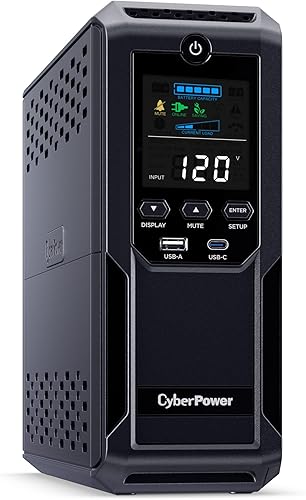
CyberPower CP1500AVRLCD3 Intelligent LCD UPS Battery Backup
Best for many connected devices - 5
 Check it
GOLDENMATE 1000VA/800W Lithium UPS Battery Backup
Best for a lithium battery design
How we chose home UPS battery backups
We compared each model's capacity, backed-up outlet count, stated runtime details, output type and surge protection features. For another brand's options, see Eaton UPS battery backups.
Our score weighs specs and features against what you're shopping for, including whether you need a small network backup or a larger desktop UPS.
A higher VA number alone doesn't tell you how long a UPS will run. Compare 1500VA UPS battery backups for watt capacity and outlet details.
Check the wattage limit and any runtime example at a load close to your devices.
| Product | Best for | Capacity | Battery backup outlets | Output | Our score |
|---|---|---|---|---|---|
| CyberPower CP1500PFCLCD PFC Sinewave UPS Battery Backup | desktop computers | 1500VA/1000W | 6 | Sine wave | 9.7 |
| APC BE600M1 UPS Battery Backup & Surge | a home office desk | 600VA/330W | 5 | 9.6 | |
| APC BE425M UPS Battery Backup and Surge | a router and modem | 425VA/255W | 4 | 9.5 | |
| CyberPower CP1500AVRLCD3 Intelligent LCD UPS Battery Backup | many connected devices | 1500VA/900W | 6 | Simulated sine wave | 9.3 |
| GOLDENMATE 1000VA/800W Lithium UPS Battery Backup | a lithium battery design | 1000VA/800W | 8 | 9.0 |
Which home UPS battery backup fits each setup?
The CyberPower CP1500PFCLCD is the strongest fit for a desktop workstation, while APC's smaller units make sense for a router, modem or compact desk. The GOLDENMATE is a higher-capacity lithium option with pure sine wave output.
CyberPower CP1500PFCLCD PFC Sinewave UPS Battery Backup: Best for desktop computers
- 1500VA/1000W capacity
- Sine wave output
- 6 battery backup and surge outlets
- Automatic voltage regulation
Sine wave output supports active PFC and conventional power supplies. Its 6 battery-backed outlets and color LCD suit a larger home office setup.
Pros
- Sine wave output
- AVR corrects minor voltage changes without switching to battery
- Color LCD shows battery and power conditions
Cons
- Only 6 of its 12 outlets provide battery backup
- Runtime depends on connected load
The CyberPower CP1500PFCLCD is the top pick for a home workstation because it combines 1,500VA/1,000W capacity with sine wave output. For a portable gaming setup, compare UPS battery backups for gaming laptops.
CyberPower says the output works with active PFC and conventional power supplies, which makes it a useful match for desktop computers and networking equipment.
It has 12 outlets, with 6 providing battery backup and surge protection and 6 providing surge protection only. The color LCD shows battery and power conditions, while automatic voltage regulation corrects minor power fluctuations without switching to battery power.
The two USB ports, one Type-A and one Type-C, can charge phones and tablets. Runtime still depends on how much power your connected equipment draws, so add up your devices before plugging them in.
Choose this model if your home office needs a higher power limit, sine wave output and a display. Its 6 battery-backed outlets are the ones to reserve for devices that need to stay on briefly.
APC BE600M1 UPS Battery Backup & Surge: Best for a home office desk
- 600VA/330W capacity
- 5 battery backup outlets
- 23 minutes at 100W
- User-replaceable battery
The compact BE600M1 provides battery backup for a computer, router or other desk essentials. It also has a USB charging port that works during an outage.
Pros
- Stated 23-minute runtime at 100W
- 5 battery backup outlets
- User-replaceable battery
Cons
- Limited to 330W
- 2 of its 7 outlets are surge-only
The APC BE600M1 suits a home office desk with a computer, router and a few other essentials. Its 600VA/330W capacity is lower than the larger CyberPower units, but APC gives a useful runtime reference of 23 minutes at a 100W load.
Five of its seven outlets provide battery backup and surge protection; the other two are surge-only. A built-in 1.5A USB port can charge a compatible phone during an outage, and the internal battery is user-replaceable.
Compare 12V UPS replacement batteries for compatible options.
Use the battery-backed outlets for the computer and internet equipment you want to keep on. Keep the total load within 330W, and remember that a heavier load will shorten runtime.
Pick the BE600M1 when you want a compact desk UPS with an explicit runtime example. If your only priority is internet access, the smaller BE425M leaves more room to focus on a router and modem.
See more APC UPS battery backups for other setups.
APC BE425M UPS Battery Backup and Surge: Best for a router and modem
- 425VA/255W capacity
- 4 battery backup outlets
- Up to 15 minutes at 100W
- Wall-mountable design
This compact UPS fits low-power network devices such as a router, modem or VoIP phone. Its wall-mountable design can keep it off a crowded desk.
Pros
- Stated runtime for a 100W load
- Wall-mountable design
- 4 battery backup outlets
Cons
- 255W maximum output
- 2 of its 6 outlets are surge-only
The APC BE425M is a small UPS for low-power essentials such as a Wi-Fi router, modem or VoIP phone. It supports 425VA/255W and offers up to 15 minutes at a 100W load.
Four of its six outlets provide battery backup and surge protection, while two provide surge protection only. The compact unit can sit under a desk or mount on a wall, which helps in a small apartment or network corner.
Use this model when your goal is to keep internet equipment running through a brief outage. A computer and monitor may use enough power to make this 255W unit a poor fit, so check their combined draw before connecting them.
CyberPower CP1500AVRLCD3 Intelligent LCD UPS Battery Backup: Best for many connected devices
- 1500VA/900W capacity
- 12 outlets
- 6 battery backup and surge outlets
- Automatic voltage regulation
This 12-outlet UPS offers 900W capacity, an LCD and AVR for a home office or entertainment setup. Its output is simulated sine wave, unlike the sine wave CP1500PFCLCD.
Pros
- 12 outlets, including 6 battery-backed
- AVR corrects minor voltage changes
- Color LCD shows battery and power conditions
Cons
- Simulated sine wave output
- Runtime depends on connected load
The CyberPower CP1500AVRLCD3 fits a home office or entertainment area with several devices and a need for up to 900W of capacity. It has 12 outlets, split evenly between battery backup with surge protection and surge-only protection.
Its LCD shows battery and power conditions, and AVR corrects minor power fluctuations without switching to battery. The key choice is output type: this model uses simulated sine wave output, while the CP1500PFCLCD uses sine wave output.
Both CyberPower units have USB Type-A and Type-C charging ports. Choose the AVRLCD3 if its 900W capacity and outlet layout match your setup; check device requirements before choosing simulated sine wave for sensitive equipment.
GOLDENMATE 1000VA/800W Lithium UPS Battery Backup: Best for a lithium battery design
- 1000VA/800W capacity
- Pure sine wave output
- 8 battery backup and surge outlets
- LiFePO4 battery
This UPS combines pure sine wave output with 8 backed-up outlets. GOLDENMATE says its LiFePO4 battery is designed for more than 5,000 charge cycles.
Pros
- Pure sine wave output
- All 8 outlets provide backup and surge protection
- LCD shows battery and power conditions
Cons
- Cooling fan can run during heavy battery use
- Check that your outlet voltage is within its 90–140V input range
The GOLDENMATE 1000VA/800W UPS is the lithium option in this group, with pure sine wave output and 8 battery-backed outlets. Its LiFePO4 battery distinguishes it from the lead-acid APC and CyberPower models described here.
GOLDENMATE says the battery is designed for more than 5,000 charge cycles and over 10 years of life. Those are manufacturer claims, not a guarantee of the battery's service life in your home.
The LCD shows battery and power conditions, and the unit includes a buzzer mute function. Its input range is 90–140V AC, so check that your household outlet falls within that range and follow the instructions for placement and cable use.
Choose this model if you want pure sine wave output, 800W capacity and a lithium battery design. The cooling fan can activate during heavy battery use, so consider where the unit will sit.
How much UPS capacity should you choose for home electronics?
Choose a UPS whose wattage rating exceeds the total power draw of the devices you plan to back up. The CP1500PFCLCD supports up to 1,000W, the CP1500AVRLCD3 up to 900W, the GOLDENMATE up to 800W, and the APC models up to 330W or 255W.
Add the wattage of the computer, monitor, router and other equipment that will use battery outlets at the same time. Keep a margin below the maximum so the UPS is not operating at its limit.
VA and watts describe different limits, so compare the watt rating when you know your equipment's power draw. The VA number by itself is not a runtime promise.
How many battery backup outlets does a home UPS need?
Count only the devices you want powered during an outage, then check how many outlets provide battery backup. Some UPS units include surge-only outlets for equipment that does not need to keep running.
The CP1500 models provide 6 battery-backed outlets out of 12 total. The BE600M1 has 5 battery-backed outlets, while the BE425M has 4; all three include additional surge-only outlets.
Use battery outlets for priorities such as a computer, modem or router. A printer, speaker or other optional device may be better left off those outlets unless you have confirmed the UPS has enough capacity.
How long will a home UPS keep devices running?
A UPS runtime depends on the connected load, battery condition and model. APC gives reference runtimes for its two compact units: 23 minutes at 100W for the BE600M1 and up to 15 minutes at 100W for the BE425M.
These examples help compare the two APC models at the same load, but they do not predict your exact setup. Higher wattage draw generally means less time on battery, and a computer's power use can change with its workload.
A UPS can provide a short bridge or allow a safe shutdown. If you need longer backup for several household devices, compare a portable power station buying guide and plan around the devices and runtime you need.
What does surge protection add to a home UPS?
Surge protection helps shield connected electronics from voltage spikes, while battery backup keeps selected devices powered when utility power is interrupted. A UPS may provide both functions on the same outlet, but some outlets can be surge-only.
Read the outlet labels before connecting equipment. Reserve battery-backed outlets for the devices you need to run during an outage, and use surge-only outlets for lower-priority equipment.
The CyberPower CP1500PFCLCD and CP1500AVRLCD3 also include AVR, which corrects minor power fluctuations without switching to battery power. That feature is useful where voltage changes occur, while the battery still handles interruptions.
How does a UPS switch to battery power?
A UPS switches connected equipment to its battery when incoming utility power is interrupted or falls outside its operating range. The transfer behavior depends on the UPS design and the power condition.
For a closer explanation of the transition, read how a UPS battery backup switches to battery power. Use the UPS display or indicators to check its state and follow the manual for alarms and shutdown steps.
Does a UPS work during a power outage?
Yes, a UPS can power devices connected to its battery-backed outlets during an outage, within the unit's capacity and remaining battery runtime. It does not provide unlimited power, and surge-only outlets do not run from the battery.
See whether a UPS battery backup works during a power outage for what to expect. If you need to support a sump pump, start with the separate guide to the best battery for sump pump backup, since pump power needs differ from computer loads.
Should you choose sine wave or simulated sine wave output?
Choose output type based on the power supply requirements of the equipment you plan to connect. The CP1500PFCLCD and GOLDENMATE specify sine wave output, while the CP1500AVRLCD3 uses simulated sine wave output.
If you are choosing between the two 1500VA CyberPower and APC desktop alternatives, see our APC BR1500MS2 vs CyberPower CP1500PFCLCD comparison. Check your equipment's requirements before buying, especially if its power supply calls for sine wave output.
When is a portable solar panel or power station a better fit?
A UPS is designed to keep selected electronics on briefly, while portable power stations can suit longer backup needs when sized for the load. Solar panels can recharge some compatible stations, but the panel and station must work together.
Learn what a portable solar panel is before planning a solar setup, or compare options in our guide to the best portable solar panels for an RV. For small devices away from a wall outlet, the power bank battery guide covers a simpler charging option.
Which home UPS battery backup should you choose?
Choose the CyberPower CP1500PFCLCD for a desktop setup that needs sine wave output and up to 1,000W, or the APC BE600M1 if you want a smaller home office UPS with a stated 100W runtime example. Pick the BE425M for a router and modem, the CP1500AVRLCD3 for a larger group of devices with simulated sine wave output, or the GOLDENMATE for a lithium battery design with pure sine wave output.
Our top 3 picks at a glance
-
1
Best for desktop computers
CyberPower CP1500PFCLCD PFC Sinewave UPS Battery Backup
9.7/10 our score
See it on Amazon -
2
Best for a home office desk
APC BE600M1 UPS Battery Backup & Surge
9.6/10 our score
See it on Amazon -
3
Best for a router and modem
APC BE425M UPS Battery Backup and Surge
9.5/10 our score
See it on Amazon
Frequently asked questions
What size UPS battery backup do I need for home?
Choose a UPS by the total wattage of the devices you need to keep running, then leave room below its maximum output. The 1500VA CyberPower models support up to 900W or 1,000W, while the APC BE600M1 supports up to 330W and the BE425M up to 255W.
Runtime also changes with load, so check runtime at a comparable wattage.
How long will a home UPS run during an outage?
Runtime depends on the UPS model, battery condition and connected load. APC gives specific examples: the BE600M1 runs for 23 minutes at 100W, while the BE425M provides up to 15 minutes at 100W.
A UPS is usually suited to bridging a short outage or safely shutting down devices, not powering a whole home.
Which home devices should go on battery backup outlets?
Use battery-backed outlets for the devices you need to keep on briefly, such as a router, modem or computer. Put less critical equipment on surge-only outlets when the UPS has them.
Check each device's wattage and the UPS's total output limit before connecting it.
Can a UPS keep a sump pump running?
A UPS can only support a sump pump if its output, runtime and battery setup match the pump's startup and running power needs. Computer UPS models are designed around electronics, so check pump compatibility carefully.
See our guide to the best battery for sump pump backup for options focused on that job.


