What Is a Tower UPS? What Really Happens

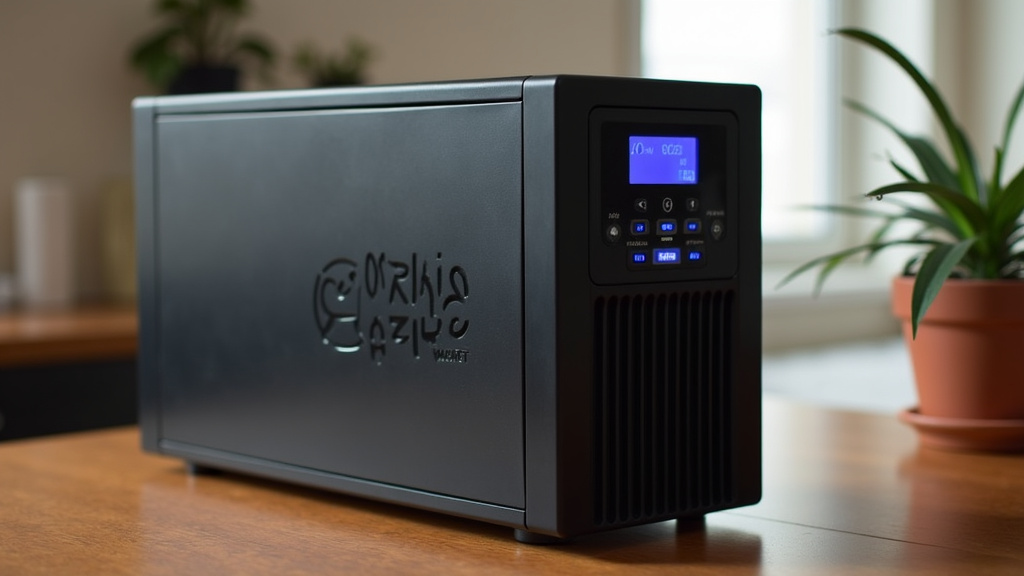
A tower UPS is a standalone, vertical battery backup unit designed to protect your electronics from power surges and outages. It sits on your desk or floor like a small tower, offering Learn how a battery backup can protect your electronics from power issues.reliable power protection when the electricity flickers or goes out. This ensures your computer and important data remain safe.
Think of it as a power guardian for your valuable devices. When the main power fails, the tower UPS instantly kicks in, providing enough battery time to properly shut down your equipment. This prevents sudden shutdowns, which can corrupt files or damage hardware. It’s a simple yet effective safeguard.
TL;DR:
- A tower UPS is a vertical battery backup.
- It protects against power surges and outages.
- It gives you time to safely shut down devices.
- This prevents data loss and hardware damage.
Below, we’ll break down exactly what a tower UPS does and why it’s a smart choice for keeping your electronics running smoothly.
How a Tower UPS Works for Your Electronics
You’re probably wondering what exactly happens when the power goes out and your tower UPS springs into action. It’s a smart system designed to protect your gear. A tower UPS acts like a bridge between your devices and the wall outlet. It constantly monitors the incoming power. When everything is normal, it lets the utility power flow through. It also uses some of that power to keep its internal battery charged.
When the electricity suddenly cuts off, the UPS instantly detects this change. It has a built-in battery that is ready to go at a moment’s notice. Think of it like a car battery that’s always ready to start the engine. The UPS quickly switches over to its battery power. This happens so fast, your connected equipment barely notices anything has changed. You won’t see your screen go black suddenly.
This immediate switchover is the main job of the UPS. It’s designed to prevent the abrupt loss of power that can cause problems. Without it, your computer would just shut down without warning. This can lead to lost work and potentially corrupted files. The UPS buys you precious time to shut things down properly.
The Core Components Inside a Tower UPS
To understand how a tower UPS works, it helps to know what’s inside. You have a few key parts working together. These components make sure you get that battery power when you need it most. They are designed for reliable performance.
1. The Battery Itself
This is the heart of any UPS. Most tower UPS units use sealed, lead-acid batteries. These are similar to the batteries found in cars, but they are designed for deep discharge cycles. The battery is the energy reserve. It stores the power that will be used during an outage. The size and capacity of the battery determine how long the UPS can power your devices.
2. The Inverter
Your home’s electricity is alternating current (AC). Your UPS battery stores power as direct current (DC). The inverter’s job is to convert the DC power from the battery back into AC power. This AC power is then sent to your connected devices. It’s like a translator, turning one type of electrical language into another so your electronics can understand it.
3. The Charger
While the inverter is busy converting DC to AC during an outage, the charger has a different role. When the utility power is present, the charger’s job is to recharge the battery. It makes sure the battery is always topped up and ready for the next power event. It prevents the battery from sitting in a discharged state for too long, which can shorten its lifespan.
4. The Transfer Switch
This is the component that makes the magic happen instantly. The transfer switch is responsible for detecting the power outage. It then quickly disconnects the utility power and connects the inverter’s output to your devices. Many UPS systems use a relay-based transfer switch. Some advanced models might use solid-state switches for even faster transitions. This is where the near-instantaneous switch occurs.
What Happens During a Power Outage? Step-by-Step.
Let’s walk through a typical power outage scenario. Imagine you’re working on your computer, and suddenly the lights flicker. This is when your tower UPS becomes your Explore a typical power outage scenario with a UPS.digital superhero.
Step 1: Power Fluctuation Detected
The UPS is constantly monitoring the voltage and frequency of the incoming AC power. If it detects a significant drop (a brownout) or a complete loss of power, it knows something is wrong. This detection is nearly immediate.
Step 2: Transfer Switch Engages
As soon as the power failure is confirmed, the transfer switch springs into action. It disconnects the unstable utility power. At the same time, it connects the internal battery’s DC power to the inverter. This switchover typically takes between 2 to 10 milliseconds. For most electronic devices, this is too fast to notice.
Step 3: Inverter Provides Power
The inverter then converts the DC power from the battery into AC power. This AC power is sent to the outlets on the UPS. Your computer, monitor, and other connected devices continue to run, drawing power from the UPS battery. It’s like a smooth handoff.
Step 4: You Get Time to Act
The amount of time the UPS can provide power depends on its battery capacity and the load (how many devices are plugged in). A typical home or small office UPS might provide 5 to 15 minutes of runtime. This is enough time to save your work and perform a graceful shutdown of your computer. You’ll usually hear a beeping sound from the UPS to alert you that it’s running on battery power.
Step 5: Power is Restored (Hopefully!)
Once the utility power returns, the UPS detects it. The transfer switch then reconnects the utility power. The inverter turns off, and the charger starts replenishing the battery. Your devices continue to run uninterrupted as the UPS switches back to wall power. It’s a full circle.
What About Power Surges?
Tower UPS units do more than just handle blackouts. They also provide protection against power surges and spikes. A surge is a sudden, brief increase in voltage. Spikes are similar but can be even more intense. These can damage sensitive electronics. Many UPS units have built-in surge protection for the outlets that are only for battery backup, as well as for any coaxial or network cables plugged into them.
When a surge comes through the wall outlet, the UPS absorbs the excess energy. It prevents that damaging jolt from reaching your connected devices. This is often handled by components called Metal Oxide Varistors (MOVs). They act like tiny sponges for excess electricity. This makes the UPS a dual-threat protector against electrical disturbances.
The Different Types of Tower UPS Systems
Not all tower UPS units are created equal. They differ in how they handle power and switch to battery. Understanding these differences can help you choose the right one. Here’s a quick look at the three main types:
| Type | How it Works | Best For |
|---|---|---|
| Standby (Offline) | Lets utility power pass through until an outage. Then switches to battery. Simplest and most affordable. | Basic home and office computers, non-critical devices. |
| Line-Interactive | Similar to standby but has an automatic voltage regulator (AVR). Corrects minor voltage fluctuations without using battery. | Most home users, small businesses, servers that need consistent power. |
| Online (Double-Conversion) | Constantly converts AC to DC and back to AC. The output power is always from the inverter, even with normal power. Offers the highest level of protection. | Mission-critical equipment, data centers, sensitive medical devices. |
For most everyday shoppers, a line-interactive tower UPS offers a good balance of protection and cost. Standby units are budget-friendly but offer less advanced protection. Online UPS systems are excellent but often more expensive than most home users need.
Choosing the Right Tower UPS for Your Needs
Selecting a tower UPS isn’t just about picking the prettiest box. You need to consider what you’ll be plugging into it and how long you need backup power. Think about the wattage of your devices. You can usually find this information on the power adapter or the device itself. Add up the wattage of everything you plan to connect.
You’ll want a UPS with a higher VA (volt-ampere) and wattage rating than your total device consumption. This gives you headroom. It also allows for future additions. Check the runtime charts provided by manufacturers. These charts show how long the UPS can power a certain load. More battery capacity means longer runtime, but also a larger and more expensive unit.
Here’s a quick checklist to help you decide:
- Determine the total wattage of devices you need to protect.
- Consider how long you need backup power (e.g., 5, 10, 20 minutes).
- Decide on the type of UPS (standby, line-interactive, or online).
- Look at the number of outlets needed for your devices.
- Factor in any special protection needed for phone or network lines.
- Check user reviews for reliability and ease of use.
By thinking through these points, you can find a tower UPS that truly fits your situation and provides the peace of mind you deserve.
Conclusion
You now understand that a tower UPS is your electronics’ personal bodyguard. It stands ready to protect your computer and data from unexpected power disruptions. From its internal battery and inverter to its quick transfer switch, each component works in harmony. This ensures a smooth transition when power flickers or fails, giving you essential time to save your work. Don’t wait for an outage to happen; decide today which tower UPS best suits your needs for reliable peace of mind.
Frequently Asked Questions
How long does a tower UPS battery typically last?
The runtime of a tower UPS battery depends on its capacity and the load connected. Most home or small office units provide about 5 to 15 minutes of backup power. This is usually enough time to properly shut down your equipment and avoid data loss.
Can a tower UPS protect against lightning strikes?
While a tower UPS offers surge protection, it’s not designed to withstand a direct lightning strike. Lightning can cause massive power surges that overwhelm most consumer-grade surge protectors and UPS units. For complete protection against lightning, consider additional surge protection devices and ensuring your home is properly grounded.
Do I need to replace the battery in my tower UPS?
Yes, UPS batteries have a limited lifespan, typically 3 to 5 years. Over time, they lose their ability to hold a charge. Most manufacturers recommend replacing the battery to maintain the UPS’s protective capabilities. You’ll often hear the UPS beep more frequently when the battery is nearing the end of its life.
What’s the difference between a UPS and a surge protector?
A surge protector only guards against voltage spikes, preventing them from reaching your devices. A UPS does this too, but it also provides battery backup power during an outage. This gives you time to save your work and shut down safely, which a surge protector alone cannot do.
Can I plug a laser printer into a tower UPS?
Generally, it’s not recommended to plug laser printers into a standard tower UPS. Laser printers draw a very large amount of power, especially when warming up. This can overload the UPS and cause it to shut down or fail to provide backup power when needed for other devices.