5 Best APC Smart-UPS Systems for Racks (November 2026)
The best rack mount smart UPS systems include the Eaton Tripp Lite SMART500RT1U SmartPro 500VA 1U for compact 1U racks, the Eaton Tripp Lite SMART1500LCD 1500VA 2U Rack for an LCD and 900W capacity, and the APC 1500VA Smart UPS with SmartConnect for remote monitoring.
On this page (8 sections)
- Which rack mount smart UPS models stand out?
- What separates these rack mount smart UPS picks?
- Which rack mount smart UPS fits your setup?
- How should you compare rack height, depth and power?
- Which monitoring features are useful for a managed rack?
- Does output type matter for rack equipment?
- What should you check before installing a rack UPS?
- Which rack mount smart UPS should you choose?
The best rack mount smart UPS for managed equipment is the APC Smart-UPS 1500VA with SmartConnect, with 1000W capacity, pure sine wave output and remote monitoring features. For a smaller rack, the SMART500RT1U fits 1U and has 300W capacity; the SMART1500LCD adds an LCD and 8 outlets in a 2U unit.
Smart UPS features vary. Some units offer software control or an LCD, while others support remote monitoring through a portal or optional card.
Match those features to how you monitor your rack and how much time you can give to checking equipment locally.
If rack installation is new to you, start with What Is a Rack Mount UPS? The Full Guide.
It covers rack size, depth and setup points to check before selecting a unit.
Our picks at a glance
-
1
 Best for compact 1U racks
Eaton Tripp Lite SMART500RT1U SmartPro 500VA 1U
9.7/10 our score
See it on Amazon -
2
 Best for an LCD and 900W capacity
Eaton Tripp Lite SMART1500LCD 1500VA 2U Rack
9.6/10 our score
See it on Amazon -
3

- 4
 Check it
APC Smart-UPS 1500VA/900W Rackmount UPS
Best for APC 900W capacity - 5
 Check it
CyberPower OR700LCDRM1U Smart App LCD UPS Battery
Best for 1U racks below 500W
Which rack mount smart UPS models stand out?
The picks suit different rack needs: 1U capacity for tighter spaces, 2U models with more wattage, and APC units with remote monitoring. We compared their stated capacities, rack height, output and management features.
Our score weighs specs and features against what you're shopping for: a rack UPS that can protect managed equipment. A higher score here reflects the fit for that use, including capacity, monitoring and installation details.
What separates these rack mount smart UPS picks?
The main differences are power capacity, rack height, outlet layout and how you check or manage the UPS. Use the comparison to shortlist models, then confirm that your rack and connected devices fit the unit's requirements.
| Product | Best for | Capacity | Rack height | Outlets | Our score |
|---|---|---|---|---|---|
| Eaton Tripp Lite SMART500RT1U SmartPro 500VA 1U | compact 1U racks | 500VA/300W | 1U | 6 UPS-backed and 1 surge-only | 9.7 |
| Eaton Tripp Lite SMART1500LCD 1500VA 2U Rack | an LCD and 900W capacity | 1500VA/900W | 2U | 8 | 9.6 |
| APC 1500VA Smart UPS with SmartConnect | remote monitoring | 1500VA/1000W | 2U | 6 | 9.4 |
| APC Smart-UPS 1500VA/900W Rackmount UPS | APC 900W capacity | 1500VA/900W | 2U | 6 | 9.3 |
| CyberPower OR700LCDRM1U Smart App LCD UPS Battery | 1U racks below 500W | 700VA/400W | 1U | 4 battery-backed and 2 surge-only | 8.9 |
Which rack mount smart UPS fits your setup?
The SMART500RT1U leads this list for compact rack installations, while the APC SMT1500RM2UC has the highest watt capacity. Each pick has a distinct use, so compare the role of the rack, load and management method before choosing.
1. Eaton Tripp Lite SMART500RT1U SmartPro 500VA 1U: Best for compact 1U racks
Eaton Tripp Lite SMART500RT1U SmartPro 500VA 1U: Best for compact 1U racks
- 500VA/300W
- 1U rack or tower design
- AVR
- Individually controllable outlet
The 1U height and 11.8 in installed depth suit a tight rack. AVR handles brownouts, and software can control one outlet for load shedding.
Pros
- 1U rack height
- 11.8 in installed depth
- One controllable outlet
Cons
- 300W maximum power
- Lower capacity than the 2U picks
The SMART500RT1U fits a rack where height and depth are limited. It uses 1U of rack space and has an installed depth of 11.8 in, with a 500VA/300W capacity for smaller network or telecom loads.
AVR corrects brownouts without draining the battery. USB and RS232 connections support monitoring, and the included PowerAlert software supports network power management and unattended shutdown.
Six outlets provide UPS backup, with one individually controllable for load shedding. A seventh outlet is surge-only, so plan which devices need battery power before connecting the rack.
Choose this model for a lighter load where rack space is tight and software control is useful. Its 300W limit makes it a poor fit for a rack whose measured load approaches that ceiling.
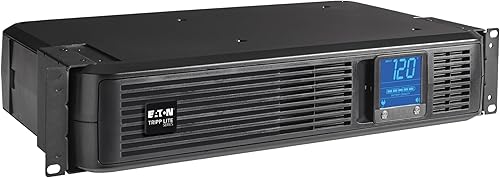
2. Eaton Tripp Lite SMART1500LCD 1500VA 2U Rack: Best for an LCD and 900W capacity
Eaton Tripp Lite SMART1500LCD 1500VA 2U Rack: Best for an LCD and 900W capacity
- 1500VA/900W
- 2U rack or tower
- Rotatable LCD
- AVR
This 2U model combines 900W capacity with a large rotatable LCD for checking voltage, runtime, load, battery and operating mode.
Pros
- Eight outlets
- LCD shows operating details
- AVR corrects voltage fluctuations
Cons
- Needs 2U of rack space
- Modified sine wave output in battery mode
The SMART1500LCD suits a rack needing more capacity and a clear local status display. Its 1500VA/900W rating and 8 outlets give it a different role from the compact 1U models.
The large LCD rotates to fit rack or tower placement and shows voltage, runtime, load, battery and operating mode. AVR corrects brownouts and overvoltages without using battery power, while USB and RS232 ports connect to a computer for monitoring and shutdown software.
This unit takes 2U of rack space, or it can stand vertically with the included adapter. In battery mode it uses modified sine wave output, so check the power requirements of sensitive equipment before connecting it.
Choose it when local status checks and 8 outlets matter. If your equipment requires pure sine wave output, compare the APC units below.
For more APC options, see our guide to best APC rack mount UPS systems. If you're comparing brands, our best CyberPower rack mount UPS systems covers another set of rack choices.
3. APC 1500VA Smart UPS with SmartConnect: Best for remote monitoring
APC 1500VA Smart UPS with SmartConnect: Best for remote monitoring
- 1500VA/1000W
- Pure sine wave output
- 2U rack mount
- SmartConnect remote monitoring
SmartConnect supports remote monitoring through a secure portal, including automatic notifications and firmware updates. The 2U unit supplies pure sine wave output.
Pros
- 1000W capacity
- Pure sine wave output
- Remote monitoring features
Cons
- Uses 2U of rack space
- SmartConnect is a 6-month free trial for units purchased or registered after August 1, 2023
The APC SMT1500RM2UC fits a managed rack where remote status checks are useful. It provides 1500VA/1000W capacity, pure sine wave output and AVR in a 2U rack mount design.
SmartConnect provides remote monitoring through a secure portal, with automatic notifications, firmware updates and support services. For units purchased or registered after August 1, 2023, SmartConnect is offered as a 6-month free trial.
The unit has 6 battery-backed and surge-protected outlets, with one switchable outlet group. Rack support rails are included, and APC describes this model for servers, switches, routers and networking devices.
Choose it if you want 1000W capacity with remote monitoring. Confirm the current SmartConnect terms and the power needs of each device before choosing it for a critical rack.
4. APC Smart-UPS 1500VA/900W Rackmount UPS: Best for APC 900W capacity
APC Smart-UPS 1500VA/900W Rackmount UPS: Best for APC 900W capacity
- 1500VA/900W
- Pure sine wave output
- 2U rack mount
- SmartConnect remote monitoring
This APC option pairs 900W capacity with pure sine wave output and SmartConnect remote monitoring. Its rack rails support a 2U installation.
Pros
- Pure sine wave output
- Remote monitoring features
- Rack support rails included
Cons
- Uses 2U of rack space
- SmartConnect is a 6-month free trial for units purchased or registered after August 1, 2023
The APC SMC1500-2UC is a 2U option for a rack that needs 900W capacity and remote monitoring. It provides pure sine wave output, AVR and 6 outlets for battery backup and surge protection.
SmartConnect supports remote monitoring through a secure portal, including automatic notifications and firmware updates. APC offers a 6-month free trial for units purchased or registered after August 1, 2023; the model also includes rack support rails.
The unit's 900W rating is below the 1000W SMT1500RM2UC, but both have 2U rack designs and 6 outlets. Check the SmartConnect terms and your equipment's load before choosing between them.
Choose this model if you want an APC Smart-UPS with 900W capacity. For a battery-focused comparison across brands, see best rack mount UPS battery backups.
5. CyberPower OR700LCDRM1U Smart App LCD UPS Battery: Best for 1U racks below 500W
CyberPower OR700LCDRM1U Smart App LCD UPS Battery: Best for 1U racks below 500W
- 700VA/400W
- 1U rack mount
- LCD panel
- AVR
The 1U design combines an LCD panel and AVR in a 400W unit. Remote management requires the optional RMCARD205 card.
Pros
- 1U rack height
- LCD shows runtime and battery status
- AVR handles minor fluctuations
Cons
- 400W maximum power
- Simulated sine wave output
The CyberPower OR700LCDRM1U pairs a 1U rack design with a 700VA/400W capacity. Its LCD panel shows runtime, battery status and power conditions, while AVR corrects minor power fluctuations without switching to battery.
It has 4 battery-backed and surge-protected outlets plus 2 surge-only outlets. The output is simulated sine wave, and remote management requires the optional RMCARD205 card.
CyberPower includes PowerPanel Business Edition management software and states a 3-year warranty that includes the batteries. Check the power requirements of connected devices, especially if they call for pure sine wave output.
Choose it when 1U height and an LCD matter, and your load stays within 400W. For a different power design, our hybrid UPS system guide explains the term, while the DC UPS system guide covers DC-powered backup.
How should you compare rack height, depth and power?
A rack UPS must fit the space and handle the connected load, so check all three before selecting a model. A 1U unit can save height, but it may have less capacity than a 2U model.
Measure the open rack space and compare it with the UPS dimensions or stated rack height. Also allow room for cables, airflow and access to outlets, and check whether the rack supports the unit's mounting method.
Next, total the wattage of the devices you plan to keep online. Choose a UPS with a watt rating above that sum, then decide whether planned expansion needs extra capacity.
Finally, map devices to battery-backed outlets. Some units have surge-only outlets as well, and those won't keep equipment running through an outage.
Which monitoring features are useful for a managed rack?
Choose monitoring based on how you want to check status and respond to power events. A front LCD helps with local checks, while software or remote services can help when the rack is unattended.
The SMART1500LCD's rotatable display shows runtime, load, battery and operating mode. The SMART500RT1U includes PowerAlert software and supports USB and RS232 monitoring connections.
The APC SmartConnect models add portal-based remote monitoring features, including automatic notifications and firmware updates. CyberPower's OR700LCDRM1U has an LCD, while remote management requires the optional RMCARD205 card.
Check whether the monitoring method works with your network and the equipment you already use. Remote visibility is useful only if you can receive and act on its alerts.
Does output type matter for rack equipment?
Output type can affect compatibility, so check the power requirements for your server, switch or storage device before buying. The APC SMT1500RM2UC and SMC1500-2UC specify pure sine wave output, while the OR700LCDRM1U specifies simulated sine wave.
The SMART1500LCD provides sine wave output in AC mode and modified sine wave output in battery mode. The SMART500RT1U's supplied product details don't state its output waveform, so verify compatibility if a connected device requires a specific type.
What should you check before installing a rack UPS?
Confirm rack fit, available power and outlet needs before mounting the UPS. Then follow the model's installation instructions and plan how you will monitor battery and load status.
Check the unit's height, depth and mounting hardware, along with room for power and network cables. The SMART500RT1U is 11.8 in deep as installed, and both APC 2U models include rack support rails.
A UPS protects only the devices connected to its backed-up outlets. Label those connections, keep surge-only devices separate and avoid exceeding the UPS's watt capacity.
Also decide how the rack will shut down during a long outage. Software connections and management features differ by model, so confirm the required cables, software and optional cards before installation.
Which rack mount smart UPS should you choose?
Choose the SMART500RT1U for a compact 1U rack and a load below 300W, or the CyberPower OR700LCDRM1U if you need 1U with a 400W ceiling and LCD. For 900W with a rotatable display, consider the SMART1500LCD.
Pick the APC SMT1500RM2UC if you need the highest stated watt capacity here, pure sine wave output and SmartConnect remote monitoring. The SMC1500-2UC offers a 900W APC alternative with similar monitoring features.
Before deciding, match your measured load to the UPS rating, confirm output compatibility and check that the rack has room for the unit and cables.
Our top 3 picks at a glance
-
1
Best for compact 1U racks
Eaton Tripp Lite SMART500RT1U SmartPro 500VA 1U
9.7/10 our score
See it on Amazon -
2
Best for an LCD and 900W capacity
Eaton Tripp Lite SMART1500LCD 1500VA 2U Rack
9.6/10 our score
See it on Amazon -
3
Frequently asked questions
What makes a rack mount UPS a smart UPS?
A rack mount smart UPS combines rack installation with features for monitoring or managing power. Depending on the model, that can include an LCD, software, network connections or a remote monitoring service.
Check which features are built in and which need an optional management card.
How much rack space do these smart UPS systems need?
The SMART500RT1U and CyberPower OR700LCDRM1U use 1U, while the other models here use 2U. Measure both rack height and usable depth before you choose.
The SMART500RT1U has an installed depth of 11.8 in.
Do I need pure sine wave output for rack equipment?
Pure sine wave output may matter for equipment whose manufacturer calls for it. The APC SMT1500RM2UC and SMC1500-2UC specify pure sine wave output, while the CyberPower OR700LCDRM1U uses simulated sine wave output.
Check the power requirements for every device you plan to connect.
How do I choose UPS capacity for a rack?
Add the wattage of the devices you want backed up, then choose a UPS with enough watt capacity for that total and any planned growth. The models here range from 300W to 1000W.
Also check outlet count and which outlets provide battery backup.