How to Choose a LiFePO4 UPS Battery Backup
Choose a LiFePO4 UPS battery backup by matching its output rating, usable runtime and installation style to your equipment. Confirm the UPS is designed for a LiFePO4 battery, then check its charging, monitoring and replacement requirements.
On this page (9 sections)
- What should a LiFePO4 UPS battery backup match?
- How do you confirm a UPS is designed for LiFePO4?
- How much runtime do you need?
- Which output and outlets fit your equipment?
- Which installation style suits your space?
- Which UPS examples show useful design trade-offs?
- How do battery backup and a battery differ?
- What should you confirm before choosing?
- Which LiFePO4 UPS should you choose?
A LiFePO4 UPS battery backup is a UPS built to work with a lithium iron phosphate battery, and you should choose one by matching its output, runtime and installation style to your equipment. Verify that the UPS is designed for LiFePO4 rather than assuming a compatible voltage is enough.
Start by listing the devices that must stay on during an outage and their power draw. Then compare the UPS's rated output, expected runtime at that load, outlet arrangement and battery guidance.
Battery chemistry affects charging and monitoring needs, so check the design as a complete system. Our guide to what type of batteries are in UPS units explains why UPS battery types are not always interchangeable.
What should a LiFePO4 UPS battery backup match?
A suitable LiFePO4 UPS should match the connected load, required runtime and battery design. A large battery cannot make an undersized inverter support more equipment than its output rating allows.
Write down the devices that need backup, such as a modem, router, workstation or small server. Add their power draw and compare the total with the UPS output in watts, leaving room for devices that draw more power at startup.
Volt-amperes and watts measure different limits. Check both figures in the UPS specifications and use watts when comparing the device load with the UPS's watt rating.
Next, decide what the UPS must do during an outage. Some systems need only enough time to save work and shut down; network equipment or a small server may need a longer bridge to a generator or another power source.
A UPS transfers equipment to battery power when utility power falls outside its acceptable range. For that sequence, see how a UPS battery backup switches to battery power.
How do you confirm a UPS is designed for LiFePO4?
Check the exact UPS documentation for approved battery chemistry and replacement rules. If the maker only specifies lead-acid, don't assume a LiFePO4 battery is a safe substitute.
The battery pack, charger, battery management system and UPS monitoring must work together. Confirm the supported pack voltage, charging limits, low-voltage cutoff behavior and any required communications between the battery and UPS.
A battery management system can help protect a LiFePO4 pack, but it does not prove that the UPS charger is compatible. Ask the UPS or battery maker to confirm compatibility for the precise model if the documentation is unclear.
Also check whether the battery is internal, user-replaceable or part of a larger UPS system. Confirm how a replacement is obtained and installed before buying, especially if the UPS will support equipment that cannot be offline for long.
How much runtime do you need?
Choose runtime based on the action you need to complete during an outage, then check the UPS runtime chart at your expected load. Runtime usually falls as the connected load rises.
For a computer, you might need enough time to save open work and shut down safely. For a router or network device, you may need continuity through a brief interruption or enough time to switch to another source.
Runtime estimates apply to specific loads and battery conditions. They can change with battery age, temperature and equipment demand, so leave a margin instead of planning around the longest published estimate.
A UPS with a larger output rating may support more equipment, but its rating alone does not tell you how long it will run. Compare the published runtime at a load close to your own.
Which output and outlets fit your equipment?
Choose output based on your devices' power needs and power-supply requirements. Check the watt limit, waveform in battery mode, outlet count and which outlets receive battery backup.
Active power factor correction (PFC) power supplies may need a compatible output waveform. If your equipment maker calls for sine wave output, confirm that the UPS provides it while running on battery, not only during normal AC operation.
Count battery-backed outlets separately from surge-only outlets. Keep essential equipment on backed-up outlets, and avoid using them for devices that draw heavily but do not need to stay on.
Check for data or monitoring connections if you want the UPS to notify a computer or trigger an orderly shutdown. USB, serial or network options vary by model.
Which installation style suits your space?
Choose a UPS that fits the rack, desk or floor space where it will operate. Confirm its mounting method, depth, ventilation needs, cord reach and access to controls before you buy.
Rack units can save floor space, but they need the right rack depth and mounting hardware. Tower models may be easier to place beside a desk, while convertible designs can support either setup if the maker includes the required parts.
Measure the space from the mounting surface to the door or wall behind it. Include room for power and communication cables, and keep the battery access panel reachable for service.
The products below are lead-acid UPS options, not LiFePO4 models. They can still help you compare output, monitoring and installation features, but use them only with their specified battery design.
Which UPS examples show useful design trade-offs?
These examples illustrate different output and installation choices, not LiFePO4 compatibility. Each uses a specified lead-acid battery, so don't treat it as a substitute for a UPS designed for LiFePO4.
Compact 1U rack or tower setup
The Eaton Tripp Lite SMART500RT1U is a 500VA, 300W line-interactive UPS that fits a 1U rack space or can be placed vertically as a tower. Its 11.8 in depth may help where rack clearance is limited.
It has six UPS-backed outlets, one surge-only outlet and one individually controllable load bank outlet. Automatic voltage regulation corrects brownouts without draining the battery, while included software supports power management and unattended shutdown.
Its specified battery type is sealed lead-acid. Choose it as an example of a compact rack design only if its 300W output, outlet arrangement and battery chemistry suit your setup.
Desktop systems that need sine wave output
The CyberPower CP1500PFCLCD is a 1500VA, 1000W mini-tower UPS with sine wave output for active PFC and conventional power supplies. It has 12 outlets, including six with battery backup and surge protection.
Its LCD shows battery and power conditions, and the unit includes Automatic Voltage Regulation for minor power fluctuations. Two USB charging ports are also included.
The UPS uses two 12V batteries. Confirm its battery chemistry and replacement requirements before choosing it; it is not identified here as a LiFePO4 UPS.
2U rack or tower installation
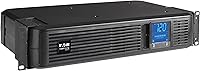
The Eaton Tripp Lite SMART1500LCD offers 1500VA and 900W output in a 2U rackmount or vertical tower format. Its eight outlets provide battery backup and surge protection.
The LCD shows voltage, runtime, load, battery and operating mode. Automatic voltage regulation addresses brownouts and overvoltages, and the unit includes USB and RS-232 ports for shutdown software connections.
Its specified battery type is lead-acid. Treat the replaceable battery feature as a service option for the supported battery, not permission to install a different chemistry.
How do battery backup and a battery differ?
A UPS is a managed power system with a battery, charging circuit, inverter and transfer controls. A standalone battery does not provide those functions by itself.
The UPS monitors incoming power and switches its output when needed. The battery stores energy, while the inverter converts that stored energy into the form the connected devices can use.
For a closer comparison, read what a UPS and a battery backup do differently. This distinction matters when considering LiFePO4, because compatibility depends on the UPS electronics as well as the battery pack.
What should you confirm before choosing?
Confirm compatibility, output, runtime and physical fit before settling on a LiFePO4 UPS. A short checklist helps catch mismatches that a battery capacity figure cannot reveal.
- The UPS maker approves LiFePO4 for the exact model.
- The UPS output in watts and volt-amperes covers the connected load.
- The runtime chart supports the time you need at that load.
- Battery-mode waveform suits the connected equipment.
- Battery-backed outlets and connector types fit your devices.
- The UPS fits the rack or floor space and allows ventilation.
- Replacement, charging and monitoring requirements are clear.
If you cannot verify battery compatibility, contact the maker with the exact model number and battery pack details. Do not rely on nominal voltage alone.
Which LiFePO4 UPS should you choose?
Choose a LiFePO4-specific UPS when the maker confirms the chemistry, charging behavior and battery pack for your intended setup. Pick output and runtime around the devices you need to keep online, then confirm outlet layout and installation space.
For a compact rack, prioritize depth and mounting format. For a workstation, check waveform and watt capacity; for a server or network cabinet, make runtime and shutdown communication part of the decision.
The three examples above show useful UPS design features, but each is specified with lead-acid batteries. Compare those features to a LiFePO4 model only after confirming its chemistry and compatibility.
Frequently asked questions
Can you put a LiFePO4 battery in any UPS?
No. Use a LiFePO4 battery only when the UPS maker approves that battery chemistry and the battery's voltage, charging limits and protection system match the UPS.
A UPS designed for sealed lead-acid batteries may not charge or monitor a LiFePO4 pack correctly, even if the voltage appears similar.
What should I check before buying a LiFePO4 UPS?
Check the UPS output in watts and volt-amperes, the devices you will connect, the runtime at your expected load, and whether the unit is designed for LiFePO4. Also confirm outlet types, installation space, monitoring options, battery replacement rules and the maker's charging guidance.
Does a LiFePO4 UPS always last longer during an outage?
No. Runtime depends on the UPS capacity, battery capacity, inverter efficiency and connected load.
Battery chemistry alone does not tell you how long equipment will run.
Use the runtime chart for the exact UPS and load, and leave margin for startup demand or later equipment changes.
Can a LiFePO4 UPS power a computer?
Yes, if its output is compatible with the computer's power supply and the UPS can support the combined load. Check wattage, output waveform and connector needs, then keep the monitor and other essential devices within the same load limit.
A pure sine wave model can suit systems that require it.
Can I replace a lead-acid UPS battery with LiFePO4?
Only if the UPS maker approves the replacement pack for that model. The charger, battery monitoring, low-voltage cutoff and protection system must suit the new chemistry.
A matching nominal voltage by itself is not enough to confirm safe or reliable operation.