9 Best USB-C Power Banks for Laptops (November 2026)
The best USB-C power banks for laptops include the Anker Power Bank for built-in cable convenience, the INIU Laptop Power Bank for compact 65W charging, and the UGREEN Nexode 25000mAh 145W 3-Port USB-C Power for high-power 145W laptops.
On this page (8 sections)
- USB-C Power Banks for Laptops: The Nine Picks
- How These USB-C Laptop Power Banks Compare
- How We Compared These Power Banks
- What Wattage Does Your Laptop Need for USB-C Charging?
- How Much Capacity Do You Need in a Laptop Power Bank?
- Should You Choose a Built-in or Retractable USB-C Cable?
- How Do You Charge a Laptop and Other Devices at the Same Time?
- Verdict: Which USB-C Power Bank for Laptop Should You Buy?
The best USB-C power bank for laptop use is the Anker Power Bank (9.6), because its built-in cable and 87W total output fit most daily carry needs.
The INIU 65W model is smaller for light laptops, while the UGREEN and TALIX cover higher-wattage machines.
A USB-C power bank for laptop charging works by matching your laptop's power negotiation.
Your laptop asks for a voltage and wattage, and the bank supplies up to its rated limit.
If the bank rates lower than your laptop wants, charging is slower or may not keep up while you work.
Our score weighs specs, features and buyer feedback against what you're shopping for.
We compared capacity, output, port layout, cable design, display and recharge speed across these nine picks.
Our picks at a glance
-
1

-
2

-
3
 Best for high-power 145W laptops
UGREEN Nexode 25000mAh 145W 3-Port USB-C Power
9.3/10 our score
See it on Amazon
- 4
 Best for four-device chargingCheck it
- 5
 Check it
TALIX 20000mAh Laptop Power Bank with Built-in
Best for display and wattage detail - 6
 Best for large 27,000mAh capacityCheck it
- 7
 Best for retractable cable designCheck it
- 8
 Check it
Lenovo Laptop Portable Power Bank
Best for Lenovo and ThinkBook users - 9
 Best for desk stand functionCheck it
Our power bank battery guide explains capacity and watt-hours in more detail.
If you want a wider search first, our best power bank for laptop roundup covers more styles, including models built around AC outlets.
USB-C Power Banks for Laptops: The Nine Picks
These nine models cover 65W to 190W total output and 20,000mAh to 27,000mAh capacity.
The right choice depends on your laptop's wattage, how many devices you charge at once, and whether you prefer a built-in cable.
Anker Power Bank: Best for built-in cable convenience
- 20,000mAh capacity
- 87W total output, up to 65W to a single device
- Built-in USB-C cable plus USB-C and USB-A ports
- Anker says a 14-inch MacBook Pro reaches 50% in under 40 minutes
A 20,000mAh Anker with a built-in USB-C cable and 87W total output. It suits laptop owners who want fewer loose cables in their bag.
Pros
- Built-in USB-C cable
- 20,000mAh capacity
- 87W total output
Cons
- 65W maximum to a single device
- About 15.5 oz to carry
This Anker suits laptop owners who want one less cable to pack. Its built-in USB-C cable is rated for more than 10,000 bends, and it adds a USB-C port and a USB-A port for other devices.
The bank holds 20,000mAh and shares 87W across three devices. A single device can receive up to 65W, which suits a MacBook Air or a light Windows laptop that charges over USB-C.
Anker says a 14-inch MacBook Pro reaches 50% in under 40 minutes. That pace fits a coffee stop or a short meeting rather than a full recharge from empty.
It recharges in about 1.5 hours with a 65W charger. With a 30W adapter, Anker says recharge takes about 4.5 hours, so adapter choice matters for daily reuse.
The 20,000mAh headline converts to about 11,000mAh to 14,000mAh usable after 30% to 45% loss. The trade-off is the 65W single-device ceiling.
Larger 16-inch laptops that ask for 100W or 140W will charge more slowly here than on the higher-output picks below. Its 6.2 by 2.9 by 1.0 inch body also means it is a bag carry rather than a pocket carry.
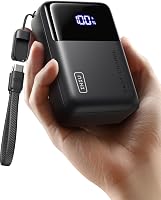
INIU Laptop Power Bank: Best for compact 65W charging
- 20,000mAh capacity
- 65W output with two USB-C ports and one USB-A port
- Detachable USB-C lanyard cable
- INIU says MacBooks, HP, Lenovo and Dell laptops reach 50% or more in 30 minutes
A compact 20,000mAh INIU with 65W triple-port charging. It suits lighter laptops and people who want a small carry.
Pros
- Compact wallet-size body
- 65W triple-port charging
- Detachable cable
Cons
- 65W ceiling for demanding laptops
- Smaller output for big 16-inch models
This INIU suits people with a light laptop who want a small carry. Its body is described as smaller than a standard wallet, with 20,000mAh inside a compact shape.
It delivers 65W across two USB-C ports and one USB-A port. You can charge a laptop, a phone and earbuds or a watch at the same time, though total power is shared.
INIU says MacBooks, HP, Lenovo and Dell laptops reach 50% or more in 30 minutes. That suits a MacBook Air or a slim Windows machine that negotiates 65W or less.
It also suits a Steam Deck or ROG Ally that needs full-speed USB-C charging without slow-charger warnings. The detachable 4.7-inch USB-C lanyard cable doubles as a carry handle.
A replaceable cable is a plus if you expect years of daily use. The cable is described as braided nylon and built 3X tougher, which matters for repeated bending.
A digital display and overcharging and short circuit protection add useful detail for daily use. The 20,000mAh cell is stated at 13.4 ounces, lighter than several larger picks.
The trade-off is the 65W ceiling. High-performance laptops and gaming machines will charge slowly, so check our best 65w power bank for laptop picks if 65W is your target.
UGREEN Nexode 25000mAh 145W 3-Port USB-C Power: Best for high-power 145W laptops
- 25,000mAh capacity
- 145W total output, up to 140W from one USB-C port
- Two USB-C ports and one USB-A port
- UGREEN says a 16-inch MacBook Pro reaches 56% in 30 minutes
A 25,000mAh UGREEN with 145W total output and up to 140W on one port. It suits larger laptops that need more than 100W.
Pros
- Up to 140W on one USB-C port
- 25,000mAh capacity
- Two-way fast recharge
Cons
- Larger and heavier carry
- Needs a 65W or higher adapter for a fast recharge
This UGREEN suits owners of larger laptops that ask for more than 100W. It offers 145W total output, with up to 140W from a single USB-C port.
Its 25,000mAh battery can recharge laptops up to 1.3 times, according to UGREEN. UGREEN says a 16-inch MacBook Pro reaches 56% in 30 minutes.
It also suits Dell XPS, HP Spectre, iPad, Steam Deck and DJI devices listed in its compatibility notes. Two USB-C ports and one USB-A port let you charge a laptop and smaller devices together.
A digital display shows remaining battery life at a glance. That helps you decide whether to ration power or use a second device.
It recharges in about 2 hours with a 65W PD charger, which is not included. A 20W adapter can take up to 6 hours, so use a 65W or higher adapter for a fast refill.
UGREEN also notes that a certified 5A USB-C cable is needed for full performance. The trade-off is size and weight for daily carry.
At 6.3 by 3.18 by 1.05 inches, it is a backpack item. If your laptop only needs 65W, a smaller bank will feel easier in a jacket pocket or a small bag.
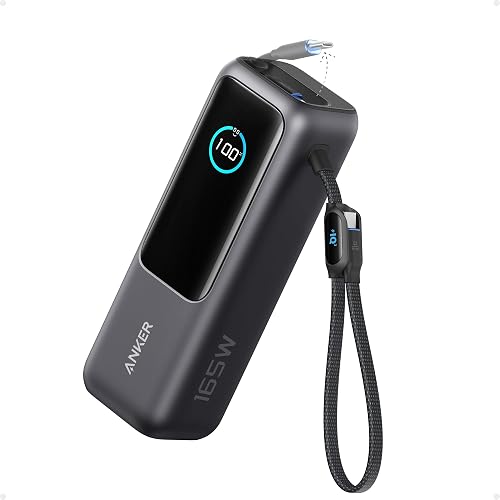
Anker Laptop Power Bank: Best for four-device charging
- 25,000mAh capacity
- 165W total output with three 100W USB-C ports
- Two built-in USB-C cables plus USB-A and USB-C ports
- Anker says a 100W or higher charger refills it in about 2 hours
A 25,000mAh Anker with 165W total output and built-in cables. It suits work setups charging a laptop plus several smaller devices.
Pros
- 165W total output
- Three 100W USB-C ports
- Built-in cables for travel
Cons
- Charger is not included
- High output still drains faster on laptops
This Anker suits remote workers who charge several devices at once. It provides 165W total output with three 100W USB-C ports, plus built-in cables.
The 25,000mAh capacity supports long trips, and Anker says it complies with 100Wh airline restrictions. It can charge four devices at once through dual cables, a USB-A port and a USB-C port.
Two built-in USB-C cables help reduce loose cords. One extends to 2.3 ft, and the shorter cable doubles as a carrying strap.
The extendable cable is rated for 20,000 retractions, and the strap cable for more than 20,000 bends. That durability matters if you travel weekly.
A protective pouch is included, which helps keep cables and ports clean in a bag. Anker says a 100W or higher charger refills the bank in about 2 hours.
Anker also explains that usable energy is about 63 to 70Wh from the nominal 90Wh cell. That conversion loss is normal and helps set expectations for laptop charging.
A trickle charging mode for the USB-A port helps charge watches or earbuds at low power. You enable it by double-pressing the button, and a blue dot shows when it is on.
The trade-off is that a charger is not included. You also need to accept that high output drains the bank faster when charging a laptop under load.
TALIX 20000mAh Laptop Power Bank with Built-in: Best for display and wattage detail
- 20,000mAh capacity
- 190W total output, up to 140W on a single USB-C port
- Built-in USB-C cable plus USB-C and USB-A ports
- Smart display shows battery, wattage, temperature and charge time
A 20,000mAh TALIX with 190W total output and a detailed smart display. It suits buyers who want to see real-time input and output.
Pros
- 190W total output
- Detailed smart display
- Built-in USB-C cable
Cons
- Actual wattage depends on your laptop
- 20,000mAh is smaller than the 25,000mAh picks
This TALIX suits buyers who want clear data while charging. It delivers 190W total output, with up to 140W on a single USB-C port when used alone.
Its smart display shows remaining battery, real-time input and output wattage, temperature and charge time. That detail helps you see whether your laptop is negotiating high power or tapering off.
The bank holds 20,000mAh, stated as 73Wh, and charges three devices at once through a built-in cable, a USB-C port and a USB-A port. A reinforced 8.7-inch built-in cable doubles as a carrying strap.
TALIX says most laptops and phones charge at up to 100W, so 140W is a maximum rather than a guarantee. Actual speed depends on your device, battery level, workload and temperature.
The spec list supports USB PD 3.1, PPS and QC protocols. That helps it deliver the fastest compatible speed for phones that use proprietary fast charging.
Safety features include NTC thermal monitoring plus overcharge, overcurrent, overvoltage and short circuit protection, with a flame-retardant housing.
The bank is stated to recharge in 1.5 hours, which suits overnight or between-meeting refills. The trade-off is capacity.
A 20,000mAh bank will give fewer laptop top-ups than the 25,000mAh and 27,000mAh models in this group. Its 6.02 by 2.87 by 1.06 inch body is also a bag carry.
INIU Laptop Power Bank: Best for large 27,000mAh capacity
- 27,000mAh capacity
- 140W PD 3.1 output
- Two USB-C ports and one USB-A port
- INIU says a 16-inch MacBook Pro reaches 59% in 30 minutes
A 27,000mAh INIU with 140W PD 3.1 charging. It suits long trips where capacity matters more than the smallest carry.
Pros
- Largest capacity in this group
- 140W PD 3.1 charging
- Three charging ports
Cons
- Largest body in this group
- Heavier carry for daily commutes
This INIU suits travelers who want the most capacity here.
It holds 27,000mAh, the largest capacity in this roundup, and INIU describes it as airline-approved.
It delivers 140W PD 3.1 charging through a USB-C port, plus a 45W USB-C port and a USB-A port.
You can charge three devices at once.
INIU says a 16-inch MacBook Pro reaches 59% in 30 minutes, a Steam Deck reaches 57%, and an iPhone 15 Pro Max reaches 71%.
Those figures suit high-power devices that need more than 100W.
An iPad Pro M2 is also listed at 64% in 30 minutes.
That breadth helps if you carry a tablet and a phone as well as a laptop.
An LED display shows battery percentage and recharge time.
That helps you plan a long day before you leave a wall outlet.
The bank is stated to recharge in 1.8 hours, which is fast for its size.
Pass-through charging lets you charge the bank and connected devices at the same time.
That can save time on a desk where you have one outlet.
INIU also lists a 3-year warranty and lifetime technical support.
The trade-off is size.
At 7.77 by 4.02 by 1.22 inches and 1.4 pounds, this is the largest body here.
It suits a backpack or carry-on better than a small sling bag.
AsperX Laptop Power Bank: Best for retractable cable design
- 20,000mAh capacity
- 165W output, up to 100W from a single port
- Built-in retractable USB-C cable
- Aluminum unibody with colour display
A 20,000mAh AsperX with 165W output and a retractable cable. It suits laptop owners who dislike loose cables in their bag.
Pros
- Retractable built-in cable
- 165W total output
- Aluminum unibody
Cons
- Maximum recharge rate is 65W
- Single port maximum is 100W
This AsperX suits laptop owners who dislike loose cables.
It has a built-in retractable USB-C cable, so you pull, plug and charge without searching your bag.
It offers 165W total output, with a maximum of 100W from a single port.
AsperX says it can provide 100W and 65W fast charging for two computers at the same time.
The bank holds 20,000mAh and uses an aluminum unibody.
AsperX says the metal shell dissipates heat better than plastic alternatives.
The company claims 40% more heat dissipation than plastic, which helps during sustained high-power charging.
A colour display shows battery level, remaining time and input or output power.
Screen brightness can be adjusted for indoor and outdoor use.
A small-power mode also helps charge fans, headphones and smart watches.
You enter it by long-pressing the power button.
That mode prevents low-power devices from being rejected by a high-output bank.
The package includes a 240W USB-C to USB-C cable and a carrying bag.
A 24-month warranty and 7x24 after-sales support are also listed.
AsperX notes that some USB-C ports transfer data only and cannot charge.
You should confirm your laptop port supports charging before you travel.
The trade-off is recharge speed.
AsperX says the maximum recharge rate is 65W, so a higher-wattage adapter will not refill it faster.
Lenovo Laptop Portable Power Bank: Best for Lenovo and ThinkBook users
- 20,000mAh capacity
- 140W maximum from USB-C1, 135W total across three ports
- Two USB-C ports and one USB-A port
- TFT display with high temperature warning
A 20,000mAh Lenovo with 140W maximum output and a TFT display. It suits ThinkBook and MacBook users who want clear status data.
Pros
- 140W maximum from USB-C1
- Clear TFT display
- 240W cable included
Cons
- 135W total across three ports
- Best single-port result needs USB-C1
This Lenovo suits ThinkBook, MacBook and Samsung Galaxy owners who want a clear display. It provides up to 140W from USB-C1 and 135W total across two USB-C ports and one USB-A port.
Its 20,000mAh capacity charges a 14-inch MacBook Pro 16 to 46% in 30 minutes, according to Lenovo. Use USB-C1 alone when you want the fastest laptop charge.
A 2.01-inch TFT display shows remaining capacity, input and output power. It also gives a high temperature warning, which adds a useful safety check.
Digital hybrid technology lets the bank run in battery and DC power modes at the same time. Lenovo says that approach can accelerate charging and improve energy storage efficiency.
The included 5 ft USB-C to USB-C cable supports 140W Lenovo Legion and 125W Motorola fast charging. That cable length also helps at a desk or a shared table.
The bank recharges in 90 minutes, according to its spec list. That speed suits a short turnaround between work sessions.
At 6.06 by 2 by 1.53 inches and 16 ounces, it fits in a bag without taking a full laptop sleeve. Its three ports suit a laptop, phone and tablet combination.
The trade-off is total output. When you charge three devices at once, total output drops to 135W, so a laptop may charge more slowly.
You also need to use USB-C1 for the best single-port result.
Mukiya Laptop Power Bank: Best for desk stand function
- 20,000mAh capacity
- 130W total output, up to 100W through USB-C
- Built-in retractable USB-C cable
- TFT display and built-in phone stand
A 20,000mAh Mukiya with 130W total output and a phone stand. It suits desk and meeting use where you want a tidier setup.
Pros
- Retractable USB-C cable
- Phone stand for desk use
- TFT display with real-time wattage
Cons
- 100W maximum through USB-C
- 130W total needs USB-C and USB-A together
This Mukiya suits desk setup owners who want a phone stand built in. It delivers up to 100W through USB-C and 130W total output when USB-C and USB-A are used together.
Its 20,000mAh battery, stated as 74Wh, gives laptops, tablets and phones a backup for commutes, meetings and travel. Mukiya says it complies with 100Wh airline restrictions.
A built-in retractable USB-C cable extends to 27.56 inches and stores back into the body. That reduces loose cables on a desk, in a cafe or at an airport.
A colour TFT shows remaining battery, input and output status, and real-time wattage. The integrated stand props up a phone for video calls or a mobile workstation.
Two USB-C paths and one USB-A output let you charge up to three devices at once. The 130W total is reached when a USB-C output and USB-A are used together.
Compatibility notes include laptops, tablets, smartphones, cameras and electric razors. The 4.72 by 1.97 by 1.97 inch body is compact for a 20,000mAh bank.
The trade-off is the 100W USB-C ceiling. Laptops that ask for 140W will charge at a lower pace than on the 140W and 145W picks.
If you only need 100W, our best 100w power bank for laptop guide covers that class in more depth.
How These USB-C Laptop Power Banks Compare
The comparison below shows the main split in this group: 65W banks for light laptops, 100W banks for most performance laptops, and 140W or higher banks for large machines.
Capacity is the second split, with 20,000mAh for daily carry and 25,000mAh to 27,000mAh for long trips.
| Product | Best for | Capacity | Total Output | Ports | Our score |
|---|---|---|---|---|---|
| Anker Power Bank | built-in cable convenience | 20,000mAh | 87W | Built-in USB-C cable, USB-C, USB-A | 9.6 |
| INIU Laptop Power Bank | compact 65W charging | 20,000mAh | 2 USB-C, 1 USB-A | 9.5 | |
| UGREEN Nexode 25000mAh 145W 3-Port USB-C Power | high-power 145W laptops | 25,000mAh | 145W | 2 USB-C, 1 USB-A | 9.3 |
| Anker Laptop Power Bank | four-device charging | 25,000mAh | 165W | Dual built-in cables, USB-A, USB-C | 9.3 |
| TALIX 20000mAh Laptop Power Bank with Built-in | display and wattage detail | 20,000mAh | 190W | Built-in USB-C cable, USB-C, USB-A | 9.1 |
| INIU Laptop Power Bank | large 27,000mAh capacity | 27,000mAh | 2 USB-C, 1 USB-A | 8.9 | |
| AsperX Laptop Power Bank | retractable cable design | 20,000mAh | Retractable USB-C cable, USB-C, USB-A | 8.8 | |
| Lenovo Laptop Portable Power Bank | Lenovo and ThinkBook users | 20,000mAh | 2 USB-C, 1 USB-A | 8.4 | |
| Mukiya Laptop Power Bank | desk stand function | 20,000mAh | 130W | Retractable USB-C cable, USB-C, USB-A | 8.1 |
For a wider view of high-capacity models, see our best big power bank for laptop picks.
For models that also run AC devices, our best power bank with ac outlet guide covers a different design.
How We Compared These Power Banks
We compared specs, features and buyer feedback against what laptop owners need most.
That means wattage first, then capacity, port layout and cable design.
We checked whether each model can negotiate laptop-grade USB-C power, not just phone power.
A bank that lists 65W total may charge a laptop well, while a bank that lists 190W total may still limit a single port to 100W.
We also looked at recharge speed for the bank itself.
A bank that refills in 1.5 to 2 hours with a 65W or 100W adapter suits daily reuse better than a bank that needs 6 hours on a 20W adapter.
We weighed port count and shared output.
Three ports are useful, but total wattage is shared, so a laptop may slow down when a phone and earbuds are also connected.
We checked display type, cable design and size.
A built-in or retractable cable reduces clutter, while a TFT or smart display helps you watch wattage and battery level.
How maker claims were treated
We treated charging percentages and recharge times as maker claims.
Those figures depend on device, battery level, cable and temperature.
We used them to compare relative pace, not as guaranteed results.
We also checked airline and warranty notes in the product data.
Those details matter for travel and long-term use.
We did not test these products.
We researched the specs, features and buyer patterns, and we label maker claims as claims where they appear.
What Wattage Does Your Laptop Need for USB-C Charging?
Your laptop's own charger wattage is the best guide.
If your charger says 65W, a 65W bank will usually keep up.
If it says 100W, look for a bank that supplies 100W from one port.
65W for light laptops
Choose 65W if you use a MacBook Air or a slim Windows laptop.
The INIU 65W model and the Anker 87W model both fit this class, with the Anker giving more shared output for other devices.
100W for most performance laptops
Choose 100W if you use a 14-inch MacBook Pro or a mid-size Windows laptop.
Several picks here supply 100W from one port, which covers most high-performance laptops without the size of a 140W bank.
140W or more for large laptops
Choose 140W or more if you use a 16-inch MacBook Pro or a gaming laptop that lists a 140W charger.
The UGREEN, TALIX, INIU 140W and Lenovo models target this need.
Why total wattage is not the same as single-port wattage
Total wattage is shared across all connected devices.
Single-port wattage is what your laptop can use alone, so check both numbers before you buy.
How Much Capacity Do You Need in a Laptop Power Bank?
Capacity decides how many top-ups you get, not how fast you charge.
Wattage decides speed, while milliamp-hours decide total energy.
A 20,000mAh bank suits daily carry and one laptop top-up.
A 25,000mAh bank suits a full laptop charge plus phone charges on a long trip.
A 27,000mAh bank suits the longest trips in this group.
Remember that usable energy is lower than the headline number.
Conversion losses of about 30% to 45% are common, so a 20,000mAh bank may deliver about 11,000mAh to 14,000mAh to your devices.
A simple estimate is to multiply capacity by 0.65, then divide by your device's battery capacity.
That gives a rough count of phone charges, not a promise for a laptop under load.
Laptops drain a bank faster than phones because their batteries are much larger.
Expect a bank to drop quickly while it charges a laptop at high output.
Watt-hours and airline limits
Watt-hours convert capacity into energy that airlines use for limits.
A 100Wh limit covers most banks in this group.
That is why several models note airline carry-on compliance.
Check the watt-hour rating before you fly with a larger bank.
Should You Choose a Built-in or Retractable USB-C Cable?
A built-in cable removes one loose cord from your bag.
The Anker, TALIX, Anker 165W, AsperX and Mukiya models use built-in or retractable cables.
A retractable cable extends for laptop charging and stores back into the body.
That suits a desk, a cafe table or a train seat where loose cables get tangled.
A detachable cable, like the INIU 65W lanyard cable, can be replaced over time.
That may suit buyers who want a bank to last for years of daily use.
A separate cable gives you more choice of length and wattage rating.
Use a certified 5A USB-C cable when you need full performance from a 140W bank.
Check that your laptop port charges over USB-C, not just transfers data.
Some USB-C ports cannot charge, and AsperX warns about this point for its own model.
How Do You Charge a Laptop and Other Devices at the Same Time?
Use the highest-wattage port for your laptop.
That gives the laptop the best chance to negotiate full power while other devices use the remaining output.
Expect slower laptop charging when you add a phone and earbuds.
Total wattage is shared, so a 165W bank cannot give 165W to each device at once.
Use trickle or small-power modes for watches and earbuds where available.
The Anker 165W model and the AsperX model describe modes for low-power devices.
Keep the bank ventilated while it charges at high output.
Warmth is normal during high-power charging, and temperature protection may reduce power to keep operation safe.
Recharge the bank with a 65W or 100W adapter where the model supports it.
A low-wattage adapter will take much longer, even if the bank can output high power.
Verdict: Which USB-C Power Bank for Laptop Should You Buy?
Pick the Anker Power Bank (9.6) if you want a built-in cable and 87W total output for most laptops.
Pick the INIU 65W model if you want the smallest carry for a light laptop.
Pick the UGREEN Nexode if your laptop needs up to 140W from one port.
Pick the Anker 165W model if you charge four devices at once and want built-in cables.
Pick the INIU 27,000mAh model if capacity matters most for long trips.
Pick the Mukiya if a phone stand and retractable cable suit your desk setup.
Start with your laptop's charger wattage, then choose capacity for your longest day without a wall outlet.
That order will help you avoid a bank that is too weak for your laptop or too heavy for daily carry.
Our top 3 picks at a glance
-
1
-
2
-
3
Best for high-power 145W laptops
UGREEN Nexode 25000mAh 145W 3-Port USB-C Power
9.3/10 our score
See it on Amazon
Frequently asked questions
How many watts does a laptop USB-C power bank need?
Most light laptops charge well at 65W, while many larger models need 100W. If your laptop charger rates at 140W, look for a bank that supplies 140W from one port.
Check the wattage printed on your own charger first, then match the bank to that number.
Can a USB-C power bank charge a laptop and a phone at once?
Yes, if the bank has enough total output and ports. The total wattage is shared, so your laptop may charge more slowly when a phone is also connected.
Use the highest-wattage port for the laptop when you need speed the most.
Why does a laptop power bank drain faster than a phone charge?
Laptop batteries hold much more energy than phone batteries, so each percentage point costs more. High output also lowers conversion efficiency a little.
Expect a laptop to gain charge more slowly and a bank to drop faster than with a phone.
What capacity should I pick for travel?
For one laptop top-up, 20,000mAh is a common starting point. For a full charge plus phone charges, look at 25,000mAh or 27,000mAh.
Remember that usable energy is lower than the headline number after conversion losses.