9 Best High Capacity Power Banks for Laptops (November 2026)
The best big power bank for laptop include the Anker Power Bank for travel with a built-in cable, the INIU Laptop Power Bank for compact 65W laptop charging, and the Anker 737 Power Bank for a smart display and 140W charging.
On this page (10 sections)
- Best big power banks for laptop: the full shortlist
- How to compare these big laptop power banks
- How much capacity do you need for a laptop?
- What wattage does your laptop actually need?
- How many ports and cables should you get?
- Which ports do you need for USB-C laptop charging?
- How do displays help you charge smarter?
- Can you fly with a big power bank for laptop use?
- How do you get the most runtime from a large power bank?
- What is the best large power bank for a laptop?
The best big power bank for laptop is the Anker Power Bank with 20,000mAh and 87W, because its built-in USB-C cable helps a MacBook Air reach 52% in 30 minutes without hunting for a cable. If you need longer runtime, the 25,000mAh and 26,250mAh picks below give more stored energy and higher total wattage.
Capacity, in milliamp-hours, sets how much energy you carry. Wattage sets how fast that energy can enter your laptop.
A laptop draws far more than a phone, so its percentage rises slowly while the power bank percentage falls faster. That gap is normal.
Our score weighs specs, features and buyer feedback. We compared capacity, output, port count, cables, displays and weight across all nine picks.
Start with our power bank battery guide for capacity basics. For a wider laptop look, see our best power bank for laptop roundup.
Our picks at a glance
-
1

-
2

-
3

- 4
 Check it
UGREEN Nexode 25000mAh 145W 3-Port USB-C Power
Best for 25,000mAh with 140W single-port power - 5
 Best for charging four devices at onceCheck it
- 6
 Best for very fast recharging and 300W totalCheck it
- 7
 Check it
UGREEN Nexode Pro 25000mAh 200W Laptop Power
Best for a retractable cable and TFT display - 8
 Best value 140W pick for three devicesCheck it
- 9
 Check it
UGREEN Nexode 25000mAh 200W PD 3.1 TFT
Best for 200W shared output and a TFT screen
Best big power banks for laptop: the full shortlist
The Anker at the top wins on simple, cable-free travel. The INIU wins on size.
The rest win on capacity and wattage for heavier laptops and multi-device days.
Anker Power Bank: Best for travel with a built-in cable
- 20,000mAh capacity
- 87W total, up to 65W to one device
- Built-in USB-C cable
- 3 ports
Built-in cable simplifies travel charging and 87W shared output helps a laptop and phones together.
Pros
- Built-in USB-C cable
- 87W shared output
- Airline travel approved
Cons
- 65W limit to a single device
- Smaller capacity than 25,000mAh picks
This Anker suits travelers who want one pack for a MacBook and phones, especially where a loose cable is easy to lose. Its built-in USB-C cable removes the most common failure point, a forgotten cable, and is rated for more than 10,000 bends.
You get 87W to share across three devices, with up to 65W to one device. Anker says that charges a 14-inch MacBook Pro to 50% in under 40 minutes.
The built-in cable lifts an iPhone 15 Pro to 58% or a MacBook Air to 52% in 30 minutes.
The 20,000mAh capacity is airline travel approved, and the pack recharges in 1.5 hours with a 65W charger. Anker notes conversion losses mean about 11,000mAh to 14,000mAh of usable output, so plan on partial laptop charges.
At 6.2 x 2.9 x 1.0 inches and 15.5 oz, the trade-off against 25,000mAh picks is less runtime for less weight.
INIU Laptop Power Bank: Best for compact 65W laptop charging
- 20,000mAh capacity
- 65W triple-port charging
- Detachable 4.7-inch USB-C cable
- 3 ports
Wallet size with 65W output suits a MacBook Air or light laptop plus phone and earbuds.
Pros
- Small wallet-sized body
- 65W triple-port output
- Detachable cable
Cons
- 65W ceiling is low for large laptops
- 20,000mAh is not the largest here
This INIU suits a lighter laptop user who needs a pack for a small bag or jacket pocket. It is wallet-sized at 4.3 x 2.8 x 1.1 inches and 13.4 oz, and INIU says high-density stacking shrinks volume by 38% while boosting efficiency by 10%.
It gives 65W triple-port charging, so a MacBook Air, HP, Lenovo or Dell laptop can reach more than 50% in about 30 minutes. You can charge a laptop, phone and Apple Watch or earbuds together, which suits a single bag for work and travel.
The 20,000mAh capacity gives one full MacBook Air charge or more than three flagship phone charges, and the pack is TSA approved. The detachable 4.7-inch USB-C cable doubles as a carry handle, uses braided nylon and can be replaced.
The trade-off is the 65W ceiling, fine for ultrabooks but slow for a 16-inch pro laptop.
Anker 737 Power Bank: Best for a smart display and 140W charging
- 24,000mAh capacity
- 140W output
- Smart digital display
- 3 ports
Smart display shows input and output power, and 140W suits heavier laptops.
Pros
- 140W fast output
- Real-time smart display
- Includes 140W cable
Cons
- Heavier at about 22 oz
- Needs a 5A cable for full speed
This Anker 737 suits a buyer who wants to see exactly what happens during a charge, for example before adding a second device. Its smart digital display shows real-time input and output power plus estimated recharge time, so numbers replace guesswork.
It delivers 140W with Power Delivery 3.1 from a 24,000mAh cell. Anker says it can charge an iPhone 16 Pro 4.13 times or a 2024 13-inch iPad Pro 1.33 times, showing why this class suits a laptop plus a tablet or phone in one day.
The display is most useful when you plug in a second device and watch both numbers change. That tells you whether the shared total is slowing your laptop or only trimming a phone charge.
At 6.1 x 2.1 x 1.9 inches and about 22 oz, it is travel-ready and TSA friendly, with a 140W cable and travel pouch included. The trade-off is weight and cable rules.
You need a 5A cable and 140W charger for full speed, and a 60W cable caps you at 60W.
UGREEN Nexode 25000mAh 145W 3-Port USB-C Power: Best for 25,000mAh with 140W single-port power
- 25,000mAh capacity
- 145W total, 140W from one USB-C port
- Digital display
- 3 ports
Large capacity plus 140W single-port output aims at a 16-inch MacBook Pro and phones.
Pros
- 25,000mAh capacity
- 140W single-port output
- Two-way fast recharge
Cons
- Heavier than 20,000mAh picks
- Recharge adapter is not included
This UGREEN Nexode suits a 16-inch MacBook Pro owner who needs speed for one large laptop rather than shared power for many devices. A single USB-C1 port gives up to 140W, and UGREEN says it takes a 16-inch MacBook Pro from 0 to 56% in 30 minutes.
The 25,000mAh capacity steps up from 20,000mAh packs. UGREEN says it can fully recharge laptops up to 1.3 times and mobile devices up to 5.2 times, helping when the laptop is not the only device drawing power.
That reserve matters on a long day when a phone, tablet and laptop all start low. A smaller pack can run out before the laptop is full, while this size gives more room for top-ups between meetings.
Total output is 145W with PD3.1 and QC3.0, across two USB-C ports and one USB-A port. A digital display shows remaining battery, and the pack recharges in about 2 hours with a 65W PD charger, not included.
Pack a proper charger and use the included 5A cable for full performance.
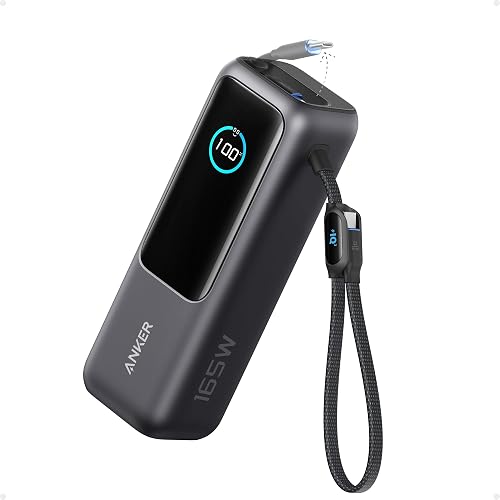
Anker Laptop Power Bank: Best for charging four devices at once
- 25,000mAh capacity
- 165W total output
- Two built-in USB-C cables
- 4 ports
Dual built-in cables plus two more ports let you charge four devices together.
Pros
- Charges 4 devices at once
- Two built-in cables
- Three 100W USB-C ports
Cons
- 165W total is shared across ports
- Built-in cables limit cable choice
This Anker suits a family or desk worker charging several people at once, such as a group sharing one pack at a campsite or hotel. It has three 100W USB-C ports plus a USB-A port, so it can charge four devices together without a hub.
Total output is 165W from a 25,000mAh pack. That suits a laptop plus phones, but each device shares the total, and trickle charging mode helps watches or earbuds on USB-A.
Trickle mode is a small detail that saves frustration with low-power accessories. Without it, a watch or earbuds case can switch off before it is charged, which is easy to miss in a busy bag.
Two built-in USB-C cables help, with one extendable to 2.3 ft and another short cable that doubles as a strap. Both are rated for more than 20,000 bends, and the pack complies with 100Wh airline restrictions.
Anker says usable energy is about 63 to 70Wh from the 90Wh cell rating. The trade-off is fixed cable length, and high output drains the pack faster than phone-only use.
Anker Prime Power Bank: Best for very fast recharging and 300W total
- 26,250mAh capacity
- 300W total, 140W max fast charging
- 250W dual-port input
- Smart display and app control
Largest capacity here and the fastest recharge, aimed at two MacBook Pros at once.
Pros
- 300W total output
- Recharges to 50% in 13 minutes
- Largest 26,250mAh capacity
Cons
- Heaviest pick here
- High output needs a 5A cable
This Anker Prime suits two laptop users or one user who hates waiting, for example a couple with two MacBook Pros. It gives 300W total across two USB-C ports and one USB-A port, enough to keep two MacBook Pros running at full speed in Anker's description.
Single-device speed is 140W max with a 5A cable. Anker says it powers a MacBook Pro M4 Pro to 50% in 27 minutes and an iPhone 16 Pro to 50% in 26 minutes, so 300W total is about sharing rather than a single 300W laptop charge.
Capacity is 26,250mAh, or 99.75Wh, the largest here. Anker says it charges a MacBook Pro M4 up to 0.8 times, and it is TSA approved with a smart display and app control.
Its 250W dual-port input recharges it to 50% in 13 minutes. The trade-off is 6.3 x 2.5 x 1.5 inches and 600 g, the heaviest pick.
UGREEN Nexode Pro 25000mAh 200W Laptop Power: Best for a retractable cable and TFT display
- 25,000mAh capacity
- 200W max, 100W per USB-C port
- 26.7-inch retractable USB-C cable
- TFT display
Retractable cable plus a TFT screen that shows wattage, battery health and time left.
Pros
- 200W max output
- Retractable built-in cable
- Detailed TFT display
Cons
- 100W per port limits single-laptop speed
- Retractable cable is fixed in place
This UGREEN Nexode Pro suits a traveler tired of tangled cables in a carry-on. It has a built-in 26.7-inch retractable USB-C cable rated for 100W and tested over 25,000 pulls.
Output is 200W max with 100W per USB-C port, so it can charge two MacBook Pro 16-inch units to 43% in 30 minutes. Capacity is 25,000mAh with a 90Wh rating UGREEN calls airline friendly, and it charges an iPhone 17 Pro 4.7 times or a Galaxy S25 Ultra 3.4 times.
The retractable cable pulls out for a laptop on a tray table and tucks away for packing. That saves space, but it also means the main cable cannot be swapped for a longer or thicker one.
The TFT display shows wattage, battery health, cycles and time left, and low-current mode helps earbuds and smartwatches. An extra 13.8-inch strap cable adds a second built-in option.
The trade-off is the 100W per-port cap, slower for one large laptop than a 140W port.
Ansody 140W Laptop Power Bank: Best value 140W pick for three devices
- 25,000mAh capacity
- 145W total, 140W max to one device
- TFT smart digital display
- 3 ports
140W single-device speed with three ports at a mid-range position in this group.
Pros
- 140W max to one device
- Charges three at once
- TFT digital display
Cons
- 145W total is shared
- Lower score than the larger brands here
This Ansody suits a game enthusiast or business traveler who wants 140W for a Steam Deck, MacBook or Windows laptop without moving to the largest packs. It gives 140W max to one device from 145W total, and Ansody says it charges a 14-inch MacBook Pro to 50% in under 40 minutes.
Capacity is 25,000mAh, which Ansody says charges a MacBook Pro 1.3 times and an iPhone 15 4.3 times. It has two USB-C ports and one USB-A port for three devices at once, with PD3.0, QC3.0 and other fast charging standards supported.
A TFT display shows charge status, and low-current mode is available for watches and earbuds. Ansody notes usable capacity is about 65%, or 16,250mAh.
At 6.48 x 3.19 x 1.08 inches and 17.53 oz, it is about the size of two iPhone 14 Pro Max units. The trade-off is a lower score than Anker and UGREEN picks, plus 145W shared.
UGREEN Nexode 25000mAh 200W PD 3.1 TFT: Best for 200W shared output and a TFT screen
- 25,000mAh capacity
- 200W total, 140W on USB-C1
- TFT display
- 3 ports
200W total across two USB-C ports suits two lighter laptops or a laptop plus phones.
Pros
- 200W total output
- 140W on the first port
- TFT display
Cons
- Output drops when ports are shared
- Heavier than the 20,000mAh picks
This UGREEN Nexode suits photographers, designers and gamers sharing power at a shoot or studio. It gives 200W total, with USB-C1 up to 140W and USB-C2 up to 100W, so one large laptop can get full speed while a second device waits.
Capacity is 25,000mAh, enough for an iPhone 17 Pro 4.3 times. It charges three devices at once, and compatibility covers laptops, phones, tablets and smartwatches.
That mix suits a workday where different people need different speeds. A laptop can stay on the faster port while a phone or tablet uses the second port without waiting for a free outlet.
The TFT display shows battery level, remaining time, output and input power, voltage and current, so you can see charging slow as a device fills. UGREEN says capacity stays above 80% after 1,000 cycles, with real-time temperature detection.
At 6.1 x 2.13 x 1.97 inches, it is a thick brick. The trade-off is shared output: two laptops split 200W.
How to compare these big laptop power banks
| Product | Best for | Capacity | Output | Weight | Our score |
|---|---|---|---|---|---|
| Anker Power Bank | travel with a built-in cable | 20000mAh | 87W | 15.5 oz | 9.6 |
| INIU Laptop Power Bank | compact 65W laptop charging | 20000mAh | 65W | 13.4 oz | 9.5 |
| Anker 737 Power Bank | a smart display and 140W charging | 24000mAh | 140W | 22 oz | 9.4 |
| UGREEN Nexode 25000mAh 145W 3-Port USB-C Power | 25,000mAh with 140W single-port power | 25000mAh | 145W | 505 g | 9.3 |
| Anker Laptop Power Bank | charging four devices at once | 25000mAh | 165W | 300 g | 9.3 |
| Anker Prime Power Bank | very fast recharging and 300W total | 26250mAh | 300W | 600 g | 9.2 |
| UGREEN Nexode Pro 25000mAh 200W Laptop Power | a retractable cable and TFT display | 25000mAh | 200W | 360 g | 9.0 |
| Ansody 140W Laptop Power Bank | value 140W pick for three devices | 25000mAh | 140W | 17.53 oz | 8.6 |
| UGREEN Nexode 25000mAh 200W PD 3.1 TFT | 200W shared output and a TFT screen | 25000mAh | 200W | 0.51 kg | 8.3 |
We compared capacity first, because 20,000mAh and 26,250mAh packs carry different laptop runtime. We checked total wattage next, then single-port wattage, because that sets speed for one laptop.
Total wattage shows power available for several devices. Single-port wattage shows speed for one laptop alone.
We also compared port count, built-in cables, displays and weight.
Weight against runtime
Weight rises as capacity and wattage rise. The INIU at 13.4 oz and Anker 20,000mAh at 15.5 oz suit a daily bag, while the Anker Prime at 600 g is a deliberate carry.
That weight buys runtime and speed, not pocket comfort. Conversion losses matter too.
Anker and UGREEN note 30% to 45% loss in conversion, so usable charges are lower than headline milliamp-hours.
How much capacity do you need for a laptop?
A 20,000mAh pack suits a MacBook Air or light ultrabook plus phone top-ups. A 25,000mAh pack suits a 14-inch or 16-inch pro laptop better.
Think about the battery inside your laptop before you buy. A larger laptop battery needs more energy from the pack, so even a big power bank may give only a partial charge.
UGREEN says its 25,000mAh pack recharges a laptop about 1.3 times, while the Anker Prime at 26,250mAh gives about 0.8 charges for a MacBook Pro M4. Laptop batteries differ, so treat charge counts as comparison tools, not promises.
Conversion losses also lower the usable total, because some energy is lost in the cells and circuitry. That is why headline milliamp-hours do not turn into the same number of full laptop charges.
If you share the pack with phones, tablets or earbuds, choose the larger size. The extra reserve helps when several devices draw power during the same day.
For a single light laptop and one phone, the smaller size can be easier to carry. For heavier laptops or shared use, the added capacity is worth the extra weight.
20,000mAh for light laptops
Choose 20,000mAh for a MacBook Air, Chromebook or similar light model. You get one solid laptop charge plus room for phones.
25,000mAh and up for pro laptops
Choose 25,000mAh or more for a large laptop battery or high wattage charger. The extra reserve helps when phones and earbuds share the same pack.
What wattage does your laptop actually need?
Your laptop charges at the highest wattage it asks for, up to what the pack and cable allow. A 65W pack charges a 140W laptop at reduced speed.
A 140W port is the sweet spot for most pro laptops. The Anker 737, UGREEN Nexode 145W and Ansody give 140W to one device.
A 200W or 300W total is for two laptops at once, with each laptop sharing that total.
Speed also falls as a battery fills, and cable rating matters. A 60W cable limits charging to 60W, and several picks need a 5A cable for top speed.
For lower wattage options, see our best 65W power bank for laptop guide.
How many ports and cables should you get?
Three ports is the minimum for a shared laptop pack: one for the laptop, one for a phone and a spare for a watch or earbuds. Four ports, like the Anker Laptop Power Bank, suit a family or team.
Built-in cables cut clutter but fix length and style. With three ports, devices charge together but share the same total wattage pool.
If you often charge only a laptop and one phone, three ports suffice. If you travel as a pair, the extra port avoids swapping cables.
Built-in and retractable cables
Built-in cables help on planes and in bags because you cannot forget them. The UGREEN Nexode Pro adds a retractable cable extending to 26.7 inches.
Bring your own cables
Bring-your-own-cable packs let you choose a 5A cable for 140W charging. A 60W cable caps charging at 60W even on a 140W pack.
Which ports do you need for USB-C laptop charging?
USB-C with Power Delivery is the standard for laptop charging. Our best USB-C power bank for laptop guide explains why that matters.
Check your laptop uses USB-C before buying. Older barrel-plug laptops may need an adapter that limits wattage.
A USB-A port remains handy for older phones, watches and earbuds, and some packs add trickle mode for low-power accessories.
Use USB-C for the laptop and modern phones, and USB-A for accessories that need it. For smaller packs, our best 20000mAh power bank for laptop guide covers similar displays and cables.
How do displays help you charge smarter?
The Anker 737 shows input and output power plus recharge time, while UGREEN TFT screens show wattage, voltage and time left. That detail shows when output drops as a battery fills.
A display also shows input wattage when recharging the pack itself, revealing whether your charger delivers expected speed. Some screens add battery health and cycles, useful for tracking aging over time.
At a glance, you can tell if a slow charge is caused by the device, the cable or a weak wall charger. That saves you from blaming the power bank for a problem elsewhere in the setup.
Displays also help when you add a second device. You can see the total draw rise and decide whether to keep both devices plugged in or move one to a wall outlet.
For travel, an estimated time left is easier to read than a row of lights. You can judge whether the pack will last until your next stop or whether you should charge it now.
A health or cycle readout helps over months of use. It will not change daily charging, but it shows how the pack is holding up and when it may need replacement.
Can you fly with a big power bank for laptop use?
Many packs here are airline carry-on friendly within 100Wh limits. The Anker Prime at 99.75Wh and UGREEN Nexode Pro at 90Wh both state airline-friendly ratings.
Always check the watt-hour rating printed on your unit, as rules differ by airline and country. Keep the pack in carry-on baggage, as most airlines require that for spare lithium batteries.
That printed rating matters more than the product name or the milliamp-hour figure. Some airlines ask for the rating at security, and a pack that is fine on one carrier may face extra checks on another.
If you fly with a laptop and a large pack, keep both in your carry-on and be ready to show the rating. That avoids surprises when a bag is checked or when staff ask about spare batteries.
For longer trips, charge the pack before you leave and pack a suitable wall charger. A fast recharge during a layover can restore enough power for the next flight and the workday after it.
If you prefer AC power, our best power bank with AC outlet guide covers a different design that adds weight and cost.
An AC outlet can charge a laptop through its own charger and can run small devices that need a plug. The trade-off is a larger body, more heat and a higher price for the same battery capacity.
For most laptop users, USB-C charging keeps the setup light and simple. Choose AC power only if your laptop, camera or other gear cannot charge over USB-C.
How do you get the most runtime from a large power bank?
Recharge with a high-wattage charger. The Anker Prime recharges to 50% in 13 minutes with 250W dual-port input, while several picks take about 2 hours with a 100W or 65W charger.
Use a cable matching the wattage you need, often the included 5A cable. Reduce load during charging by lowering brightness and pausing heavy tasks, and charge one device at a time for fastest results.
Care and storage
Store the pack in a cool, dry place away from heat. Anker advises a cool, well-ventilated spot between 32 and 77 degrees Fahrenheit during use.
Heat and safety
Warmth is normal at high wattage. Stop use if the case bulges, you smell burning, or it is too hot to touch, and keep it out of pillows, bags and hot cars.
What is the best large power bank for a laptop?
The best large power bank depends on your laptop size and how many devices you charge together. Our best large power bank guide covers high-capacity packs beyond laptop use.
For this group, pick the Anker Power Bank for simple travel, the Anker Prime for two laptops and fast recharging, or the UGREEN Nexode Pro for a retractable cable. Pick the INIU if size matters more than top speed.
Match capacity and wattage to your laptop and choose the port count that fits your daily load. For one light laptop and a phone, a 20,000mAh built-in-cable pack keeps things simple.
For a pro laptop shared with others, a 25,000mAh pack with 140W or more gives more headroom.
Our top 3 picks at a glance
-
1
-
2
-
3
Frequently asked questions
How many laptop charges does 25,000mAh give?
It depends on your laptop battery and conversion losses. UGREEN says this class of pack can charge a laptop about 1.3 times, while Anker notes usable energy is roughly 63 to 70 percent of the cell rating.
Treat those figures as estimates and check your laptop's watt-hour rating.
Can a big power bank charge two laptops at once?
Yes, if the total output covers both laptops. The Anker Prime gives 300W total and UGREEN models give 200W total, while the Anker Laptop Power Bank gives 165W.
Each laptop will charge more slowly than it would alone.
Are these power banks allowed on planes?
Many are airline carry-on friendly within the 100Wh limit stated for several models here. Always check the watt-hour rating printed on your unit and your airline's current rule before you travel.
Why does my power bank feel warm while charging a laptop?
High-power charging naturally creates heat, and Anker and UGREEN both say warmth is normal at high wattage. Use it in a cool, well-ventilated place and stop use if it becomes too hot to touch comfortably.


