6 Best Mini DC UPS Systems for Routers (November 2026)
The best mini DC UPS systems for routers include the SKE DC20000 Plus Altair for simple multi-voltage router backup, the TalentCell Mini UPS Uninterrupted Power Supply 27000mAh for higher capacity and multiple DC ports, and the Hosyond Mini DC UPS Battery Backup Uninterruptible for a dedicated POE output.
On this page (10 sections)
- How we chose a mini DC UPS for routers
- Compare DC UPS mini options
- The best mini DC UPS systems for routers
- How do you match a DC UPS to your router?
- Do you need 5V, 9V or 12V output?
- Is a mini DC UPS enough for a router and modem?
- How much battery capacity do you need?
- When should you choose a DC UPS over an AC UPS?
- What should you check before an outage?
- Which mini DC UPS should you choose?
The best DC UPS for a router is one with a matching voltage, connector and output limit. Our top pick, the SKE DC20000 Plus Altair, has 5V, 9V and 12V outputs, plus USB and Type-C charging for other low-voltage devices.
A mini UPS can keep a router or modem powered through an outage, but only if the power requirements match. For whole-home backup, compare a UPS or inverter for home.
The port shape alone isn't enough: confirm voltage, polarity, connector size and total load.
If you're new to this backup type, see What Is a Mini UPS? What You Need to Know.
See What Is a DC UPS System? The Plain Answer.
We compared the options below by their stated DC output choices, capacity, port types and fit for common router setups.
Our picks at a glance
-
1

-
2
 Best for higher capacity and multiple DC ports
TalentCell Mini UPS Uninterrupted Power Supply 27000mAh
9.6/10 our score
See it on Amazon -
3
 Best for a dedicated POE output
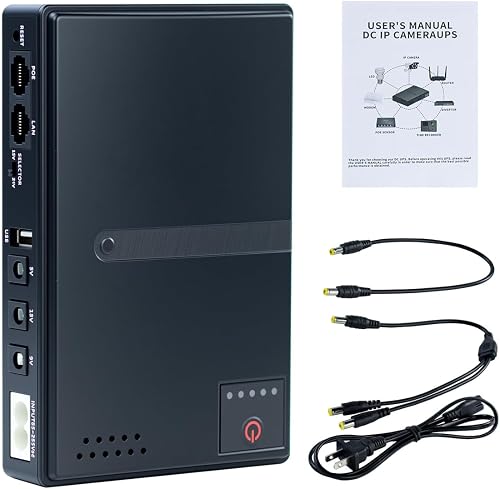
Hosyond Mini DC UPS Battery Backup Uninterruptible
9.5/10 our score
See it on Amazon
- 4
 Check it
Yuuki Power Mini DC UPS 20800mAh
Best for wall mounting and barrel adapters - 5
 Check it
Wbacon 14 PCS Mini UPS 20000mAh Battery
Best for multiple devices and connector tips - 6
 Check it
WALLECUBE UPS for NAS 150W DC Uninterruptible
Best for routers paired with a DC NAS
How we chose a mini DC UPS for routers
The best mini DC UPS for your setup is the one that meets each device's power needs and has enough capacity for the outage you expect. We compared the stated outputs, battery capacity, connector options and design features of these six systems.
For background on battery chemistries used in UPS units, see UPS battery types.
We gave more weight to voltage range and practical connection options because a router won't run from an output that doesn't match its input. A high capacity figure is useful only when the UPS can supply the right voltage and connector.
Our scores weigh specs and features against what router buyers need. They aren't claims of product use, and runtime depends on connected-device load.
Compare DC UPS mini options
The table shows the key differences at a glance, but your router's label or manual should guide the final match. Check the exact output port, connector and polarity before use.
| Product | Best for | DC outputs | Battery | Maximum output | Our score |
|---|---|---|---|---|---|
| SKE DC20000 Plus Altair | simple multi-voltage router backup | 5V, 9V and 12V | 20,000mAh | 20W | 9.7 |
| TalentCell Mini UPS Uninterrupted Power Supply 27000mAh | higher capacity and multiple DC ports | 12V and 9V | 9.6 | ||
| Hosyond Mini DC UPS Battery Backup Uninterruptible | a dedicated POE output | 5V, 9V and 12V | 18W | 9.5 | |
| Yuuki Power Mini DC UPS 20800mAh | wall mounting and barrel adapters | 20,800mAh, 70Wh | 18W | 9.4 | |
| Wbacon 14 PCS Mini UPS 20000mAh Battery | multiple devices and connector tips | 20,000mAh, 75Wh | 65W | 9.3 | |
| WALLECUBE UPS for NAS 150W DC Uninterruptible | routers paired with a DC NAS | 150W | 9.2 |
The best mini DC UPS systems for routers
The SKE DC20000 Plus Altair is the top pick for a range of low-voltage devices, while other models add more capacity, POE or NAS support. Choose based on the devices you want to back up and the connections they use.
SKE DC20000 Plus Altair: Best for simple multi-voltage router backup
- 5V, 9V and 12V outputs
- USB and Type-C charging
- 20,000mAh battery
- LED battery indicator
Several output voltages cover common low-voltage networking needs, while an LED indicator shows remaining battery capacity. Check the output limit against your router and modem's combined draw.
Pros
- Three DC voltage options
- USB and Type-C charging
- Battery status lights
Cons
- Connector fit and polarity still need checking
- Runtime depends on device load
The SKE DC20000 Plus Altair is a flexible option for a router setup because it supports 5V, 9V and 12V DC outputs. The stated 20,000mAh battery and 20W maximum output give you two figures to compare against your equipment's needs.
It also has USB and Type-C charging, an LED battery indicator and built-in automatic voltage regulation. Those details can help you check battery status and use the unit with compatible low-voltage devices beyond a router.
The product information describes support for routers, modems and security cameras. Runtime depends on the connected load, so the stated seven-hour runtime shouldn't be treated as a promise for every router or a router-and-modem pair.
Choose it if your equipment uses one of its DC output voltages and stays within its limit. Confirm the connector size and polarity before connecting it.
TalentCell Mini UPS Uninterrupted Power Supply 27000mAh: Best for higher capacity and multiple DC ports
- 97.2Wh capacity
- Four 12V DC outputs and one 9V output
- USB-A and USB-C outputs
- 37W continuous device limit
Its stated 97.2Wh capacity and several DC ports may suit a router setup with more than one low-voltage device. The maker cautions that loads above 37W drain the battery quickly.
Pros
- Four 12V DC outputs
- Includes DC cables and a charger
- USB-A and USB-C outputs
Cons
- Confirm the router uses a compatible 5.5 x 2.1mm port or get an adapter
- Avoid continuous loads above 37W
TalentCell's Mini UPS is suited to buyers who want multiple 12V DC ports and a stated 97.2Wh battery capacity. It also has a 9V output and 18W USB-A and USB-C outputs for compatible devices.
TalentCell cautions that loads above 37W can't be powered continuously, and that the battery will drain quickly at that level. Add the router and modem's power needs before using both outputs at once.
This unit uses 5.5 x 2.1mm DC ports and includes cables. If your router uses a different connector, check whether you need an adapter before buying.
Choose it when its capacity and port count suit your setup. For a closer look at 12V router options, see our guide to best mini UPS systems for 12V WiFi routers.
Hosyond Mini DC UPS Battery Backup Uninterruptible: Best for a dedicated POE output
- 5V, 9V and 12V DC outputs
- 15V or 24V POE output
- 18W maximum output
- LED battery indicator
The POE port adds an option for compatible networking equipment, alongside standard low-voltage DC outputs. Keep the total load within the 18W maximum and check the device's voltage and current needs.
Pros
- POE output for compatible devices
- Multiple DC voltage choices
- Wide AC input range
Cons
- 18W total output calls for careful load planning
- Check connector size and polarity
Hosyond's mini DC UPS stands out for its 15V or 24V POE output alongside 5V, 9V and 12V outputs. That range may fit a setup with compatible POE networking gear, as long as each device's voltage and current requirements match.
The maximum output is 18W. Hosyond advises against connecting multiple devices when their combined power exceeds 15W for stable operation, so plan around the lower guidance when sharing power.
The unit also has a battery indicator and protections for conditions such as overcurrent and deep discharge. Those features don't replace checking that a router's input voltage and polarity match the selected output.
Choose Hosyond when you need a POE output and your total load fits its limits. It can also power a standard router through a matching DC port.
Yuuki Power Mini DC UPS 20800mAh: Best for wall mounting and barrel adapters
- 20,800mAh and 70Wh battery
- 5V, 9V and 12V DC outputs
- 15V and 24V POE outputs
- Wall-mountable
This compact unit offers several DC and POE voltage options, and it can be wall-mounted. Its total output is limited to 18W, so check the combined load before using it for a router and modem.
Pros
- Several DC and POE output options
- Wall-mountable form
- Barrel adapters included
Cons
- 18W maximum output
- Charge time is 9 hours
Yuuki Power combines 20,800mAh capacity with 5V, 9V and 12V DC outputs and 15V or 24V POE outputs. It has an 18W maximum output, so the number of available ports doesn't mean every device can draw full power at once.
Its wall-mountable design can help keep a backup unit near networking gear, and it comes with barrel adapters. The stated charge time is 9 hours, a detail to consider if you plan to recharge it between outages.
Choose it if the DC and POE options match your devices and you want a mounting choice. For another comparison focused on battery backup, see best DC UPS systems with batteries.
Wbacon 14 PCS Mini UPS 20000mAh Battery: Best for multiple devices and connector tips
- 20,000mAh and 75Wh battery
- 65W maximum output
- Eight output ports
- Nine barrel tips
The included cables and barrel tips give this unit more connection options for a home network setup. It has a 65W total output limit, but each device still needs a matching voltage and connector.
Pros
- Nine interchangeable barrel tips
- Three 100cm DC cables
- USB and Type-C outputs
Cons
- Larger and heavier than the other compact picks
- Confirm port and output details for each device
Wbacon includes nine interchangeable barrel tips and three 100cm DC cables, which gives you several connection options for routers and modems. Its stated battery capacity is 75Wh, and the maximum output is 65W across its ports.
The port mix includes DC, USB and Type-C outputs. Check the required voltage for each device and make sure the combined draw stays within the unit's total limit.
This pick makes sense when cable and tip options matter or you want to power more than one compatible device. Its listed dimensions and weight are larger than the other compact options here, so measure the space near your router before choosing it.
WALLECUBE UPS for NAS 150W DC Uninterruptible: Best for routers paired with a DC NAS
- 150W maximum output
- Dual DC output
- App monitoring
- No AC sockets
This DC-to-DC UPS is designed for network gear such as a NAS and router, with dual DC output and app monitoring. It has no standard AC sockets, so it won't power an AC-only router.
Pros
- High stated output capacity
- App monitoring for battery and load
- Compact fanless design
Cons
- No standard AC sockets
- Check DC voltage and compatibility for both devices
WALLECUBE is the most specialized choice here: a DC UPS for a NAS and network devices, with a stated 150W maximum output and dual DC output. For rack-mounted network equipment that uses AC power, compare CyberPower rack-mount UPS systems.
Its app can show battery, voltage, load and temperature details.
It has no standard AC sockets, which rules it out for an AC-only router. For compact AC models, compare small UPS battery backups.
The maker describes compatibility with NAS systems and routers that use DC power, but you still need to confirm each device's requirements.
Choose it when you want one DC backup for a compatible NAS and router, or other suitable network gear. Skip it if your router needs an AC outlet.
For rack-based AC equipment, compare APC rack-mount UPS systems.
How do you match a DC UPS to your router?
Match the UPS output to the router's voltage, polarity, connector and power draw before plugging it in. A connector that fits does not prove the electrical match is correct.
Start with the label on the router or its power adapter. Note the voltage, amperage or wattage, and the polarity symbol; then compare those details with the UPS output.
If you want to back up a modem or ONT too, add each device's power draw. Keep the combined total within the UPS's stated output limit, with room for any extra networking equipment you plan to connect.
Do you need 5V, 9V or 12V output?
You need the voltage that your router requires, which is commonly shown on its power adapter. A multi-voltage mini DC UPS can cover more than one voltage, but you must choose the matching output for each device.
Don't select a higher voltage because it seems likely to provide more power. Check the router label or manual, and confirm connector polarity before use.
Is a mini DC UPS enough for a router and modem?
A mini DC UPS can power both when it has enough compatible outputs and capacity for their combined load. Check whether the model can supply the right voltage to each device at the same time.
Some models have multiple ports but a limited total output. For example, the Hosyond and Yuuki Power units have an 18W maximum, while the TalentCell cautions against continuously powering devices above 37W.
How much battery capacity do you need?
The right capacity depends on how much power your equipment draws and how long you need it to stay on. Capacity alone doesn't predict runtime across different routers and modems.
A router with a low draw may run longer than a router-and-modem pair on the same battery. Compare watt-hours when available, and treat runtime figures as estimates tied to a load rather than a guarantee.
When should you choose a DC UPS over an AC UPS?
Choose a DC UPS when your networking equipment accepts DC input and the UPS output matches its power needs. It can supply power directly through compatible DC ports without relying on an AC outlet for the device.
Choose an AC UPS if your router needs a standard AC power connection. A DC-only unit such as the WALLECUBE has no AC sockets, so it won't directly power an AC-only router.
What should you check before an outage?
Check that the UPS charges, the cables fit, and the output matches your devices before you need backup power. Keep the router's power details and any required adapters together with the unit.
If you plan to power several devices, confirm their combined draw and test the setup according to the manufacturers' instructions. This helps catch a voltage or connector mismatch before an outage interrupts your connection.
Which mini DC UPS should you choose?
Pick the SKE DC20000 Plus Altair for a straightforward 5V, 9V or 12V setup with a battery indicator. Choose TalentCell for several 12V ports and a 97.2Wh capacity, Hosyond or Yuuki Power if you need POE, and WALLECUBE for compatible DC NAS equipment.
For any pick, check voltage, polarity, connector size and total load before connecting your router.
If you're comparing broader backup options, start with What Is a Hybrid UPS System? A Beginner’s Guide or [What Is a Modular UPS System?
The Real Answer](/what-is-a-modular-ups-system/).
Our top 3 picks at a glance
-
1
-
2
Best for higher capacity and multiple DC ports
TalentCell Mini UPS Uninterrupted Power Supply 27000mAh
9.6/10 our score
See it on Amazon -
3
Best for a dedicated POE output
Hosyond Mini DC UPS Battery Backup Uninterruptible
9.5/10 our score
See it on Amazon
Frequently asked questions
What should I check before connecting a mini DC UPS to a router?
Check the router's required voltage, current or wattage, connector size, and polarity. The UPS output must match the router's requirements, and the combined load must stay within the UPS limit.
If the router label or manual is unclear, confirm the needed power details with the router maker before connecting it.
Can one mini DC UPS power a router and modem?
Yes, if the UPS has enough output capacity and the right ports or cables for both devices. Add their power needs together and compare that total with the UPS limit.
Also check each device's voltage and connector separately.
A port that fits physically can still have the wrong voltage or polarity.
How long will a mini DC UPS run a router?
Runtime depends on battery energy and the router's actual power draw. A higher-capacity battery may last longer under the same load, but extra devices shorten runtime.
Use maker runtime claims as estimates for their stated conditions.
For an outage plan, check the router and modem together and leave a reserve instead of assuming a fixed number of hours.
Is a mini DC UPS the same as an AC UPS?
No. A mini DC UPS supplies low-voltage DC power through compatible DC outputs, while an AC UPS typically provides AC outlets.
Check what power input your router uses before choosing either type.
A DC model won't power an AC-only device unless that model specifically provides a suitable AC output.
Will a mini DC UPS keep my internet working during a power cut?
It can keep a compatible router powered, but internet service also depends on the modem or ONT and the provider's network equipment having power. Back up each device that your connection needs.
Check the UPS output capacity and connections for the whole setup, then ask your provider whether service equipment in your area remains active during outages.