7 Best Small UPS Battery Backups (November 2026)
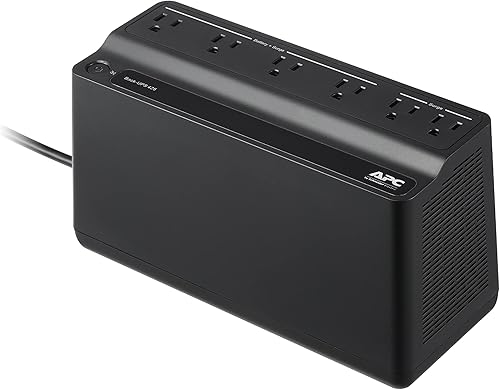
The best compact UPS battery backups include the CyberPower CP1500PFCLCD PFC Sinewave UPS Battery Backup for higher wattage desktop setups, the APC BE600M1 UPS Battery Backup & Surge for a compact desk setup, and the APC BE425M UPS Battery Backup and Surge for wall mounting.
On this page (7 sections)
- How we chose small UPS battery backups
- The best small UPS battery backups for desks and routers
- How much capacity should a compact UPS have?
- Which outlet layout works best in a small space?
- Is an AC UPS better than a mini or portable UPS?
- When should you replace a small UPS battery?
- Which small UPS should you choose?
The APC BE600M1 is the best small UPS battery backup for most compact desk setups, with 5 battery-backed outlets and a built-in USB charging port. The APC BE425M is a space-conscious wall-mountable choice, while the Tripp Lite BC350 has a low-profile case.
A compact AC UPS still needs enough capacity for the devices you want to keep running. For broader home backup needs, compare a UPS and inverter for home use.
Check both the unit's dimensions and its watt limit before choosing a spot under a desk or beside a router.
If you mean a DC unit for a router rather than standard AC outlets, see our guide to What Is a Mini UPS? What You Need to Know.
For other outlet styles and use cases, compare a best mini UPS battery backup and our best DC UPS with battery guide.
Our picks at a glance
-
1
 Best for higher wattage desktop setups
CyberPower CP1500PFCLCD PFC Sinewave UPS Battery Backup
9.7/10 our score
See it on Amazon -
2
 Best for a compact desk setup
APC BE600M1 UPS Battery Backup & Surge
9.6/10 our score
See it on Amazon -
3
- 4
 Check it
APC BX1500M UPS Battery Backup & Surge
Best for a higher capacity home office - 5
 Check it
CyberPower ST425 Standby UPS Battery Backup
Best for a small router and modem setup - 6
 Check it
Eaton Tripp Lite BC350 350VA Small UPS
Best for a shallow desktop footprint - 7
 Check it
Staples TECH 650VA UPS Battery Backup
Best for extra outlet count in a compact case
How we chose small UPS battery backups
The best small UPS battery backups balance physical footprint, outlet layout and enough watt capacity for the intended devices. We compared stated dimensions, outlet counts, battery-backed outlet counts and useful features for compact desks and network corners.
We gave higher scores to units that pair a manageable form with enough backed outlets or capacity for a clear use. Larger towers remain here because a compact option for a higher-power computer setup can be useful, though their footprint is less suited to a crowded desk.
A UPS switches to battery power when utility power fails, giving connected equipment temporary power. Our guide explains how a UPS battery backup switches to battery power and what that change means for connected devices.
Our score weighs specs, features and buyer feedback against what you're shopping for.
| Product | Best for | Capacity | Outlets | Dimensions | Our score |
|---|---|---|---|---|---|
| CyberPower CP1500PFCLCD PFC Sinewave UPS Battery Backup | higher wattage desktop setups | 1500VA/1000W | 12, including 6 battery-backed | 14 x 3.9 x 11 in | 9.7 |
| APC BE600M1 UPS Battery Backup & Surge | a compact desk setup | 600VA/330W | 7, including 5 battery-backed | 10.79 x 4.13 x 5.47 in | 9.6 |
| APC BE425M UPS Battery Backup and Surge | wall mounting | 425VA/255W | 6, including 4 battery-backed | About 10 x 5.5 x 4.1 in | 9.5 |
| APC BX1500M UPS Battery Backup & Surge | a higher capacity home office | 1500VA/900W | 10, including 5 battery-backed | 15.04 x 3.94 x 9.84 in | 9.4 |
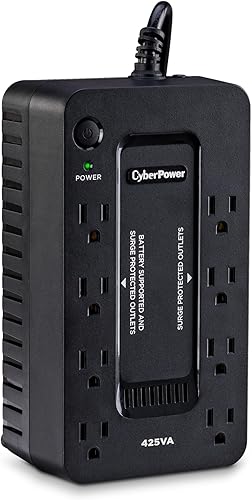
| CyberPower ST425 Standby UPS Battery Backup | a small router and modem setup | 425VA/260W | 8, including 4 battery-backed | 3.2 x 8.3 x 4.5 in | 9.2 |
| Eaton Tripp Lite BC350 350VA Small UPS | a shallow desktop footprint | 350VA/210W | 6, including 3 battery-backed | About 8 x 5 x 3 in | 9.1 |
| Staples TECH 650VA UPS Battery Backup | extra outlet count in a compact case | 650VA/360W | 8 | 7.88 x 14.13 x 4.63 in | 8.5 |
The best small UPS battery backups for desks and routers
The right pick depends on your load and the space you have available. The BE600M1 is a balanced desk choice, while the larger CyberPower and APC towers offer more watt capacity for desktop setups.
CyberPower CP1500PFCLCD PFC Sinewave UPS Battery Backup: Best for higher wattage desktop setups
- 1500VA/1000W
- 12 outlets, 6 with battery backup
- Automatic voltage regulation
- Tilting color LCD
A mini-tower with 1000W capacity, sine wave output and 6 battery-backed outlets. It suits a desktop setup that needs more capacity, though its 24.9 lb weight and tower form take more room than the smaller picks.
Pros
- 1000W capacity
- Sine wave output
- AVR and color LCD
Cons
- Largest and heaviest pick here
- Only 6 of 12 outlets have battery backup
The CyberPower CP1500PFCLCD is the strongest choice here when a desktop setup needs more than a small router-focused UPS can provide. It offers 1500VA/1000W and sine wave output for active PFC and conventional power supplies.
Its 12 outlets divide evenly: 6 provide battery backup and surge protection, and 6 provide surge protection only. The color LCD shows battery and power conditions, and its screen tilts up to 22 degrees for easier viewing under a desk.
Automatic voltage regulation corrects minor power fluctuations without switching to battery power. Two USB ports, one Type-A and one Type-C, can charge phones and tablets.
At 24.9 lb and 14 in deep, this mini-tower takes more space than the compact units below. Choose it when capacity and sine wave output matter more than a small desktop footprint.
APC BE600M1 UPS Battery Backup & Surge: Best for a compact desk setup
- 600VA/330W
- 5 battery-backed outlets
- Compact form
- USB-A charging port
This compact 600VA unit combines 5 battery-backed outlets with a USB charging port. It is a practical fit for a router, modem and a few desk essentials.
Pros
- Compact form
- 5 battery-backed outlets
- User-replaceable battery
Cons
- 330W maximum power
- Only 5 outlets provide battery backup
The APC BE600M1 is a strong everyday option for a desk with a computer, router and a few other essentials. Its compact form measures 10.79 x 4.13 x 5.47 in, with 5 battery-backed outlets and 2 surge-only outlets.
APC gives a runtime estimate of 23 minutes at a 100W load. Your actual runtime depends on the devices connected, so use that figure as a reference point rather than a promise for every setup.
The built-in 1.5A USB-A port can charge a compatible phone during an outage. The internal battery is user-replaceable, which can extend the unit's useful life without replacing the full UPS.
For a different battery chemistry, see LiFePO4 UPS battery backups.
At 330W maximum, this unit is for a modest load rather than a high-draw computer setup. Check your combined wattage and reserve the backed outlets for devices you need during an outage.
APC BE425M UPS Battery Backup and Surge: Best for wall mounting
- 425VA/255W
- Wall-mountable
- 4 battery-backed outlets
- Compact form
The compact case can mount on a wall or sit under a desk, keeping it off the main work surface. Its 255W capacity suits low-power devices such as a router or modem.
Pros
- Wall-mountable design
- 4 battery-backed outlets
- Up to 15 minutes at 100W
Cons
- 255W maximum power
- Fewer battery-backed outlets than the BE600M1
The APC BE425M is the most direct fit when you need a small UPS that can sit under a desk or mount on a wall. Its compact case includes 4 battery-backed outlets and 2 surge-only outlets.
Its 425VA/255W capacity suits lower-power gear such as routers, modems and small home-office electronics. APC says it can provide up to 15 minutes at a 100W load, enough for short interruptions or a planned shutdown in some setups.
The wall-mountable design can free up desk space, but check the outlet positions and your plug shapes before mounting it. The unit weighs 5.7 lb.
Choose the BE425M for a low-power network corner or small workspace. If your computer load is higher, compare the watt limit with the devices you plan to connect before deciding.
APC BX1500M UPS Battery Backup & Surge: Best for a higher capacity home office
- 1500VA/900W
- 10 outlets, 5 battery-backed
- Automatic voltage regulation
- LCD status panel
This tower provides 900W capacity and an LCD showing status details such as estimated runtime and load. Its 15 in depth takes more space than compact desktop units.
Pros
- 900W maximum power
- AVR and LCD panel
- User-replaceable battery
Cons
- Tower form needs floor or desk space
- Only 5 outlets provide battery backup
The APC BX1500M suits a home office that needs higher capacity and a status display. It provides 1500VA/900W, with 5 battery-backed outlets and 5 surge-only outlets.
Its LCD displays battery charge, estimated runtime, load capacity and input voltage. Automatic voltage regulation corrects low voltage and surges without using the battery for those fluctuations, according to APC's feature description.
The 15.04 in depth and tower shape need more floor or desk room than the BE600M1 or BE425M. The battery is user-replaceable, and the unit also includes coaxial and Ethernet surge protection.
Pick it for a larger setup where capacity and monitoring matter. For a router alone or a tight desktop corner, one of the smaller units is easier to place.
CyberPower ST425 Standby UPS Battery Backup: Best for a small router and modem setup
- 425VA/260W
- 8 outlets, 4 battery-backed
- Compact form
- LED status light
The short 8.3 in length and 3.8 lb weight make this a space-conscious option for low-power devices. Four outlets provide backup, while the other four are surge-only.
Pros
- Small footprint
- 8 total outlets
- 3-year warranty including battery
Cons
- 260W maximum power
- Simulated sine wave output
The CyberPower ST425 is a compact standby UPS for a router, modem or a small group of low-power devices. It measures 3.2 x 8.3 x 4.5 in and weighs 3.8 lb.
There are 8 outlets in total, with 4 battery-backed and 4 surge-only. Its 425VA/260W rating is similar to the BE425M, while the ST425 gives you more total outlets.
The LED indicates power-on and wiring-fault status. CyberPower describes its output as simulated sine wave, so check compatibility requirements for sensitive equipment before connecting it.
This is a sensible choice when you want several outlets in a small case. Keep high-power desktop systems on a UPS rated for their combined load.
Eaton Tripp Lite BC350 350VA Small UPS: Best for a shallow desktop footprint
- 350VA/210W
- 6 outlets, 3 battery-backed
- Replaceable internal battery
- Wall-mounting tabs
This compact 350VA UPS is about 3 in high and 5 in deep, with tabs for wall mounting. It fits basic AC backup needs for a router or other low-power electronics.
Pros
- Low profile
- Replaceable internal battery
- Wide-spaced outlets
Cons
- 210W capacity
- Only 3 battery-backed outlets
The Eaton Tripp Lite BC350 has a low case profile for shelves or desks with limited vertical clearance. Its 350VA/210W rating is aimed at modest loads, and three of its six outlets provide battery backup with surge protection.
Three additional outlets are surge-only, and the wide spacing can accommodate bulky plugs. The BC350 also has bottom mounting tabs, a 5 ft power cord and a replaceable internal battery.
Its stated dimensions vary slightly by measurement source, so measure your available area and confirm the orientation you plan to use. The core fit is clear: it is a compact, low-power AC backup unit.
Choose it for a router, small computer or other electronics that fit within 210W. It is not the right match for a power-hungry desktop setup.
Staples TECH 650VA UPS Battery Backup: Best for extra outlet count in a compact case
- 650VA/360W
- 8 outlets
- Compact form
- Surge protection
The 650VA unit offers 360W capacity and 8 outlets in a compact form. Check the outlet layout to confirm which connections receive battery backup and which are surge-only.
Pros
- 360W maximum power
- 8 total outlets
- Compact form
Cons
- Outlet backup split is not specified here
- 14.13 in wide
The Staples TECH 650VA UPS offers 360W capacity and 8 total outlets in a compact form. That capacity gives it more headroom than the 255W and 260W units above, while its dimensions make it wider than some short UPS cases.
The outlet count is useful if your desk has several devices, but confirm which outlets are battery-backed before relying on them in an outage. Connect only the equipment that needs temporary power to the backed outlets.
This unit makes sense when you need a higher watt limit in a compact UPS and can fit its 14.13 in width. Verify that your devices' combined draw stays under 360W.
How much capacity should a compact UPS have?
Choose a UPS with a watt rating above the combined draw of the devices you want to back up. A 255W model can suit a router and modem, while a desktop computer may call for a higher-capacity unit.
Add the power needs of every device that will run during an outage, including a monitor if you want it backed up. For larger loads, use this guide to size a large UPS battery backup.
Leave some capacity in reserve, because a UPS at its limit has little room for a load spike or an added device.
VA and watts are different ratings, so compare the watt limit with your equipment's power draw. For sizing help, our guide to what is the difference between a UPS and a battery backup explains the role of each device.
Which outlet layout works best in a small space?
Count the devices that need battery power separately from the accessories that only need surge protection. On several models here, only some outlets provide battery backup, so check the split before you plug in your setup.
A router, modem or computer should go on a battery-backed outlet if you want it to stay on during an outage. Printers, speakers and other nonessential devices can use surge-only outlets where available.
Allow access to the rear or side of the UPS so you can reach its power cord and outlets. Wall mounting can help when desk space is scarce, but confirm the mounting position works with your plugs and cable lengths.
Is an AC UPS better than a mini or portable UPS?
An AC UPS is the more direct fit for devices that use standard wall plugs. A mini UPS may be a better match for low-power networking devices that use DC barrel connectors, while portable UPS designs can serve other power needs.
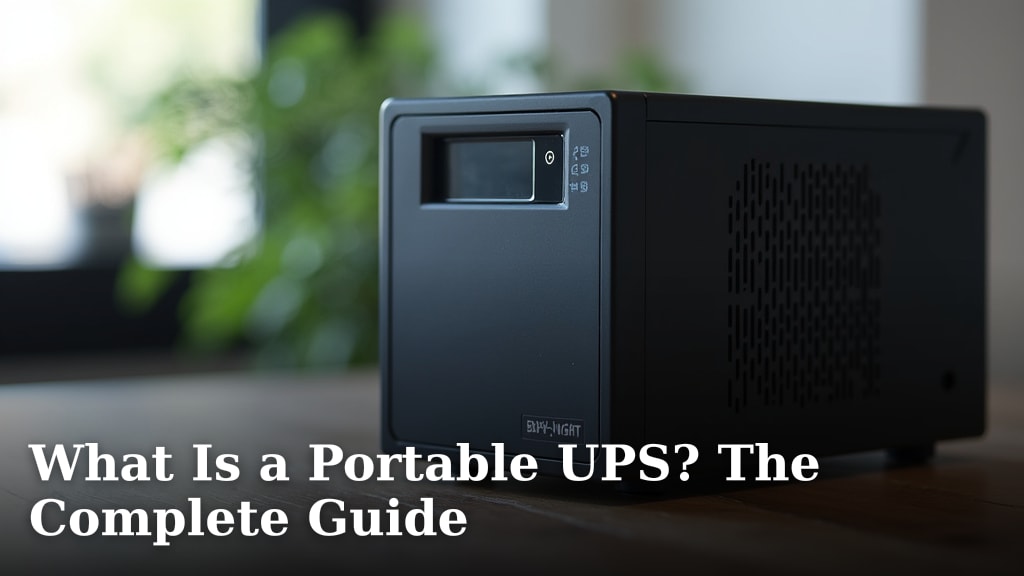
Check your device's input voltage and connector before choosing. The guide to [What Is a Portable UPS?
The Complete Guide](/what-is-a-portable-ups/) covers portable designs and how they differ from standard AC backup units.
A compact AC UPS is the simplest choice when several devices use ordinary plugs and need surge protection along with short-term backup. For a single router, compare its adapter type and power draw first.
When should you replace a small UPS battery?
Replace the battery when the UPS signals a battery fault or no longer provides the backup you need. A user-replaceable battery can let you restore backup function without replacing the entire UPS.
Check the unit's manual for the compatible battery and safe replacement steps. Keep a clear route to the UPS so you can inspect status lights, alarms and battery access when needed.
A UPS battery is not a permanent source of power. It gives connected equipment temporary time during an outage, so plan to save work or shut down devices rather than expecting extended operation.
Which small UPS should you choose?
Choose the APC BE600M1 for a compact desk setup with multiple battery-backed outlets, or the BE425M when wall mounting and low-power networking are priorities. Pick the Tripp Lite BC350 for a low profile, and the CyberPower CP1500PFCLCD or APC BX1500M when your desktop needs more watt capacity.
Measure the available space, add your devices' wattage and confirm which outlets have battery backup. Those checks will narrow the options faster than choosing by outlet count alone.
Our top 3 picks at a glance
-
1
Best for higher wattage desktop setups
CyberPower CP1500PFCLCD PFC Sinewave UPS Battery Backup
9.7/10 our score
See it on Amazon -
2
Best for a compact desk setup
APC BE600M1 UPS Battery Backup & Surge
9.6/10 our score
See it on Amazon -
3
Frequently asked questions
What is the difference between a small UPS and a mini UPS?
A small UPS usually provides standard AC outlets for devices with regular power cords. A mini UPS is often designed for lower-power devices and may use DC outputs instead.
Check the output type before buying so it matches your router, modem or computer power adapter.
How do I choose a compact UPS for a desk?
Start with the devices that must stay on, then add their wattage and compare it with the UPS watt capacity. Measure the available area and check the unit's dimensions, outlet count and which outlets have battery backup.
Leave room to reach plugs and replace the battery if the design allows it.
Can a small UPS keep a Wi-Fi router running?
Yes, if the router's power draw fits within the UPS capacity and you connect it to a battery-backed outlet. Runtime depends on the connected load and battery condition.
For router and modem backup, the APC BE425M and CyberPower ST425 are lower-capacity options in this group.
Can I plug a computer into a compact UPS?
Yes, if the computer and other devices stay within the UPS watt limit. A desktop computer can draw much more power than a router, so check its power needs and leave room for the monitor if you want both backed up.
A higher-capacity tower may suit a larger setup better.
Are all outlets on a small UPS battery-backed?
No. Many UPS units split their outlets between battery backup with surge protection and surge-only protection.
Check the outlet labels and connect your router or computer to a battery-backed outlet.
Use surge-only outlets for accessories that can turn off during an outage.