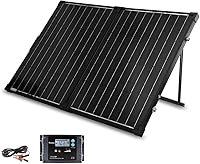
How to Use an EcoFlow Solar Panel
Unfold the EcoFlow panel in direct sunlight, then connect it to a compatible power station’s solar input using the correct cable. Check the station’s manual for its input limits and connection steps before charging.
On this page (7 sections)
- What should you check before connecting an EcoFlow solar panel?
- How do you set up the panel in sunlight?
- How do you connect the panel to an EcoFlow power station?
- How can you get steadier solar charging?
- Can you use a third-party panel with EcoFlow?
- What should you do if the station isn't charging?
- How do you use an EcoFlow solar panel safely?
To use an EcoFlow solar panel, place it in direct sunlight and connect it to a compatible EcoFlow power station’s solar input with the correct cable. Check the manuals for both devices first, because connector types and solar input limits vary by model.
The steps are straightforward: confirm compatibility, unfold and aim the panel, connect it securely, and check the station for charging input. If you're new to portable solar, start with what a portable solar panel is and how it turns sunlight into power for a battery.
What should you check before connecting an EcoFlow solar panel?
Confirm that the panel’s electrical output fits the power station’s solar input range. Check the open-circuit voltage, current, and wattage limits in the manuals for your exact models.
EcoFlow panels and power stations may use different connectors or cables. For example, EcoFlow's solar panel manual describes connecting an MC4 output to a power station’s XT60 input with a solar charging cable.
Other panels or stations may use different connection steps.
Don't assume that a plug fitting means the electrical values are compatible. EcoFlow's manuals warn that panel output parameters must fall within the connected device’s input range.
For a model-specific panel comparison, see our guides to the best solar panel for EcoFlow DELTA 2 and the best solar panel for EcoFlow DELTA 3. RIVER owners can compare options in our EcoFlow RIVER 2 solar panel guide.
How do you set up the panel in sunlight?
Unfold the panel on a stable surface, face it toward the sun, and adjust its stand to aim the panel directly at the light. Keep the panel clear of shade from trees, buildings, people, and gear.
Set the panel where it won't slide or tip in wind. If your model has a kickstand or angle guide, use it as described in its manual and adjust the panel as the sun moves.
Keep the power station in a dry, shaded place with room around it, following its manual. Avoid placing the station on hot ground or where rain can reach it.
How do you connect the panel to an EcoFlow power station?
Connect the panel output to the power station’s solar input using the cable specified for your models. Make sure the connectors are fully seated, and don't force a plug into a port.
On some EcoFlow panels, the cable path runs from the panel's MC4 connectors through an MC4-to-XT60 charging cable and into the station's XT60 input. The EcoFlow 110W panel manual shows a model-specific XT60i connection, so follow your panel and station manuals rather than assuming every setup is the same.
Once connected, check the station’s screen or app for solar input. The EF ECOFLOW DELTA Pro bundle includes a 400W portable solar panel and a solar charge cable; the power station and panel may arrive in separate packages.
The DELTA Pro also has multiple AC, USB, DC, car, and Anderson outputs for devices once they’re powered. Read its manual before connecting loads or changing charge settings.
For other station sizes, see our guides to the best solar panel for EcoFlow RIVER 3, best solar panels for EcoFlow DELTA Pro 3, and best solar panels for EcoFlow DELTA Pro.
How can you get steadier solar charging?
Keep the panel in direct sun and check the station’s input display as conditions change. Clouds, shade, panel angle, and the station’s input limit can all affect the power reaching the battery.
If charging drops, first inspect the panel for shade or a shifted angle. Then check that each cable connection is secure and that the panel is still within the station’s input range.
A higher-wattage panel won't always deliver its rated output in real conditions. The EcoFlow manual explains that solar output depends on placement and that the device’s input range must be observed.
The best solar panel for EcoFlow DELTA 2 Max and the best solar panel for EcoFlow DELTA guides can help you compare options for those stations. For RIVER 2 Pro and RIVER 2 Max, see our RIVER 2 Pro panel guide and our RIVER 2 Max panel guide.
Can you use a third-party panel with EcoFlow?
Sometimes, if the panel’s connector and electrical output meet the power station’s requirements. Check the station manual and the panel specs before buying or connecting an adapter.
The Mytions 200W foldable panel lists XT60, Anderson, and DC8020-compatible solar output options. Match the cable and electrical limits to your EcoFlow model before using it.
The Renogy 400W portable panel has MC4 output cables, and its compatibility guidance calls for matching voltage, current, and connector requirements. Its 4-in-1 adapter cable is sold separately, so confirm the required cable before planning a connection.
Use EcoFlow solar panel specs explained to understand the values to compare, or read the EcoFlow 110W portable solar panel review and EcoFlow 220W solar panel review for model-specific details.
What should you do if the station isn't charging?
Check sunlight, cable connections, port choice, and input compatibility in that order. Look at the station’s display or app after each check to see whether solar input returns.
Move the panel out of shade and point it toward the sun. Firmly reconnect the cable at both ends, using the correct solar input port and cable for the station.
If it still doesn't charge, compare the panel’s output limits with the station’s solar input range. Don't connect panels in series or parallel unless the manuals for both devices allow that setup.
For broader solar power planning, read what a solar UPS is, compare the best EcoFlow 200W solar panel options, or see the best EcoFlow RIVER solar panels.
How do you use an EcoFlow solar panel safely?
Follow the instructions for your exact panel and station, and keep connections within their stated limits. Don't use a damaged cable, force connectors, or leave the station where water can reach it.
Disconnect the setup before adjusting cables or moving equipment. Keep the panel stable, and stop using it if connectors or cables become damaged.
For a reliable setup, choose a compatible panel and cable, place the panel in clear sunlight, and monitor the station’s input. If you’re comparing options, use the station-specific guides for the EcoFlow DELTA Pro, DELTA Pro 3, or RIVER 3.
Frequently asked questions
Can you connect any solar panel to an EcoFlow power station?
No. The panel must use a compatible connector, and its voltage, current, and wattage must fit the power station’s solar input limits.
Check the manuals for both devices before connecting them.
If you use a third-party panel, confirm that the station accepts its output and that you have the right cable.
Does an EcoFlow solar panel need direct sunlight?
Direct sunlight usually helps a panel produce more power, though output can change with cloud cover, shade, panel angle, and temperature. Point the panel toward the sun and adjust its stand as the sun moves.
Keep checking the station’s input display to see how the setup is performing.
Can you leave an EcoFlow solar panel outside in the rain?
Check the manual for your exact panel before exposing it to rain. Water protection varies by model, and connectors or charging equipment may have different limits.
Keep the power station and cable connections dry, and disconnect the setup if conditions exceed the panel’s instructions.
How do you know an EcoFlow solar panel is charging?
Check the power station’s screen or app for solar input and battery status after making a firm connection. If no input appears, check sunlight, cable seating, the selected input port, and whether the panel’s output falls within the station’s limits.
Consult both manuals before changing the wiring.