9 Best Portable Power Station for Starlink Mini (November 2026)
The best portable power stations for Starlink Mini include the Jackery Explorer 300 Portable Power Station for balanced remote work, the BLUETTI Elite 100 V2 Portable Power Station for long backup, and the HOWEASY Portable Power Station for light travel.
On this page (7 sections)
- Which portable power station is best for Starlink Mini?
- How much capacity should a Starlink Mini power station have?
- Should you use AC or direct DC power for Starlink Mini?
- Portable power station or UPS for Starlink Mini?
- How should you set up a Starlink Mini power station outdoors?
- How can you extend portable power station runtime?
- Which portable power station for Starlink Mini should you choose?
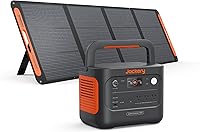
The best portable power station for Starlink Mini is the Jackery Explorer 300 for most remote-work and camping setups. It has 292Wh of capacity, 300W output, 2 AC outlets, a 100W USB-C PD port and a 7.5 lb design.
That mix suits people who want one station to cover Starlink Mini plus a laptop, phone or camera without carrying a much larger unit. The capacity is not the largest here, but it gives a practical working range for a day session when other loads stay modest.
Choose the ROVEDGE MK-1 if you want a purpose-built portable power source for Starlink Mini with direct 30V DC output. Pick the BLUETTI Elite 100 V2 or Anker SOLIX S2000 when Starlink Mini is only one part of a larger backup plan.
Watt-hours tell you how much energy is stored, while watts tell you how much power the station can deliver at once. Both matter, because a high watt rating will not help if the stored capacity runs out early.
Connection type matters just as much for daily use. Some setups work well through a standard AC outlet, while others benefit from a direct DC path that can reduce extra adapters.
Weight decides where the station fits in real life. A lighter unit is easier to move from a vehicle to a tent or desk, while a heavier station is often better left in one place.
Our score weighs specs, features and buyer feedback against what you are shopping for. For most buyers, the goal is the setup that runs the equipment you actually use, for the length you actually need.
Our picks at a glance
-
1
 Best for balanced remote work
Jackery Explorer 300 Portable Power Station
9.6/10 our score
See it on Amazon -
2

-
3

- 4
 Check it
Anker SOLIX C300 DC Portable Power Station
Best for DC-first setups - 5
 Check it
ALLWEI Portable Power Station 300W
Best for compact AC backup - 6
 Check it
Anker SOLIX S2000 Portable Power Station
Best for whole-site backup - 7
 Check it
Anker SOLIX C300 Portable Power Station
Best for AC and USB flexibility - 8
 Check it
BLUETTI Elite 10 Mini Portable Power Station
Best for airline-friendly backup - 9
 Check it
ROVEDGE MK-1 Portable Power Station for Starlink
Best for direct Starlink Mini power
Which portable power station is best for Starlink Mini?
The Jackery Explorer 300 is the strongest all-around pick because it balances battery capacity, output and portability. The ROVEDGE MK-1 is more direct, while the BLUETTI Elite 100 V2 gives you much more stored energy for longer backup.
Jackery Explorer 300 Portable Power Station: Best for balanced remote work
- 292Wh capacity
- 300W rated output
- 2 AC outlets
- 100W USB-C PD port
The Explorer 300 combines a 292Wh battery with 300W output and several connection types. Its 7.5 lb design suits portable Starlink Mini setups where capacity and carry weight both matter.
Pros
- 292Wh capacity
- 300W output
- 2 AC outlets and USB-C PD
- 7.5 lb weight
Cons
- Solar panel sold separately
- Not a direct 30V DC Starlink Mini station
The Jackery Explorer 300 is the best balanced option for a Starlink Mini work kit. Its 292Wh capacity and 300W rated output leave room for the Starlink equipment plus smaller devices such as a laptop or phone, as long as the combined draw stays within the station's limits.
Two AC outlets support standard AC connections, while the 100W USB-C PD port, 2 USB-A ports and 120W car port give you other ways to power accessories. The integrated handle and 7.5 lb weight make it easier to move between a vehicle, campsite and temporary desk.
Jackery states that the Explorer 300 can reach 80% capacity in about 2.8 hours with a 100W solar panel. The solar panel is not included, so plan that as a separate part of an off-grid setup.
Choose this model when you want one station that can cover Starlink Mini and common work devices. It is less specialized than a direct 30V station, so confirm the Starlink Mini power connection you plan to use.
BLUETTI Elite 100 V2 Portable Power Station: Best for long backup
- 1024Wh capacity
- 1800W AC output
- 10ms UPS backup
- 45 minutes to 80% charge
The Elite 100 V2 is the high-capacity choice for extended Starlink Mini backup and other devices. Its 10ms UPS function also suits a home or office setup where a connected router or computer needs fast switchover.
Pros
- 1024Wh capacity
- 1800W output
- 10ms UPS backup
- Fast AC charging
Cons
- 25 lb weight
- More capacity than some short trips require
The BLUETTI Elite 100 V2 is the best choice for extended backup. Its 1024Wh capacity is more than three times the capacity of the Jackery Explorer 300, giving you more room for Starlink Mini, a computer, lighting and other essentials.
Its 1800W AC output is far above what a Starlink Mini setup normally needs, but that extra headroom helps when several devices share the station. The 10ms UPS function is useful for a home office with a Wi-Fi router or computer connected to the backup.
The trade-off is portability. At 25 lb, it is still designed for camping and road trips, but it is better for a vehicle-based setup than for carrying deep into a campsite.
The station reaches 80% charge in about 45 minutes through its stated 1200W AC charging system. Keep it upright during storage and transport, as laying it on its side may damage internal components.
Fast charging helps when you have a short window at a wall outlet before the next session. For camping, think of it as a base station in the vehicle that you place on a stable surface for longer use.
HOWEASY Portable Power Station: Best for light travel
- 88Wh capacity
- 120W output
- 8 output ports
- 2.3 lb weight
The HOWEASY is the lightest option here for small electronics and short power needs. Its 120W output makes it a poor fit for a Starlink Mini setup unless the system's actual draw stays within the station's limits.
Pros
- 2.3 lb weight
- 8 output ports
- Three recharge methods
- Built-in LED lighting
Cons
- Small 88Wh capacity
- 120W output limits Starlink Mini use
The HOWEASY Portable Power Station is best for light electronics and short sessions, not as a default Starlink Mini battery. Its 88Wh capacity and 120W output leave little room for a Starlink Mini setup once conversion losses and other devices are considered.
Its 8 output ports include 2 AC sockets, a USB-C port, 2 QC 3.0 USB ports, a USB port and 2 DC ports. The 2.3 lb weight and 6.6 x 4 x 3 in size make it easy to pack.
HOWEASY supports AC, solar and car charging. It also has built-in LED lighting with steady, flash and SOS modes, which can help around a campsite during a power outage.
Choose it only after checking your Starlink Mini setup's actual draw and required connection. For longer sessions, the 256Wh to 292Wh models here give you more useful capacity.
The small size is the clear advantage for travel. It can fit into a bag that would not hold a mid-size station, which makes it appealing for short stops where only a small device needs power.
The limit is endurance. With 88Wh stored, even a modest continuous load will use the battery quickly, so it works best as a short bridge rather than a station for a full evening of connected work.
The range of ports looks broad on paper, but the total output still sets the ceiling. Adding more devices at once does not create more energy, and the combined draw must stay within the station's limits.
Lighting is a useful extra around a campsite, especially during an outage. It will not extend runtime, but it can make setup and packing easier after dark.
Anker SOLIX C300 DC Portable Power Station: Best for DC-first setups
- 288Wh capacity
- 300W output
- Two 140W USB-C ports
- 7 charging ports
The C300 DC focuses on efficient USB-C and car-socket connections rather than AC outlets. It fits buyers who can power their equipment through compatible DC connections and want 288Wh in a compact body.
Pros
- 288Wh capacity
- 300W output
- Two 140W USB-C ports
- Compact design
Cons
- DC-only design
- Starlink Mini connector compatibility must be confirmed
The Anker SOLIX C300 DC is the best fit for a DC-first setup. It combines 288Wh capacity with 300W output, but its main appeal is the connection layout: 2 USB-C ports rated at 140W, another USB-C port, 2 USB-A ports and a 120W car socket.
A DC setup may avoid some AC conversion steps, but you must confirm that the voltage and connector match your Starlink Mini equipment. This station does not replace a direct 30V Starlink Mini output.
The C300 DC can recharge to 80% in about an hour through its dual PD 3.1 USB-C ports. It also supports solar charging with compatible Anker panels and car charging.
At 2.8 kg, it is a practical choice for buyers who carry the station with other equipment. Choose it for compatible DC and USB-C gear, not simply because the word DC appears in its name.
ALLWEI Portable Power Station 300W: Best for compact AC backup
- 256Wh capacity
- 300W continuous output
- 600W peak surge
- 6 output ports
The ALLWEI gives Starlink Mini users a compact 300W station with a 256Wh battery and an AC outlet. It is a practical middle ground for camping or emergency use when you need both AC and DC connection options.
Pros
- 256Wh capacity
- 300W output
- 6.4 lb weight
- Pass-through charging
Cons
- Solar panel sold separately
- Only 1 AC outlet
The ALLWEI Portable Power Station 300W is a compact AC backup option with 256Wh capacity and 300W continuous output. Its 600W peak surge rating gives connected equipment some starting headroom, although you should still compare each device's power needs.
It has 1 AC outlet, 2 DC5521 ports, 1 car port, an 18W USB-A port and a 60W USB-C PD port. The 6.4 lb weight and 9.25 x 5 x 6.8 in size suit a car, tent or small emergency kit.
ALLWEI supports AC, car, solar and dual charging. The maker states that dual AC and solar charging can fully recharge the station in about 2 to 2.5 hours, with a 100W solar panel sold separately.
Pick it when you want a mid-size battery with AC and DC choices. Check the Starlink Mini adapter path before ordering because this model does not provide the ROVEDGE's direct 30V output.
Anker SOLIX S2000 Portable Power Station: Best for whole-site backup
- 2010Wh capacity
- 1500W continuous output
- 3000W peak output
- Under-10ms UPS switchover
The S2000 is for buyers who want Starlink Mini backup alongside larger home or camp loads. Its 2010Wh capacity is substantial, but the 35.7 lb weight makes it less convenient for frequent carrying.
Pros
- 2010Wh capacity
- 1500W continuous output
- Under-10ms UPS
- Up to 400W solar input
Cons
- 35.7 lb weight
- No 12V DC port
The Anker SOLIX S2000 is the best portable power station for Starlink Mini when you also need substantial site or home backup. Its 2010Wh battery and 1500W continuous output give it far more capacity than the compact options.
The S2000 has 8 outlets and supports up to 400W of solar input. Its under-10ms switchover also makes it suitable for a home office backup arrangement, provided the connected equipment is set up through the correct output.
At 35.7 lb, this is not the station to carry on a long hike. It is better placed in an RV, vehicle, cabin or home office where you want Starlink Mini available during a longer outage.
The S2000 has no 12V DC port, so plan around its available outlets. Choose it for capacity and shared backup loads rather than minimum size.
Solar input up to 400W gives more options for recharging at a fixed site. Check the panel, cable and input limits together before you rely on solar as your main refill method.
Anker SOLIX C300 Portable Power Station: Best for AC and USB flexibility
- 288Wh capacity
- 300W output
- 3 AC outlets
- 8 charging ports
The AC version of the C300 gives you three AC outlets, USB-C ports and a car socket in one station. It suits a Starlink Mini workspace that also needs power for laptops, phones or cameras.
Pros
- 288Wh capacity
- 3 AC outlets
- 140W USB-C ports
- 25dB stated noise level
Cons
- Solar panel sold separately
- Not a direct Starlink Mini 30V station
The Anker SOLIX C300 is the best choice when your Starlink Mini setup also includes several AC and USB devices. It has 288Wh capacity, 300W output and 3 AC outlets, plus a 120W car socket and several USB-C and USB-A ports.
Its 140W two-way USB-C ports support fast charging for compatible equipment. The station also reaches 80% charge in about 50 minutes from a wall outlet, according to Anker's stated charging information.
At 4.13 kg, it is heavier than the C300 DC but still portable for road trips and camping. The stated 25dB noise level may also suit a quiet workspace.
This model does not have a direct Starlink Mini 30V output. Use it when your equipment can safely connect through AC or another supported port, and confirm the full power path first.
The three AC outlets are the practical difference from the DC-only version. They make it easier to run a familiar AC adapter while also charging phones or a laptop from the USB ports.
Two-way USB-C charging helps in two directions. It can charge compatible devices quickly, and it can also be used as a recharge route for the station when a suitable charger is available.
Noise matters more than many buyers expect in a tent or quiet room. A low stated noise level will not make the station silent in every condition, but it is a better starting point for shared spaces.
Weight is the trade-off against that flexibility. At 4.13 kg, it is still a road-trip station, but it will take more effort to carry than the lightest options in this group.
BLUETTI Elite 10 Mini Portable Power Station: Best for airline-friendly backup
- 128Wh capacity
- 200W AC output
- 10ms UPS
- 4 lb weight
The Elite 10 Mini is a small backup station with a 200W AC outlet and 10ms UPS. Its 128Wh capacity is better suited to short sessions or smaller connected equipment than extended Starlink Mini operation.
Pros
- 4 lb weight
- 200W AC outlet
- 10ms UPS
- 128Wh capacity
Cons
- Less capacity than the leading picks
- Starlink Mini runtime depends on actual system draw
The BLUETTI Elite 10 Mini is a compact option for short backup sessions. Its 128Wh capacity, 200W AC outlet and 4 lb weight place it between a large power bank and a full-size portable power station.
The built-in 10ms UPS and 350W bypass output can help keep a laptop, router or security camera connected during an outage. For Starlink Mini, however, runtime depends on the system's draw and the power conversion path.
BLUETTI supports AC, solar and car charging. The station also has Bluetooth app control and 3 lighting modes, including SOS.
Choose the Elite 10 Mini when portability matters more than all-night runtime. If you need extended Starlink Mini use, move up to a 256Wh, 288Wh or 292Wh model.
The 4 lb weight makes it easy to keep in a vehicle or small emergency kit. That convenience is the main reason to accept the smaller 128Wh capacity.
The 200W AC outlet covers small loads better than a phone-only power bank. It still leaves limited headroom once Starlink Mini is connected, so other devices should be added only with care.
The UPS function can be useful for a router, laptop or camera during a brief outage. It should not be treated as a guarantee of long runtime, because the stored energy is still only 128Wh.
Solar and car charging give you more than one way to refill it on the move. For a Starlink Mini session that needs to last for hours, the smaller capacity is likely to become the limiting factor.
ROVEDGE MK-1 Portable Power Station for Starlink: Best for direct Starlink Mini power
- 189Wh capacity
- 30V DC output
- Integrated tripod stand
- IP67-rated enclosure
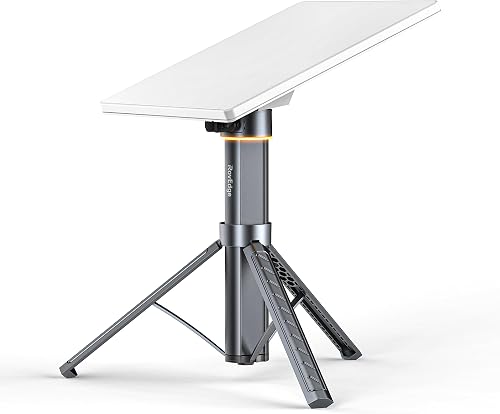
The ROVEDGE MK-1 is designed specifically for Starlink Mini, with direct 30V DC output and an integrated tripod stand. It is the most focused choice here, but its compatibility is limited to Starlink Mini.
Pros
- Direct 30V DC output
- Up to 8 hours stated runtime
- Integrated tripod
- 3.1 lb weight
Cons
- For Starlink Mini only
- 189Wh capacity is below the largest stations
The ROVEDGE MK-1 is the best direct Starlink Mini power source in this group. It has a 189Wh battery, 30V DC output and an integrated tripod stand, so the setup is built around Starlink Mini instead of general-purpose AC equipment.
ROVEDGE states that the MK-1 can provide up to 8 hours of Starlink Mini power under typical conditions. Actual runtime can change with network activity, device draw, weather and operating temperature.
The physical power switch avoids app pairing for basic operation. Pass-through charging lets the station recharge through USB-C while it continues powering Starlink Mini.
Its IP67-rated enclosure applies when protective port covers are fully closed. Keep exposed ports and cable connections dry during use, and confirm your Starlink model and connector before ordering because the MK-1 is made for Starlink Mini only.
The integrated tripod changes how the setup feels in the field. You do not need to carry a separate stand, bracket and power bank, which can simplify a temporary workspace at a campsite or RV stop.
Direct 30V DC output is the other main advantage. It reduces the need for extra adapters, but it also narrows the station to Starlink Mini use rather than general charging for many other devices.
How much capacity should a Starlink Mini power station have?
A 256Wh to 292Wh station is the best starting range for many Starlink Mini setups because it gives more working room than a small power bank without the weight of a 1kWh station. Choose 189Wh for a focused direct-power setup, or 1024Wh and above for extended shared backup.
Battery capacity is measured in watt-hours. A simple planning formula is:
Estimated runtime = battery capacity in Wh × 0.85 ÷ device draw in watts
The 0.85 factor is only a planning estimate for conversion losses. Actual runtime depends on the power station, connection type, Starlink Mini activity and other devices connected at the same time.
For a short remote-work session, the Jackery Explorer 300, Anker SOLIX C300 and ALLWEI 300W provide similar capacity ranges. For longer backup, the BLUETTI Elite 100 V2 has 1024Wh, while the Anker SOLIX S2000 has 2010Wh.
If you also need a laptop battery, compare these picks with our guide to the best portable power station for laptop.
Should you use AC or direct DC power for Starlink Mini?
Direct DC power can be more efficient when the voltage and connector are designed for Starlink Mini. The ROVEDGE MK-1 has a stated 30V DC output, while general stations usually require an AC adapter or a compatible DC connection.
That efficiency comes from fewer conversion steps. Instead of converting battery power to AC and then back down through an adapter, a direct DC path can deliver power in a form closer to what the equipment expects.
AC is easier when you already use the standard Starlink power equipment and want one station to support several devices. The Jackery Explorer 300 and Anker SOLIX C300 each provide AC outlets, while the Anker SOLIX C300 DC is built around DC and USB-C ports.
The trade-off is that AC adds steps that can reduce usable runtime. Those losses are easy to overlook when comparing watt-hours, because the stored capacity and the delivered capacity are not always the same.
Do not choose a connection based only on the port shape. Confirm voltage, current, connector type and the Starlink model before powering the system, as a plug that fits is not proof that the power is correct.
Starlink's official support resources are a useful place to confirm current equipment information. Before a trip, test the full path at home with the exact cable and adapter you plan to carry.
Portable power station or UPS for Starlink Mini?
A portable power station is better for outdoor use and longer runtime, while a UPS is better for automatic short-term backup at a fixed desk. Some portable power stations combine both roles, but the actual output path still matters.
The BLUETTI Elite 100 V2 and Elite 10 Mini specify 10ms UPS backup. The Anker SOLIX S2000 specifies under-10ms switchover, which may help protect a home-office setup from brief interruptions.
For a deeper comparison, read Portable Power Station vs UPS. You can also compare models that include a portable power station with UPS function.
A UPS feature does not guarantee that every Starlink Mini connection will remain uninterrupted. Check the station's instructions and connect the equipment through the supported output.
How should you set up a Starlink Mini power station outdoors?
Place the power station on a stable, dry surface with airflow around it. Keep cable connections protected from water, and avoid covering vents or placing the station where heat can build up.
Before leaving, charge the station fully and connect Starlink Mini while the system is still easy to inspect. Turn on the correct output, check the status display or indicator, and confirm that the dish and connected devices receive power.
For solar charging, use a panel and cable that match the station's voltage and input limits. The Jackery Explorer 300, ALLWEI 300W, Anker SOLIX C300 models and BLUETTI stations have different charging requirements, so do not assume that one panel works with every model.
The ROVEDGE MK-1 adds a fold-out tripod, but its ports still need protection while exposed. Its IP67 rating applies when the protective port covers are fully closed, not when open cables leave the ports exposed.
How can you extend portable power station runtime?
Use the lowest practical power path, disconnect devices you are not using and keep the Starlink Mini session within the battery's planned capacity. A direct DC connection may reduce conversion steps when it is designed for the correct voltage and connector.
Keep the station charged according to its instructions and store it in a suitable dry location. Recharge after a trip rather than leaving the battery empty for a long period.
If you use solar, place the panel where it receives steady sunlight and check the station's input display. Clouds, shade and panel angle can reduce the charge rate.
For home backup, a larger station gives more capacity but adds weight and storage space. The right size is the smallest model that covers your expected session plus your other connected devices.
Which portable power station for Starlink Mini should you choose?
Choose the Jackery Explorer 300 if you want the best balance of 292Wh capacity, 300W output and portability. Choose the ROVEDGE MK-1 if direct 30V DC power, a built-in tripod and Starlink Mini-only use match your setup.
Pick the BLUETTI Elite 100 V2 for longer backup with 1024Wh capacity and UPS support. If Starlink Mini shares power with larger home or camp loads, the Anker SOLIX S2000 gives you 2010Wh, but its 35.7 lb weight makes it a stationary backup choice.
For a compact DC-first system, consider the Anker SOLIX C300 DC. For mixed AC and USB devices, the Anker SOLIX C300 or ALLWEI 300W gives you more connection choices.
Confirm the voltage, connector and total power draw before you connect Starlink Mini.
For short travel, the HOWEASY and BLUETTI Elite 10 Mini are easier to carry, but their smaller capacities demand a closer look at runtime. They suit brief sessions and light loads better than a full evening of Starlink Mini use.
The mid-size stations around 256Wh to 292Wh are the safest starting point for many buyers. They offer more working room than small travel units without the weight and storage demands of a 1kWh or 2kWh station.
Solar charging should be planned as a separate purchase for most models here. The right choice is the smallest station that covers your session, your connection type and your other devices with room to spare.
Our top 3 picks at a glance
-
1
Best for balanced remote work
Jackery Explorer 300 Portable Power Station
9.6/10 our score
See it on Amazon -
2
-
3
Frequently asked questions
What is the best portable power station for Starlink Mini?
The Jackery Explorer 300 is the best portable power station for Starlink Mini for most users because it combines 292Wh capacity, 300W output, 2 AC outlets, a 100W USB-C PD port and a 7.5 lb design.
Choose the ROVEDGE MK-1 if direct 30V DC power and an integrated tripod matter more than broad device support.
How many watt-hours does Starlink Mini need?
Starlink Mini runtime depends on its actual power draw, network activity, weather and operating conditions. Use the station's usable watt-hours divided by the system's watt draw as a starting estimate, then allow for conversion losses.
A larger battery gives more operating time, but it also adds weight.
Can a portable power station run Starlink Mini overnight?
Yes, a suitable portable power station can run Starlink Mini overnight if its usable capacity covers the system's draw for the full session. The ROVEDGE MK-1 states up to 8 hours under typical conditions, while larger 1024Wh and 2010Wh stations offer more capacity for longer backup.
Actual runtime will vary.
Is DC power better than AC power for Starlink Mini?
Direct DC power can reduce the number of conversion steps and adapters in a Starlink Mini setup. The ROVEDGE MK-1 has a 30V DC output for Starlink Mini, while the Anker SOLIX C300 DC focuses on USB-C and car-socket connections.
Confirm voltage, connector and model compatibility before connecting equipment.
Can I use a portable power station as a UPS for Starlink Mini?
Some portable power stations include UPS functions, but that does not automatically make every connection a UPS setup for Starlink Mini. The BLUETTI Elite 100 V2 and BLUETTI Elite 10 Mini specify 10ms UPS backup, while the Anker SOLIX S2000 specifies under-10ms switchover.
Check the output path and Starlink equipment before relying on backup power.