8 Best Portable Power Stations with UPS Functions (November 2026)
The best portable power station with ups include the Anker SOLIX C1000 Gen 2 Portable Power Station for fast UPS backup at home, the EF ECOFLOW Portable Power Station Delta 3 Classic for PCs and sensitive electronics, and the Jackery Explorer 300 Portable Power Station for light travel backup.
On this page (9 sections)
- How we compared UPS switching and runtime
- The best portable power stations with UPS functions
- How these were compared
- Can a portable power station replace a UPS?
- How much runtime do you need from a UPS station?
- What switchover time should you look for?
- How much output wattage do you need?
- How should you set up a power station as UPS?
- Verdict: best portable power station with UPS
The best portable power station with ups for most homes is the Anker SOLIX C1000 Gen 2, with 1,024Wh, 2,000W output and a 10 ms switch. Our score weighs specs, features and buyer feedback against what you are shopping for.
A power station with UPS does two jobs. It stores power for camping or travel, and it can act as a bridge during an outage.
The UPS part matters most when your PC, router or work call must not cut out.
Start with the best portable power station guide if you want the broader buying rules. Then use this list to narrow by switchover time, capacity and output.
Our picks at a glance
-
1
 Best for fast UPS backup at home
Anker SOLIX C1000 Gen 2 Portable Power Station
9.7/10 our score
See it on Amazon -
2
 Best for PCs and sensitive electronics
EF ECOFLOW Portable Power Station Delta 3 Classic
9.7/10 our score
See it on Amazon -
3
 Best for light travel backup
Jackery Explorer 300 Portable Power Station
9.6/10 our score
See it on Amazon
- 4
 Check it
BLUETTI Elite 100 V2 Portable Power Station
Best for quiet indoor backup - 5
 Check it
OUPES Mega 1 Portable Power Station 1024Wh
Best for expandable capacity - 6
 Check it
Anker SOLIX S2000 Portable Power Station
Best for longer fridge backup - 7
 Check it
BLUETTI Elite 10 Mini Portable Power Station
Best for desk and travel UPS - 8
 Check it
AFERIY Portable Power Station 1024Wh Solar Generator
Best for budget 1kWh UPS power
How we compared UPS switching and runtime
We checked switchover claims, capacity, continuous output, surge power, charging speed and port count. We also noted which models state a true UPS mode and which are mainly travel power.
Runtime is not a fixed number. It depends on the load in watts, inverter losses and how often a fridge compressor runs.
Use capacity in watt-hours divided by load watts, then expect real runtime to be a little lower.
UPS time is stated in milliseconds. 10 ms is the fast tier here.
Under 20 ms is still quick, but it is a step slower for sensitive electronics.
Read our portable power station vs UPS post if you are torn between a dedicated UPS and a power station. Also see What Is a Portable UPS? for the full picture.
The best portable power stations with UPS functions
The top picks share 1,024Wh and a 10 ms switch. The differences come down to output, charging speed, size and extra features like expansion or a second battery.
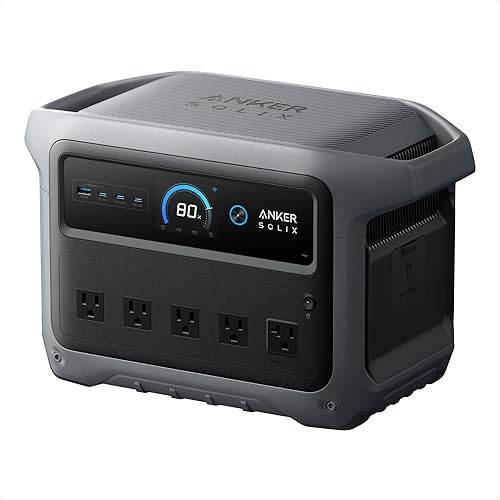
Anker SOLIX C1000 Gen 2 Portable Power Station: Best for fast UPS backup at home
- 1,024Wh capacity
- 2,000W output, 3,000W peak
- 10 ms UPS backup
- 49-minute UltraFast recharging at 1,600W
- 10 ports
A compact 1kWh station with a quick UPS switch and fast recharging for laptops, CPAP machines and home essentials.
Pros
- 10 ms UPS switchover
- 2,000W output for larger loads
- Fast 49-minute recharging
Cons
- Expansion feature removed
- 600W solar input limit
The Anker SOLIX C1000 Gen 2 suits homes that want one unit for outages, RV use and remote work. It gives 2,000W output and 1,024Wh capacity, so it can run a laptop, lights and a small fridge at the same time.
Its 10 ms UPS backup is aimed at devices like CPAP machines and laptops. That speed helps keep a work session alive when wall power drops, rather than forcing a restart.
Recharging is fast at 1,600W, with a full charge in 49 minutes when UltraFast Charging is enabled in the app. Anker says that speed depends on battery temperature, so cold batteries charge more slowly.
The unit has 10 ports and 9 outlets in its spec list. That mix suits a desk with several chargers, plus a lamp or fan during an outage.
It is 14% smaller and 11% lighter than similar models, at 15.1 x 8.2 x 9.6 inches and 11.3 kg. Anker rates the battery for 4,000 cycles with at least 80% capacity left, supporting a 10 year InfiniPower claim.
The trade-off is expansion. Anker states the Gen 2 removed the expansion feature to save weight and size.
If you need more than 1,024Wh, look at the S2000 in this list instead.
EF ECOFLOW Portable Power Station Delta 3 Classic: Best for PCs and sensitive electronics
- 1,024Wh capacity
- 1,800W output, 3,600W surge
- Under 10 ms UPS
- X-Stream charging to 80% in 45 minutes
- LiFePO4 battery
A 1kWh station aimed at PCs, servers and medical devices, with a fast UPS switch and app backup modes.
Pros
- Under 10 ms UPS switch
- 1,800W output with surge
- Fast charging to 80%
Cons
- Not compatible with DELTA 2 or DELTA 3 extra batteries
- Solar panel is optional
The EF ECOFLOW DELTA 3 Classic suits PC users and home offices. It delivers 1,800W output with 3,600W surge, and EcoFlow states a switch in under 10 ms.
That combination matters for computers, servers and medical devices. A fast switch can prevent data loss or a dropped session, while surge power helps with motors that draw extra power at start.
Charging is quick too. EcoFlow states 0 to 80% in 45 minutes with X-Stream AC charging.
That helps you top up fast when a storm forecast comes in.
The battery uses LiFePO4 cells, which EcoFlow rates for 10 or more years of daily use. The app adds Storm Alert and Self-Powered Mode for backup use.
It also offers fast solar recharging in 2.5 hours with a 500W panel, which suits long outages away from wall power. The smart Battery Management System and EV grade CTC design support safe daily use.
One limit to note: this model is not compatible with DELTA 2 Smart Extra Battery or DELTA 3 Series Smart Extra Battery. If expansion is a must, check other models in this roundup.
Jackery Explorer 300 Portable Power Station: Best for light travel backup
- 292Wh capacity
- 300W output, 600W peak
- 7.5 lb light weight
- LiFePO4 chemistry
- 100W USB-C PD port
A light 292Wh station for laptops, cameras and small devices on the move, with simple solar charging.
Pros
- Very light at 7.5 lb
- Good port mix for small devices
- LiFePO4 chemistry
Cons
- 300W output limits larger appliances
- No UPS switchover stated in its specs
The Jackery Explorer 300 suits campers and travelers who need light backup power. At 7.5 lb with 292Wh capacity, it is far easier to carry than 1kWh stations.
It has a 300W rated output with 600W peak surge. That suits laptops, drones, cameras and lights.
It will not run a fridge or kettle for long, and larger appliances need a bigger station.
The port mix is strong for its size: 2 AC outlets, a 100W USB-C PD port, 2 USB-A ports and a 120W car port. You can charge several small devices at once.
Jackery states LiFePO4 chemistry with over 4,000 cycles to 70% capacity. Solar charging reaches 80% in about 2.8 hours with a 100W panel.
It can also charge in about 3 hours via 100W USB-C, about 4 hours from a car port, and about 3.5 hours from a Jackery SolarSaga 100W panel. That choice of inputs helps on the road or at camp.
The honest trade-off is UPS use. Its specs here do not state a UPS switchover time, so treat it as travel and camp power first.
For desk backup, the BLUETTI Elite 10 below is a better fit despite lower capacity.
BLUETTI Elite 100 V2 Portable Power Station: Best for quiet indoor backup
- 1,024Wh capacity
- 1,800W output, 2,700W Power Lifting
- 10 ms UPS backup
- 80% charge in about 45 minutes
- 25 lb weight
A 1kWh station with 10 ms UPS backup and quiet operation for routers, PCs and overnight use.
Pros
- 10 ms UPS backup
- Quiet silent mode
- Compact for 1,024Wh
Cons
- 25 lb to move room to room
- Solar panel not included
The BLUETTI Elite 100 V2 suits indoor backup where noise matters. It offers 1,024Wh capacity and 1,800W output, with a 10 ms UPS switchover for routers and PCs.
BLUETTI states silent mode runs at 30 dB. That sound level is easier to live with in a bedroom or home office than a loud fan during an outage.
Charging is fast from AC. It reaches 80% in about 45 minutes and 100% in 70 minutes with 1200W TurboBoost charging.
That speed helps after an outage ends and you want the station ready again.
At 25 lb with a compact 17L design, it is easier to move than many 1kWh units. It has 11 ports, so one station can cover a router, laptop, phone and a lamp.
The LiFePO4 battery is rated for over 4,000 life cycles to 80%, supporting a 10 year lifespan claim. Solar charging up to 1000W is stated to take 50 to 90 minutes, with an average of 70 minutes.
The trade-off is power headroom. Its 2,700W Power Lifting figure is lower than some 3,600W surge rivals.
For most home essentials, 1,800W is still enough.
OUPES Mega 1 Portable Power Station 1024Wh: Best for expandable capacity
- 1,024Wh capacity
- 2,000W output, 4,500W surge
- Under 20 ms UPS
- Expandable to 5,120Wh with two B2 batteries
- 0-80% AC charge in 36 minutes
A 2,000W station with slower UPS switching than 10 ms rivals, but with battery expansion for longer outages.
Pros
- 2,000W output and high surge
- Expandable capacity
- Very fast AC charging
Cons
- Under 20 ms UPS switch
- Expansion batteries add cost and space
The OUPES Mega 1 suits buyers who plan to grow capacity later. It gives 2,000W continuous output and 1,024Wh, with expansion to 5,120Wh using two B2 Extra Batteries.
Its UPS transfer time is under 20 ms. That is slower than the 10 ms tier in this list.
For many workstations and servers it can still protect against data loss, but check sensitive gear first.
Charging speed is a strength. OUPES states 0 to 80% in 36 minutes by AC, or 26 minutes with AC and solar combined.
Fast charging helps in short windows between outages.
The port list includes dual 100W USB-C PD ports, four QC3.0 USB-A ports, 12V DC outputs and AC outlets. That range suits tools, laptops and phones at the same time.
The LiFePO4 battery is rated at 3,500 plus life cycles while maintaining 80% capacity. The proprietary smart BMS balances cells and guards against overcharging and over discharging.
The trade-off is cost and space. Expansion batteries add weight and money.
If you only need 1,024Wh, a 10 ms rival may be a better UPS choice.
Anker SOLIX S2000 Portable Power Station: Best for longer fridge backup
- 2,010Wh capacity
- 1,500W output, 3,000W peak
- Under 10 ms switchover
- 8 outlets
- 10,000-cycle LFP battery
A larger 2kWh station for home offices and fridges, with a quick UPS switch and dual-sided outlets.
Pros
- 2,010Wh for longer runtime
- Under 10 ms switchover
- 8 outlets front and rear
Cons
- 1,500W output is lower than 2,000W rivals
- No 12V DC port
The Anker SOLIX S2000 suits homes that need longer runtime. It holds 2,010Wh capacity, about twice the 1kWh models above, with 1,500W continuous output.
Anker states a switchover under 10 ms for home office use. That speed can keep a PC and router running during a brief outage without a reboot.
Capacity is the main benefit. Anker states up to 35 hours of fridge backup under lab conditions.
Real runtime varies with fridge size, room temperature and how often the compressor runs.
The station has 8 outlets, with front and rear placement for a cleaner setup. There is no 12V DC port, so check car style devices before buying.
It supports up to 400W solar input and six ways to recharge, including AC plus solar, wall outlet, generator, solar panels, alternator charger and car outlet. That flexibility helps in extended outages.
The battery uses 314Ah LFP cells rated for 10,000 charge cycles and a 15 year lifespan. At 35.7 lbs and 8.2 x 11.1 x 12.7 inches, it is stated to be 30% smaller and 25% lighter than the industry average.
Output is the trade-off. At 1,500W, it is lower than 2,000W rivals.
For fridges, lights and office gear that is fine. For kettles and power tools, a 2,000W model may be better.
BLUETTI Elite 10 Mini Portable Power Station: Best for desk and travel UPS
- 128Wh capacity
- 200W AC outlet, 350W bypass
- 10 ms UPS
- 4.0 lb weight
- 100W USB-C fast charging
A tiny 128Wh station with true UPS backup for a laptop, router or camera during short outages.
Pros
- True 10 ms UPS in a 4 lb unit
- Fast 70-minute AC charge
- LED light for outages
Cons
- 128Wh runs small loads for a short time
- 200W output limits device choice
The BLUETTI Elite 10 Mini suits a desk, truck or travel bag. It packs 128Wh capacity in a 4.0 lb unit, with a 200W AC outlet and 350W bypass output.
Its built-in 10 ms UPS is the key feature. BLUETTI states it can keep laptops, Wi-Fi routers, security cameras and gaming setups running during an outage.
Runtime is short by design. A 128Wh battery can run a low power router or charge a laptop, but it will not power a fridge.
Think of it as a bridge for short outages.
Recharging is quick. It supports 150W AC charging with a full charge in 70 minutes, plus 100W solar and 100W car charging.
Bluetooth app control lets you monitor status. It also adds 3 lighting modes, warm and cool light and SOS, with up to 50 hours of illumination.
The 128Wh size puts it in the 100 to 160Wh range for airline rules, with two units allowed in carry on with prior approval. At 7.87 x 5.75 x 4.33 inches, it fits a backpack more easily than a 1kWh station.
The trade-off is capacity. If your outage lasts hours, you need a 1kWh station.
For a 10 minute outage that would kill a work call, this mini unit is a smart fit.
AFERIY Portable Power Station 1024Wh Solar Generator: Best for budget 1kWh UPS power
- 1,024Wh capacity
- 1,800W output, 3,600W peak
- Under 10 ms UPS
- 13 ports
- 25.57 lb weight
A 1,024Wh station with a fast UPS switch and many ports for home backup, camping and work calls.
Pros
- Under 10 ms UPS switch
- 13 ports for many devices
- Compact for 1,024Wh
Cons
- Solar panel optional
- Smaller buyer base than larger brands
The AFERIY 1024Wh station suits budget conscious buyers who still want UPS speed. It offers 1,024Wh capacity and 1,800W output, with a UPS switch in under 10 ms.
That switch speed is twice as fast as 20 ms models, according to AFERIY. It can keep computers, cameras and meeting gear running when power drops.
The port count is high at 13 ports. There are four 1800W AC outlets, a 140W PD USB-C port and two QC3.0 USB-A ports.
That helps a home office with many chargers.
Charging options include AC, solar, car and AC plus solar. AFERIY states 0 to 80% in 55 minutes by AC, or 35 minutes with AC and solar combined.
The LiFePO4 battery is rated for over 4000 charge cycles and up to 10 years of use. At 25.57 lbs and 13.77 x 8.66 x 10.35 inches, it is stated to be 16% smaller and 25% lighter than most models with similar capacity.
It operates below 30dB in most daily use scenarios, which suits living rooms and campsites. The app allows remote monitoring and scheduled charging, and 3 LED modes cover steady light, SOS and strobe.
The trade-off is brand depth. This model has a smaller buyer base than Anker, EcoFlow or BLUETTI.
Check the in box items, which include an AC cable, MC4-XT60 cable and manual, before you plan solar use.
How these were compared
We compared UPS switchover time first, because that decides if your PC or router stays on. We then compared capacity, continuous output and surge power for runtime and appliance start-up.
We also checked charging speed, weight, port count and battery chemistry. LiFePO4 models dominate this list, which matters for cycle life if you use the station often.
We did not test these units. We compared specs and features from product data and used those facts to score each model for UPS use.
For laptop-focused needs, read the best portable power station for laptop guide. For Anker-specific questions, see Can You Use an Anker SOLIX Power Station as a UPS?.
Can a portable power station replace a UPS?
Yes, for many home uses, if the station has a stated UPS mode and a fast switchover. A 10 ms switch can keep a PC running through a brief outage.
A dedicated UPS is often smaller, cheaper and built only for desk backup. A power station adds camping, RV and solar use, but it costs more and takes more space.
Using a power station as UPS means it stays plugged into wall power. You plug your devices into its AC outlets and enable UPS in the app where required.
Not every power station has UPS mode. The Jackery Explorer 300 in this list does not state a switchover time, so we placed it for travel backup rather than desk UPS use.
Learn more in Is a UPS Battery Backup the Same As a Power Strip? if you are new to backup power terms.
How much runtime do you need from a UPS station?
Runtime comes from capacity divided by load. A 1,024Wh station running a 100W load gives about 10 hours before losses.
A 200W load cuts that to about 5 hours.
Fridges are tricky because they cycle. A fridge with a 50W average draw may run far longer than a constant 50W device, but door openings and warm rooms raise use.
Short outages under 30 minutes
A 128Wh mini station like the BLUETTI Elite 10 can bridge a short outage for a laptop or router. You mainly need speed, not huge capacity.
Outages of a few hours
A 1,024Wh station suits lights, phones, a laptop and a small fridge for a few hours. That is the sweet spot in this list.
Overnight or multi-day outages
A 2,010Wh station like the Anker SOLIX S2000 gives more headroom. You can also recharge with solar during the day if you own panels.
What switchover time should you look for?
Look for 10 ms or less if you protect PCs, servers or medical devices. That is the fast tier in this roundup and matches dedicated UPS expectations.
Under 20 ms is still fast for many devices. The OUPES Mega 1 uses that tier, and it can suit workstations where a brief dip is acceptable.
10 ms models
Anker SOLIX C1000 Gen 2, EcoFlow DELTA 3 Classic, BLUETTI Elite 100 V2, Anker SOLIX S2000, BLUETTI Elite 10 and AFERIY 1024Wh all state 10 ms or under.
Under 20 ms models
OUPES Mega 1 states under 20 ms. It trades a slower switch for expansion and high surge power.
Check your device manual if you are unsure. Some medical and server gear lists minimum UPS requirements that go beyond a marketing claim.
How much output wattage do you need?
Continuous output in watts decides what you can run at once. Surge or peak power helps with motors at start-up, but it does not replace continuous output.
A 200W station suits a laptop, router and lights. A 1,800W or 2,000W station can add a fridge, TV and work gear, depending on total draw.
For a home office
Add your PC, monitor, router, lights and phone chargers. Most offices stay well under 1,000W, so 1,800W gives headroom.
For a fridge and home essentials
Check the fridge start-up draw. A 2,000W station with high surge, like the Anker SOLIX C1000 Gen 2, gives more margin than a 1,500W model.
For internet gear during travel
A mini station with 200W output can power a Starlink Mini for a short period. See the best portable power station for starlink mini guide and the best power supply for starlink post for setup details.
How should you set up a power station as UPS?
Charge the station fully before an outage season. Keep it plugged into a wall outlet in a cool, dry room with space for air flow.
Plug only essential devices into the UPS outlets. Put the PC, monitor and router there, and keep high-draw appliances on wall power.
Enable UPS mode in the app if your model needs it. Anker and EcoFlow both use app settings for charging and backup modes.
Test the switch once with a non-critical device. That test shows you the switchover time and confirms your cables reach the outlets.
Store the station upright and check its charge every few months. A stored battery that sits empty for a year may not be ready when you need it.
Charging checks before storm season
Set a calendar check each season and top the battery from wall power. Note any app warnings about temperature, because several models slow charging when cells are cold.
Keep the AC cable and any solar cables stored with the unit. That way you can move from UPS use to solar recharge without hunting for parts.
Verdict: best portable power station with UPS
Pick the Anker SOLIX C1000 Gen 2 if you want the best mix of 10 ms UPS speed, 2,000W output and fast charging. Pick the EcoFlow DELTA 3 Classic if your focus is PCs and servers.
Pick the Anker SOLIX S2000 if runtime matters more than output. Its 2,010Wh capacity gives longer fridge and home office backup.
For a desk-only bridge, the BLUETTI Elite 10 Mini is small and fast. For light travel power without a stated UPS mode, the Jackery Explorer 300 is easy to carry.
Match switchover time to your devices, then size capacity to your outage length. That order will lead you to the right station in this roundup.
Our top 3 picks at a glance
-
1
Best for fast UPS backup at home
Anker SOLIX C1000 Gen 2 Portable Power Station
9.7/10 our score
See it on Amazon -
2
Best for PCs and sensitive electronics
EF ECOFLOW Portable Power Station Delta 3 Classic
9.7/10 our score
See it on Amazon -
3
Best for light travel backup
Jackery Explorer 300 Portable Power Station
9.6/10 our score
See it on Amazon
Frequently asked questions
What is a portable power station with UPS?
It is a battery and inverter in one case that can switch to battery power when wall power fails. The UPS switchover time tells you how fast that switch happens.
Models here range from under 10 ms to under 20 ms.
Can I use a power station as a UPS for a PC?
Yes, if the station states a UPS mode and a switchover time. Plug the PC into the AC outlet, connect the station to wall power, and enable UPS in the app if required.
Check the output wattage against your PC and monitor load.
How long will 1,024Wh run a fridge?
Runtime depends on the fridge draw and duty cycle, not capacity alone. A 50W average draw would use about 1,024Wh in roughly 20 hours before losses.
A fridge that cycles on and off will run longer than a constant 50W load.
Is a 10 ms switchover better than 20 ms?
For most home devices, both are fast enough to keep electronics running. A 10 ms switch is closer to a dedicated UPS and is safer for sensitive gear.
A 20 ms switch can still suit workstations and medical devices, but check your device needs.
Do I need solar panels for UPS use?
No. For outage backup, you mainly need wall charging before an outage.
Solar helps when outages last many hours or you are away from wall power.
Check each model's solar input limit before buying panels.