Portable Power Station vs UPS: Which Backup to Choose? (November 2026)
Choose a UPS for fast device protection, or a portable power station for longer runtime and flexible off-grid power. The right portable power station vs UPS choice depends on transfer time, outlets, battery capacity and what you need to keep running.
On this page (10 sections)
- Portable power station vs UPS: what is the main difference?
- Which switches faster during an outage?
- Which backup gives longer runtime?
- Which option protects devices better?
- Which product fits a laptop or router?
- Which product fits longer emergency backup?
- Which product combines portability with UPS switching?
- How should you choose between UPS and power station?
- What should you check before connecting equipment?
- Portable power station vs UPS: which should you choose?
Choose a UPS for fast device protection, or a portable power station for longer runtime and flexible off-grid power. The portable power station vs UPS decision depends on transfer time, runtime, device protection and portability.
A UPS normally stays connected between the wall outlet and your equipment. It detects a power failure and switches the load to its battery, giving devices time to keep running or shut down safely.
A portable power station is a rechargeable battery with AC outlets and other ports. It can provide backup power at home, or move to a campsite, vehicle or emergency location.
Think about where equipment sits during normal use. A desktop computer, router or storage device tends to stay in one place, so a unit that remains plugged in and ready may suit that setup better.
Think also about where backup may be needed during an outage. A station can move from a closet to a kitchen, then into a vehicle, without fixed installation.
Transfer time is the first practical difference to weigh. Equipment that restarts after a brief gap needs a clear automatic handoff, while equipment that can be plugged in after an outage values capacity and outlets more.
Runtime is the next question, how long the battery needs to support the load. A small battery may give time to save work, while a larger battery supports a longer interruption.
Device protection matters with sensitive electronics. A UPS is generally chosen when surge handling and controlled shutdown are central, while a station should be checked for its exact protection features.
Portability should match how you carry and store the unit. A lighter station moves easily between rooms or outdoors, while a larger station may suit a fixed emergency location.
Charging options also affect daily use. Some people recharge from a wall outlet, while others benefit from a car port or solar input away from home.
The overlap between categories means labels alone are not enough. Exact transfer behavior, continuous output and capacity should guide the choice for each device.
Start with the load you need to protect, then work backward to the backup format that suits it. That order keeps capacity, portability and protection in proper balance.
 Best for light portable backup
Jackery Explorer 300 Portable Power Station
 Best for longer household backup
Jackery Explorer 1000 v2 Portable Power Station
Portable power station vs UPS: what is the main difference?
A UPS is usually the better fit for always-connected electronics, while a portable power station is better for flexible backup and longer battery use. The overlap grows when a portable station includes an automatic UPS mode.
A traditional UPS is designed to remain in the power path. Your computer, router or network equipment stays connected to the UPS while the UPS remains plugged into the wall.
A portable power station can be stored charged and used when needed. You may connect devices directly to its AC outlets, USB ports or DC port, depending on the load and the station's available outputs.
For a deeper explanation of the category, read What Is a Portable UPS? The Complete Guide.
The terms overlap, but the transfer behavior and protection features still vary by model.
Which switches faster during an outage?
A dedicated UPS usually gives the clearest answer for rapid switchover, but some portable power stations publish a UPS transfer time. The exact number matters more than the product label.
The EF ECOFLOW RIVER 3 230 lists automatic UPS switching under 20 milliseconds. That makes it the clearest match here for a small device that needs an automatic handoff during a power cut.
The Jackery Explorer 300 and Jackery Explorer 1000 v2 have useful battery and outlet specifications, but the supplied product data does not give a UPS transfer time for either model. Don't assume that every AC outlet behaves like a UPS outlet.
Read How Does a UPS Battery Backup Switch to Battery Power? if you want to understand what happens during the handoff. For a desktop computer, storage device or network appliance, check the exact transfer specification before relying on a station.
Why transfer time matters
A short interruption may be harmless to a phone charger but disruptive to a desktop computer, modem or network device. Some equipment keeps running through a brief gap, while other equipment shuts down or restarts.
A UPS can also give your operating system time to save work and shut down. A portable power station may provide longer energy, but longer runtime does not automatically mean faster transfer.
Which backup gives longer runtime?
Battery capacity usually decides runtime when the connected load is the same. The Explorer 1000 v2 has 1,070Wh, compared with 292Wh for the Explorer 300 and 230Wh for the RIVER 3 230.
A simple estimate is:
Runtime in hours = battery capacity in Wh × 0.85 ÷ device load in watts
The 0.85 factor is only a planning estimate. Conversion losses, charging behavior and the device's changing power draw affect actual runtime.
At a 60W load, the Explorer 300's 292Wh capacity gives an estimated 4.1 hours using that formula. A 60W load on the Explorer 1000 v2 gives an estimated 15.1 hours, while the RIVER 3 230 gives about 3.3 hours.
These are estimates, not guarantees. A laptop may draw less after its battery fills, while a motor or heating device may need extra power when it starts.
Which option protects devices better?
Choose the UPS design when automatic transfer, surge protection and controlled shutdown are your main concerns. Choose a portable station when you need stored energy and flexible outlets, then confirm the model's protection features.
UPS protection can include automatic transfer, surge handling and power conditioning. The exact design varies, so check whether the model uses standby, line-interactive or online operation and what protection it publishes.
A portable power station may have pure sine wave AC output, overload protection or a UPS mode. Those features are useful, but they don't make every station identical to a UPS.
The Explorer 1000 v2 has 3 pure sine wave AC ports and a 1,500W AC output. The RIVER 3 230 has a 300W AC output, under-20ms UPS switching and X-Guard protection with current, voltage, temperature and circuit monitoring described in its product data.
For a closer look at one portable station's UPS use, see Can You Use an Anker SOLIX Power Station as a UPS?. The answer depends on the exact model and how its UPS mode works.
Which product fits a laptop or router?
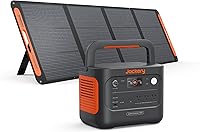
The Jackery Explorer 300 suits a light laptop or router setup when portability matters. It weighs 7.5 lb, has 292Wh of capacity, 2 AC outlets, a 100W USB-C PD port, 2 USB-A ports and a 120W car port.
Its 300W rated output limits the total connected load. The product data gives a 600W peak surge, but that does not mean a device can run continuously above the 300W rating.
In daily use, that limit means a laptop charger plus a router may fit comfortably, while adding a second high-draw device could push the total too high. Check the wattage on each charger before connecting more than one item.
The 292Wh battery also sets a practical time limit for that setup. A lighter load will run longer, but conversion losses and changing device draw mean the estimate should be treated as a guide rather than a promise.
The Explorer 300 can charge devices while it recharges. That pass-through style use can help when a laptop needs power and the station itself is low, though it should not be treated as automatic UPS protection.
It also supports AC, car-port and solar charging, with a solar panel sold separately. Wall charging is the simplest option at home, while solar charging may suit camping or travel when suitable sunlight is available.
For a laptop-focused comparison, see Best Portable Power Stations for Laptops. Match the station's output to the laptop charger and leave room for conversion losses.
Which product fits longer emergency backup?
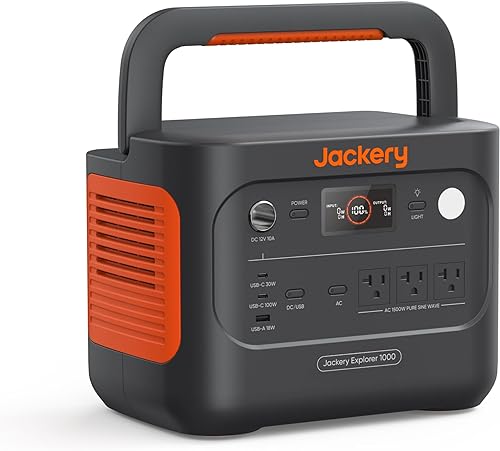
The Jackery Explorer 1000 v2 is the stronger choice for longer backup and higher-wattage loads. Its 1,070Wh capacity and 1,500W AC output give it much more capacity and output than the smaller stations in this comparison.
It has 3 pure sine wave AC ports, 2 USB-C ports, 1 USB-A port and 1 DC car port. The 23.8 lb weight and foldable handle make it portable, but it is less convenient to move than a 7.5 lb station.
The Jackery app includes emergency charging, a quiet overnight charging mode and an energy efficiency mode. One-hour charging requires emergency charging to be enabled in the app.
Its default full-charge mode is 1.7 hours.
Solar panels are not included. The product data states that the Explorer 1000 v2 is compatible only with Jackery solar panels for solar charging.
Which product combines portability with UPS switching?
The EF ECOFLOW RIVER 3 230 is the best match here when automatic UPS switching is more important than maximum capacity. It lists under-20ms switching, a 230Wh battery and a 300W AC output.
The RIVER 3 230 weighs 7.8 lb and has a built-in handle. It can charge from AC in 1 hour or from a 110W solar input in about 2.6 hours.
Its 300W output can power devices up to 600W with X-Boost, according to the product data. Treat that as a device-specific feature, not as a reason to connect any 600W appliance without checking how the appliance behaves.
It also lists 6 outlets, under-30 dB operation at a distance of 1.5 ft, and IP54 battery protection. Those details may help in a small emergency setup, but they don't replace safe placement and the owner's instructions.
How should you choose between UPS and power station?
Choose by the equipment's failure risk first, then choose battery capacity and portability.
Pick a UPS when:
- Your computer, router or storage device must stay connected all the time.
- A short power gap could cause a restart or lost work.
- You want automatic battery transfer and a defined UPS design.
- You need time to shut down equipment cleanly.
Pick a portable power station when:
- You need backup power in different rooms or away from home.
- Runtime matters more than a compact always-connected setup.
- You need AC, USB and car-port outputs in one unit.
- You may recharge from a car or compatible solar panel.
A hybrid approach can also work. A UPS can protect a desktop or network device, while a portable station can support lights, chargers or other equipment during a longer outage.
Use Portable Power Stations: The Complete Buying Guide to compare capacity, output and charging choices before you buy. If your backup needs include satellite internet, Best Portable Power Stations for Starlink Mini covers that use case separately.
What should you check before connecting equipment?
Add the wattage of every device and compare the total with the station's continuous output. Also check startup demand for motors, compressors and other loads that draw more power when they begin.
A 300W station is not a safe choice for a load that needs 500W continuously. Keep the total below the rated output and follow the manual when a device has a high starting surge.
For a UPS, check the supported load, outlet count, transfer mode and shutdown software if your equipment needs controlled power-off. For a portable station, check AC output, battery capacity, charging inputs and whether UPS operation is explicitly included.
Don't place a station where moisture, heat or blocked ventilation can damage it. Keep cables organized, recharge the battery as directed and test the setup before an outage rather than waiting for an emergency.
Portable power station vs UPS: which should you choose?
Choose a UPS for always-connected electronics and fast automatic protection. Choose a portable power station for flexible placement, longer runtime and mixed charging ports.
For the products here, choose the Jackery Explorer 300 when low weight and 292Wh are enough. Choose the Jackery Explorer 1000 v2 for 1,070Wh and 1,500W output.
Choose the EF ECOFLOW RIVER 3 230 when under-20ms UPS switching is the deciding feature.
For a laptop or router that stays in one place, a UPS design may be the simpler fit. It remains in the power path and is chosen for automatic transfer and time to shut down safely.
For backup that needs to move between rooms, a vehicle or an outdoor location, a portable station offers more flexibility. Its battery, AC outlets and other ports can support a wider mix of devices.
Runtime should be matched to the outage you expect, not just to the largest battery available. A compact station may cover a short interruption or a light load, while a larger station can support higher-wattage equipment for longer.
Output needs the same care. Add the wattage of every connected device and keep the total below the continuous rating, with extra room for startup demand from motors or compressors.
Transfer behavior remains the key dividing line in this comparison. A station without a stated UPS transfer time should not be assumed to protect equipment in the same way during a sudden power cut.
Charging method may decide the choice for some users. A station that recharges quickly from AC may suit home use, while solar or car charging may matter more for travel and outdoor backup.
Care and setup also deserve attention before an emergency. Test the exact devices, keep the unit charged as directed, and store it where heat, moisture and blocked ventilation will not damage it.
The best portable power station vs UPS choice is the one whose transfer behavior, output and capacity match the device you need to keep running. Match the format to the equipment first, then compare specific models on capacity and output.
Frequently asked questions
Is a portable power station the same as a UPS?
A portable power station and a UPS both store energy for an outage, but they are built around different priorities. A UPS usually emphasizes automatic switchover and device protection, while a portable power station emphasizes battery capacity, flexible outlets and use away from a wall outlet.
Some power stations also include UPS operation.
Which is better for a computer, a UPS or a portable power station?
A UPS is usually the simpler choice for a desktop computer because automatic switchover and surge protection are central to its design. A portable power station can work for a laptop or other computer setup when its output, transfer behavior and charging method match your needs.
Check the exact model before connecting sensitive equipment.
Does a portable power station protect against surges?
Don't assume every portable power station offers the same surge protection as a UPS. Check the exact unit's protection features and manual.
A station may provide battery backup without replacing a dedicated UPS for equipment that needs automatic transfer, power conditioning or a defined surge-protection design.
Which lasts longer, a UPS or a portable power station?
Runtime depends on battery capacity and the wattage of the connected load, not only on the product category. A 1,070Wh portable power station can run a smaller load longer than a compact UPS, while a UPS may be better for a short outage and automatic shutdown.
Calculate runtime from the exact battery and load.
Can a portable power station run during charging?
Some portable power stations support pass-through use, but the behavior depends on the model and connected load. The Jackery Explorer 300 can charge devices while it recharges.
For any station, follow the manual and avoid treating pass-through operation as proof that it provides the same transfer protection as a dedicated UPS.