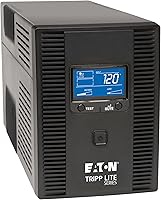
What Can You Plug Into a UPS Battery Backup? A Practical Guide
You can plug essential electronics into a UPS battery backup, like computers, monitors, Wi-Fi routers, and external hard drives. These are devices that need uninterrupted power to avoid data loss or sudden shutdowns during an outage. For a backup unit you can move with your equipment, read our portable UPS guide.
The primary role of an uninterruptible power supply is to provide immediate battery power and surge protection. It acts as a bridge, giving you a few minutes to save work and shut down properly, or keeping critical network gear running. We found that understanding its capacity and runtime is key to knowing what it can safely handle.
- A UPS keeps essential devices running during a brief power outage.
- It protects sensitive electronics from dangerous power surges.
- Not all devices are suitable—like space heaters or large appliances.
- Check your UPS’s wattage rating to match it with your equipment.
- This guide breaks down what to connect and what to avoid.
Below, we’ll walk you through a practical checklist of what to plug into a UPS, how to calculate your power needs, and common mistakes to avoid.
Conclusion
A UPS battery backup is a practical way to protect your essential electronics. You can safely connect devices like computers, monitors, and routers to keep them running during outages. Always check the wattage rating of both your UPS and your equipment to avoid overloads. Take a moment today to review what’s plugged into your current setup. This ensures your backup system works when you need it most.
Frequently Asked Questions
Can I plug my gaming PC into a UPS battery backup?
Yes, you can, but be mindful of power demands. Gaming PCs often use high wattage, so match it with a UPS that has a suitable capacity. We recommend calculating your PC’s total power needs first to ensure stability.
How long will a UPS keep my internet running during a power outage?
The runtime depends on the UPS battery size and your router’s power consumption. A typical home router may run for 30 to 60 minutes on a standard UPS. This is often enough time to save work or wait for power restoration.
Is it safe to plug a TV or refrigerator into a UPS?
Generally, no. These appliances require more power than most home UPS units can provide. We advise using a UPS only for low to medium wattage devices that need immediate backup power.
What happens if I plug too many devices into a UPS?
Overloading can cause the UPS to shut down or malfunction. Always add up the wattage of all connected devices and keep it below the UPS’s maximum rating. This prevents damage and ensures reliable protection.
Do I need a UPS for my laptop if it has a built-in battery?
A UPS can still provide extra protection for your laptop. It guards against power surges and keeps your charging setup running during outages. Connecting your laptop charger to a UPS adds an important layer of safety.