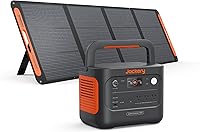
How to Charge a Portable Power Station with Solar Panels
Match the solar panel's voltage and current to the power station's solar input, then connect the panel with the correct cable and place it in direct sun. Charging speed changes with sunlight, panel output, battery level, and the station's input limit.
On this page (9 sections)
- How do you match a solar panel to a power station?
- Which cables and adapters connect the panel?
- How do you connect a solar panel safely?
- Where should you place the solar panel?
- How long does solar charging take?
- Is a small power station useful for solar charging?
- Can you charge while running devices?
- What should you do when solar charging stops?
- What is the best way to use solar charging?
Portable power station solar charging works when the panel's output matches the station's solar input. Use the right connector, confirm polarity, place the panel in strong direct sunlight, and expect charging to slow when clouds, shade, heat, or device use reduce the available power.
A solar setup gives you a way to refill a battery away from an outlet. It doesn't guarantee a fixed charging time because sunlight changes throughout the day.
For a broader look at battery capacity, output limits, and useful features, see our guide to the best portable power station.
How do you match a solar panel to a power station?
Start with the power station's solar input range and maximum input wattage. The panel's operating voltage must fit that range, and its current should not exceed the station's limit.
Check these details before connecting anything:
- Solar input voltage range
- Maximum solar charging wattage
- Maximum input current
- DC connector size
- Connector polarity
- Whether the station needs a special adapter
- Whether the panel uses a compatible output connector
A panel rated at a high wattage may still deliver less power in real sunlight. The power station may also limit the input to protect its battery or charging circuit.
Do not assume that a panel works because its plug fits. Matching voltage, current, connector size, and polarity matters more than the physical connection.
What does solar input matching mean in daily use?
Solar input matching means the panel and power station can operate within the same electrical limits. A compatible panel may charge efficiently, while an incompatible panel may charge slowly, refuse to start, or create a safety risk.
The panel's open-circuit voltage can be higher than its normal operating voltage. Check the value the power station allows, not just the panel's headline wattage.
If you connect multiple panels, confirm whether the station allows panels in series or parallel. Combining panels changes voltage or current, so follow the power station's instructions instead of guessing.
Which cables and adapters connect the panel?
Use a cable made for the power station's input and confirm every connector before turning on the setup. A cable for AC wall charging is not automatically suitable for solar input.
The HulkGoo Heavy-Duty Power Station Charging Cable is a 6 ft, 14AWG AC power cord with a NEMA 5-15P to IEC C13 connection. Its title names compatibility with Jackery Explorer Pro models, EcoFlow DELTA and RIVER series, Bluetti EB3A, and Anker 757 and 767.
Use this type of cable for the charging method it supports. For solar charging, confirm that the station's DC input accepts the cable and adapter arrangement you plan to use.
The MARBERO 19V AC/DC Adapter Power Cord Power is a wall adapter with 100V to 240V, 50/60Hz AC input and 18V to 19V output for devices drawing less than 1.5A. Its title names compatibility with MARBERO M82, M82MAX, M822, M822MAX, M87, M88, and M168 portable power stations.
This adapter is not a universal solar connector. Match it to the named MARBERO model and its charging requirements before use.
If you need a replacement cable for a specific EcoFlow unit, our guide to the best EcoFlow DELTA charging cable can help you compare cable types. For indoor charging choices, see the best portable power station charger.
How do you connect a solar panel safely?
Turn off the power station if its instructions require it, connect the panel to the correct solar input, and check the display for charging activity. Keep the connectors dry and avoid forcing a plug.
Use this order:
- Place the panel where it can receive sunlight.
- Inspect the cable, plug, and input for damage or moisture.
- Confirm voltage, current, polarity, and connector fit.
- Connect the panel cable to the station's solar input.
- Watch the display for input watts or a charging symbol.
- Disconnect the panel if the station shows an error or unexpected input.
Keep the cable away from sharp edges, standing water, hot surfaces, and areas where people may trip. Do not connect exposed electrical parts during rain.
If the panel has a built-in controller, learn how that controller interacts with the power station. Some power stations already manage the solar charging process, so adding another controller may be unsuitable.
Where should you place the solar panel?
Place the panel in unobstructed sunlight and aim it toward the strongest available sun. Even a small shadow can reduce the output of a panel with multiple cells.
A practical setup includes:
- A clear outdoor area away from tree shadows
- A stable surface that will not tip
- An angle that faces the sun as directly as practical
- Enough cable length to keep the station shaded
- A dry location for the power station
- Periodic repositioning as the sun moves
Keep the power station out of unnecessary heat. Solar panels can become warm in direct sun, while a shaded battery location may make the setup easier to monitor.
A cover can help during storage and transport, but it should not block airflow or be used as a substitute for weather protection. See our guide to the best solar generator cover for storage and carrying considerations.
How long does solar charging take?
Estimate charging time from battery capacity and usable solar input, then add extra time for changing conditions. The panel's rated wattage is a best-case figure, not a promise of continuous power.
For a rough estimate:
charging time ≈ battery capacity in watt-hours ÷ usable solar watts
A 500Wh battery receiving about 100W of usable solar input would need more than 5 hours in ideal conditions. Clouds, shade, heat, low sun, cable loss, battery charge limits, and power used by connected devices can extend that time.
Charging often slows as the battery gets close to full. If you are planning for an outage, start charging early rather than waiting until the battery is empty.
Is a small power station useful for solar charging?
A small power station can suit phones, laptops, lights, and other low-power devices when its input and output limits fit your needs. It is less suitable for appliances that need more power than the station can provide.
The Daran Portable Power Station 89.6Wh LiFePO4 Battery 100W(200W Peak) Solar Power Bank has a 10V to 30V DC5521 solar input rated at 3A and up to 40W. Its recommended solar panel range is 18V to 35V open-circuit voltage, with a suggested 22.5V, 3A, 40W panel.
The DaranEner model has a 100W output limit and a 200W peak figure, so keep connected device power within its stated 100W limit. Its solar panel is optional and not included.
Its 89.6Wh capacity is better suited to lightweight power needs than long appliance runs. Use the display to monitor remaining power, and remember that connected devices reduce the energy available for later use.
Can you charge while running devices?
You may be able to use a power station while it receives solar power, but the result depends on the model and the total load. If devices use more power than the panel supplies, the battery can still decline.
For example, a 40W solar input cannot maintain a 60W load indefinitely. The station may draw the difference from its battery until the load falls, the sun improves, or the battery becomes empty.
Check the manual for pass-through charging, output restrictions, and charging behavior. Avoid treating a solar panel as a constant power source when clouds and shade can change its output quickly.
What should you do when solar charging stops?
Check sunlight, cable connections, input limits, and battery status before assuming the station has failed. A shaded panel or loose connector is often enough to stop charging.
Use this short checklist:
- Move the panel into direct sunlight.
- Check every plug for a loose connection.
- Confirm that the panel voltage is within the input range.
- Remove unnecessary loads from the power station.
- Check whether the battery is already full.
- Review any error code in the manual.
- Stop using the setup if a cable or connector becomes hot, damaged, or wet.
For vehicle-based charging, solar is only one option. You can compare an EcoFlow 800W alternator charger review, learn what an Anker SOLIX alternator charger is, or read what the EcoFlow alternator charger does.
What is the best way to use solar charging?
Choose the panel by the power station's input limits, connect it with the correct cable, and plan around real sunlight instead of the panel's maximum label. Keep the panel clear, the station dry and shaded when possible, and the total load below the station's output limit.
Pick the DaranEner model if you want a small 89.6Wh station with a 40W solar input and a 100W output limit. Pick the MARBERO adapter when you need a compatible indoor wall charger for the named MARBERO models.
Pick the HulkGoo cable when your compatible station needs its specified AC power cord.
Solar charging is different from ordinary wall charging, so check the input details before connecting anything. If you are also comparing backup charging methods, read how a UPS battery backup charges and what a portable UPS is.
Frequently asked questions
Can any solar panel charge a portable power station?
No. The panel must match the power station's solar input voltage, current, connector, and polarity.
Check the input range and maximum wattage before connecting it.
A panel that produces too much voltage can damage the station, while a small panel may charge slowly or fail to start charging.
How long does portable power station solar charging take?
Charging time depends on battery capacity, panel wattage, sunlight, temperature, cable losses, and the station's input limit. A simple estimate is battery watt-hours divided by usable solar watts, then add time for changing sun and conversion losses.
Real charging is rarely as fast as the panel's label suggests.
Can you charge a power station while using it?
Many power stations support pass-through charging, but the exact behavior depends on the model and output being used. Check the manual before relying on it.
If the connected devices use nearly as much power as the panel supplies, the battery may charge slowly or continue losing power.
Does a solar panel need direct sunlight?
Direct, unobstructed sunlight gives the panel its best chance of reaching useful output. Shade, clouds, low sun, dirt, and poor panel angle reduce power.
Move the panel during the day if practical, and keep it away from tree shadows, roof edges, and other obstructions.