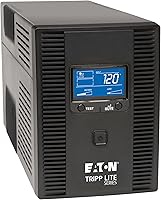
5 Best Small Rack Mount UPS Systems (November 2026)
The best small rack mount UPS systems include the Eaton Tripp Lite SMART500RT1U SmartPro 500VA 1U for shallow racks, the Eaton Tripp Lite SMART1500LCD 1500VA 2U Rack for higher capacity in 2U, and the APC 1500VA Smart UPS with SmartConnect for remote monitoring.
On this page (7 sections)
- How we chose small rack mount UPS systems
- The best small rack mount UPS picks
- What should you measure before choosing a small rack UPS?
- How much UPS capacity does a small rack need?
- Which UPS features matter in a shallow rack?
- Can a small rack UPS support emergency equipment?
- How do you choose the best small rack mount UPS?
The best small rack mount UPS for a shallow rack is the Eaton Tripp Lite SMART500RT1U, which uses 1U and has an installed depth of 11.8 in. If your equipment needs more than 300W, compare the 2U models and confirm that their depth, rack rails and cable clearance fit.
A compact UPS still needs enough capacity for the equipment it protects. Add the real watt draw of your server, switch, router and other devices, then check both rack dimensions and the outlet layout.
Our picks at a glance
-
1
 Best for shallow racks
Eaton Tripp Lite SMART500RT1U SmartPro 500VA 1U
9.7/10 our score
See it on Amazon -
2
 Best for higher capacity in 2U
Eaton Tripp Lite SMART1500LCD 1500VA 2U Rack
9.6/10 our score
See it on Amazon -
3

- 4
 Check it
APC Smart-UPS 1500VA/900W Rackmount UPS
Best for a 900W APC setup - 5
 Best for mounting a UPS outside the rackCheck it
How we chose small rack mount UPS systems
The best small rack mount UPS depends on more than its height. We compared published capacity, rack height, depth, outlet count, voltage regulation and monitoring features, then matched those details to common rack constraints.
A 1U unit can preserve vertical space, while a shallow 2U unit may provide much more watt capacity without using a deep rack. Dimensions can be reported in different ways, so verify the manufacturer’s installation drawing and allow room for power and data cables.
A UPS only protects equipment connected to its battery-backed outlets. For help choosing which devices to connect, see what you can plug into a UPS battery backup.
For a primer on rack form factors and installation, read what a rack mount UPS is.
| Product | Best for | Capacity | Rack height | Installed depth | Our score |
|---|---|---|---|---|---|
| Eaton Tripp Lite SMART500RT1U SmartPro 500VA 1U | shallow racks | 500VA / 300W | 1U | 11.8 in | 9.7 |
| Eaton Tripp Lite SMART1500LCD 1500VA 2U Rack | higher capacity in 2U | 1500VA / 900W | 2U | 9.6 | |
| APC 1500VA Smart UPS with SmartConnect | remote monitoring | 1500VA / 1000W | 2U | 9.4 | |
| APC Smart-UPS 1500VA/900W Rackmount UPS | a 900W APC setup | 1500VA / 900W | 2U | 9.3 | |
| VIVO UPS | mounting a UPS outside the rack | 8.8 |
The best small rack mount UPS picks
The SMART500RT1U is the shallowest 1U option here, while the 2U choices offer higher power capacity. Choose by measured rack space and total load, then use monitoring and outlet features as tie-breakers.
Eaton Tripp Lite SMART500RT1U SmartPro 500VA 1U: Best for shallow racks
- 500VA / 300W
- 1U rack space
- 11.8 in installed depth
- 6 UPS outlets and 1 surge-only outlet
- AVR
The 1U height and 11.8 in installed depth suit racks with limited vertical and front-to-back space. It offers 300W maximum power, so check your connected load before choosing it.
Pros
- Uses 1U of rack space
- Shallow 11.8 in installed depth
- AVR corrects brownouts without draining the battery
Cons
- 300W maximum power may not cover a larger load
- Only 6 outlets provide battery backup
The Eaton Tripp Lite SMART500RT1U is the clearest fit when rack depth is tight. It takes 1U of rack space and has an installed depth of 11.8 in, so it is easier to accommodate in a shallow enclosure than a deeper full-size unit.
Its maximum output is 300W. That suits a modest networking or telecom load only when the connected devices stay below that limit; add the watt draw from their labels or management interface before deciding.
Six outlets provide UPS backup, and one additional outlet is surge-only. One of the battery-backed outlets can be individually controlled for load shedding, which can help reserve battery runtime for more critical equipment.
AVR corrects brownouts without using battery power, and the unit has USB and RS232 connections, plus an EPO interface. Optional SNMP/Web card support and PowerAlert software add management options for remote or unattended systems.
Buy it for a short rack and a measured load under 300W. If your equipment needs more capacity, choose a 2U model after checking that the extra rack height and mounting depth work.
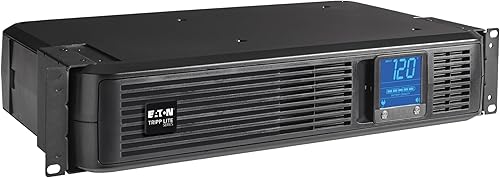
Eaton Tripp Lite SMART1500LCD 1500VA 2U Rack: Best for higher capacity in 2U
- 1500VA / 900W
- 2U rack space
- 10.5 in deep
- 8 outlets
- Rotatable LCD and AVR
This 2U model pairs a 900W maximum with a stated depth of 10.5 in. Its rotatable LCD shows voltage, runtime, load, battery and operating mode.
Pros
- 900W maximum power
- Eight outlets
- Can also be installed as a vertical tower
Cons
- Uses twice the rack height of a 1U model
- Weighs 29 lb
The Eaton Tripp Lite SMART1500LCD is a compact-depth 2U choice when 1U capacity is not enough. It provides 1500VA / 900W and is 10.5 in deep, though you still need to account for the rack rails, connectors and cable bend space during installation.
Eight outlets support battery backup and surge protection. Its LCD rotates for rack or tower placement and displays voltage, runtime, load, battery and operating mode, making status checks easier in a rack.
AVR corrects brownouts and overvoltages while keeping the battery available for outages. The internal battery is user-replaceable, and the UPS also has USB and RS232 ports for shutdown and monitoring software.
This model can also stand vertically as a tower with the included adapter. Its 29 lb weight means the rack and mounting hardware need to support the installed unit safely.
Buy it for a 900W maximum load when 2U is available. Check the total depth with cables attached and confirm the rack can support its weight.
APC 1500VA Smart UPS with SmartConnect: Best for remote monitoring
- 1500VA / 1000W
- 2U rackmount
- Pure sine wave output
- AVR
- SmartConnect remote monitoring
The 2U APC has a 1000W maximum and SmartConnect remote monitoring through a secure portal. It includes rack support rails and has six battery-backup outlets.
Pros
- Highest wattage capacity among these UPS models
- Pure sine wave output
- SmartConnect notifications and remote monitoring
Cons
- Requires 2U of rack space
- SmartConnect is offered as a 6-month free trial for units purchased or registered after August 1, 2023
The APC Smart-UPS with SmartConnect suits a rack that needs up to 1000W and remote status access. It is a 2U rackmount UPS with support rails and six battery-backup outlets.
The unit provides pure sine wave output and AVR. SmartConnect uses a secure portal for remote monitoring and automatic notifications; for units purchased or registered after August 1, 2023, the feature is offered as a 6-month free trial.
Its listed dimensions are 23.2 x 24 x 9.3 in, which do not clearly identify front-to-back installed depth. Confirm the rack fit with APC’s installation details before buying, especially if your rack has limited depth.
The six protected outlets can be enough for a small server group, but count plugs and check whether any equipment needs a separate power arrangement. Compare the load’s watt draw with the 1000W limit, and leave capacity for any planned additions.
Buy it for a 2U rack with a load within 1000W and a need for remote monitoring. Choose another model if the fit cannot be confirmed for your rack depth.
APC Smart-UPS 1500VA/900W Rackmount UPS: Best for a 900W APC setup
- 1500VA / 900W
- 2U rackmount
- Pure sine wave output
- AVR
- SmartConnect remote monitoring
This APC 2U model supports up to 900W and includes rack rails, AVR and SmartConnect remote monitoring. Its capacity matches the Eaton 2U model, so compare monitoring and installation needs.
Pros
- 900W maximum power
- Pure sine wave output
- Includes rack rails
Cons
- Uses 2U of rack space
- The listed dimensions are not a front-to-back rack depth measurement
The APC Smart-UPS SMC1500-2UC provides 1500VA / 900W in a 2U rackmount design. It includes rack rails, AVR, pure sine wave output and six battery-backup outlets.
SmartConnect remote monitoring can provide notifications and firmware updates through a secure portal. As with the other APC model, units purchased or registered after August 1, 2023, have a 6-month free trial offer for SmartConnect.
The dimensions given for this model are 17.3 x 6.7 x 8.6 in, but the measurement labels do not make the rack’s front-to-back clearance clear. Verify the correct orientation and clearance with APC’s mounting instructions rather than assuming the first measurement is the installed depth.
This pick and the Eaton 2U model both have a 900W maximum. The APC is a fit when its monitoring and sine wave features suit your equipment, and when its measured installation depth works with the rack.
Buy it for an APC 900W setup with remote monitoring. Measure the unit and cable clearance against the usable rack depth before installation.
VIVO UPS: Best for mounting a UPS outside the rack
- Adjustable steel holder
- Wall or under-desk mounting
- Supports devices up to 33 lb
- Fits devices up to 15 x 11 x 5.5 in
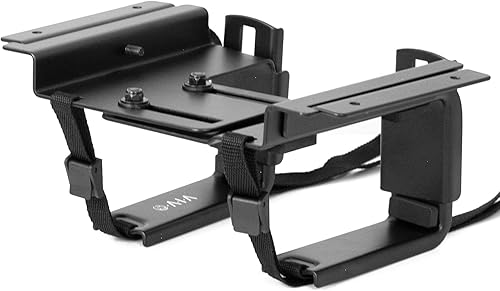
VIVO is a mounting bracket for a compatible UPS, not a rackmount UPS with battery backup. It may help move a UPS out of a crowded rack if wall or under-desk mounting suits your setup.
Pros
- Can mount vertically on a wall or horizontally under a desk
- Mounting hardware is included
- Supports up to 33 lb
Cons
- Does not provide battery backup
- Device must fit the bracket's stated size range
VIVO’s MOUNT-UPS01 is a mounting bracket, not a UPS. It can move a compatible UPS to a wall or under a desk, which may free rack space when the rack itself is too crowded.
The adjustable steel holder supports up to 33 lb and fits devices from 8.3 x 4.5 x 3.1 in to 15 x 11 x 5.5 in. The bracket’s outside dimensions vary from 9.9 to 12.1 in long, 5.5 in wide and 4.7 to 7.5 in high.
Hardware is included for wood studs, concrete or brick walls, drywall and under-desk mounting. Check the surface and installation instructions, then confirm your UPS fits the bracket’s size and weight limits.
A bracket outside the rack can be useful when the rack has no spare U space, but the UPS still needs a safe power connection and access for maintenance. If you want an in-rack battery backup, pick one of the actual rackmount units above.
Buy it for relocating a compatible UPS outside the rack. Do not choose it as a replacement for a UPS or as a rackmount battery backup.
What should you measure before choosing a small rack UPS?
Measure usable rack depth from the front mounting rails to the nearest obstruction at the back. Include the room needed for power plugs, network cables and airflow, since a cabinet’s outside depth does not tell you the space available to equipment.
Next, count the free rack units and check the mounting method. A 1U UPS fits one vertical unit, while a 2U model needs two, plus any space needed for service access or nearby equipment.
Dimensions deserve special care when manufacturers give only overall measurements or do not label each side clearly. The APC units here have listed dimensions that do not plainly identify installed front-to-back depth, so verify their mounting drawings before making a tight fit.
Finally, check weight support and ventilation. A UPS with a higher capacity may be heavier, and the rack needs to support the unit and its rails without blocking the vents.
How much UPS capacity does a small rack need?
The right UPS capacity is the watt load of the equipment you need to keep running, with room for practical headroom. VA ratings alone do not tell you the maximum usable watt load, so compare your total draw directly with the UPS watt rating.
Add the wattage of each server, switch, modem, router or storage device that should stay on during an outage. If the device reports current instead, use its rated input information or manufacturer guidance to estimate power, and avoid treating peak and typical draw as the same.
The SMART500RT1U has a 300W maximum, while the 2U units here range from 900W to 1000W. For larger loads, see how to size a large UPS backup.
A 600VA UPS may suit a smaller load, but the relevant limit is its watt rating and expected runtime; see whether a 600VA UPS is enough for your equipment.
A larger rating does not automatically mean longer runtime at every load. Runtime generally falls as more equipment draws power, so check the UPS runtime chart at your expected wattage and leave room for orderly shutdown if that is your goal.
Which UPS features matter in a shallow rack?
The most useful features depend on how you manage the rack. AVR helps address some voltage fluctuations without switching to battery, while USB, serial or network monitoring can support alerts and automatic shutdown.
Outlet count matters because servers, network gear and peripherals can use more plugs than expected. Separate battery-backed and surge-only outlets can help reserve battery capacity for equipment that needs to stay on.
For a managed rack, look for shutdown software or network monitoring that matches your operating systems and network setup. The SMART500RT1U has USB and RS232, the Eaton 2U has USB and RS232, and the APC models add SmartConnect remote monitoring.
A surge protector can provide surge protection, but it does not supply battery power during an outage. Compare the role of a 650VA CyberPower unit with a UPS, and review how to mount a surge protector if you are arranging power hardware in the rack.
Can a small rack UPS support emergency equipment?
A rack UPS can support compatible electronics during a power interruption, but it is not automatically a suitable emergency lighting system. Check the lighting equipment’s power requirements, backup duration and applicable safety rules before connecting it.
For business continuity, the UPS may keep network equipment online long enough to send alerts or shut down systems. That is different from providing room lighting or exit illumination, so choose dedicated equipment where emergency lighting is required.
Read the emergency lighting system guide to plan that separate need. If your setup combines different power sources or operating modes, the guide to hybrid UPS systems can help explain the terminology.
How do you choose the best small rack mount UPS?
Choose the SMART500RT1U when 1U height and 11.8 in depth matter most and the measured load stays within 300W. Choose the Eaton SMART1500LCD when you need up to 900W in a stated 10.5 in depth, or compare the APC 2U models for their 900W or 1000W capacity and monitoring features.
Before deciding, confirm the UPS’s installed dimensions, cable clearance, rack support and watt load. If the rack is full, the VIVO bracket may move a compatible UPS outside it, but it does not provide backup power itself.
A rack mount UPS is only a good fit when it suits both the load and the cabinet. Measure first, then choose capacity and monitoring features for the equipment you actually need to protect.
Our top 3 picks at a glance
-
1
Best for shallow racks
Eaton Tripp Lite SMART500RT1U SmartPro 500VA 1U
9.7/10 our score
See it on Amazon -
2
Best for higher capacity in 2U
Eaton Tripp Lite SMART1500LCD 1500VA 2U Rack
9.6/10 our score
See it on Amazon -
3
Frequently asked questions
What makes a rack mount UPS small?
A small rack mount UPS takes little rack height, has a short front-to-back depth, or both. Check the rack’s usable depth and available U space against the UPS dimensions, including room for cables and airflow.
The SMART500RT1U uses 1U and has an installed depth of 11.8 in.
Is a 1U UPS enough for a server?
A 1U UPS can be enough if its watt capacity covers the connected equipment and its runtime meets your shutdown or ride-through needs. The SMART500RT1U supports up to 300W, so add the actual watt draw of your server and network gear before selecting it.
Keep extra capacity for startup or future equipment.
How much rack space does a 2U UPS need?
A 2U UPS occupies two vertical rack units, twice the height of a 1U model. The SMART1500LCD and both APC picks here are 2U.
Measure available rack height and depth before ordering, and check the rail and cable clearances in the installation instructions.
Can I use a desktop UPS in a rack?
Only if the UPS is designed for rack mounting or you have a compatible, secure mounting method. A bracket can hold some UPS units outside the rack, but it does not turn them into rackmount models or add battery backup.
Confirm device size, weight limits and mounting surface first.
How do I size a rack mount UPS?
Add the watt draw of the devices that need backup, then choose a UPS with a watt rating above that total. Also decide how long equipment must stay on during an outage and whether you need automatic shutdown, monitoring or extra outlets.
VA and watt ratings are different, so compare the watt limit directly with your load.