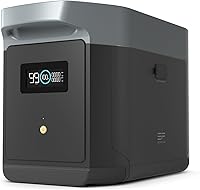
How to Use an EcoFlow DELTA 2
To use an EcoFlow DELTA 2, charge it first, connect only devices within its output limits, and turn on the matching output before plugging in equipment. Check the display during charging and unplug devices when they are finished.
On this page (10 sections)
- How do you charge an EcoFlow DELTA 2 first?
- How do you turn on the DELTA 2 outputs?
- How do you use the AC outlets safely?
- How do you use USB and DC outputs?
- How do you connect solar charging?
- Can you use the DELTA 2 while it charges?
- How do you use the EcoFlow app?
- How do you estimate runtime?
- How should you shut down and store the station?
- What is the simplest daily routine?
To use an EcoFlow DELTA 2, charge the station, turn on the output you need, connect compatible devices, and monitor the display. For the newer model, see our EcoFlow DELTA 3 use guide.
Start with a dry, stable location, keep the vents clear, and follow the DELTA 2 manual for charging limits and safety warnings.
The basic controls are simple once you separate charging from output. Charging fills the battery, while the AC, USB, and DC controls decide which connected devices receive power.
How do you charge an EcoFlow DELTA 2 first?
Charge the DELTA 2 fully before using it as backup power. Use the included charging method or another method approved in the manual, then confirm that the input reading and battery level change on the display.
Keep the station on a firm surface while charging. Leave space around the ventilation areas, and keep the station, cables, and plugs away from water.
Before connecting a cable, inspect it for cuts, bent contacts, or loose ends. Stop if a cable or plug becomes unusually hot, smells burnt, or causes a warning.
A wall charge is useful when you need the station ready indoors. Solar charging can help during an outage or outdoor trip, but sunlight and panel placement change the charging rate.
How do you turn on the DELTA 2 outputs?
Press the button for the output type you want before connecting a device. Use the AC button for standard AC equipment, the USB controls for USB devices, and the DC control for compatible DC loads.
Connect one device first and check the display. A sudden change in output or a warning gives you a reason to disconnect the load and check its power needs.
Turn off unused output groups when you no longer need them. This reduces unnecessary battery use and makes the display easier to read.
Do not connect a device just because its plug fits. Check its voltage, wattage, starting demand, and the DELTA 2 limits in the manual.
How do you use the AC outlets safely?
Use the AC outlets for devices that need household-style alternating current and stay within the station's output limit. Small electronics are easier to manage than equipment with a high starting demand.
Connect a laptop charger, light, or other suitable device after turning on AC output. Watch the battery level and output reading while the device runs.
High-draw appliances can use a large share of the stored energy. A heating appliance, motor, or compressor may also need more power when it starts, so check its specifications first.
Never use the station to power damaged cords or wet equipment. If the DELTA 2 shuts down, remove the load, check the warning, and follow the manual before trying again.
How do you use USB and DC outputs?
Use USB outputs for compatible small electronics and DC outputs for devices designed for that type of power. Match the cable and output to the device instead of relying on an adapter that changes the connection without confirming compatibility.
USB charging is useful for phones, tablets, cameras, and similar equipment. Turn off the USB group after charging is complete if you want to avoid leaving the output active.
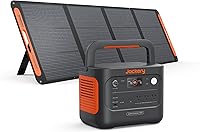
For a smaller station with clearly listed ports, the Jackery Explorer 300 offers 2 AC outlets, a 100W USB-C PD port, 2 USB-A ports, and a 120W car port.
The Explorer 300 weighs 7.1 lb and has a compact form factor. Its included items are the power station, AC adapter, car charger cable, and user guide, while the solar panel is not included.
Choose this type of smaller station when portability matters more than running larger loads. Its stated 300W maximum power does not make it a substitute for a larger station.
How do you connect solar charging?
Connect solar panels only when their voltage, current, connectors, and wiring match the DELTA 2 manual. Place the panel in useful sunlight, avoid shade where possible, and check the station's input reading after making the connection.
The panel's rated output is not a promise of the same charging rate in every condition. Clouds, shade, angle, cable length, and panel temperature can change the energy reaching the station.
The ECO-WORTHY kit has 200W maximum power, 12V and 24V use, a 30A PWM charge controller, MC4 connectors, and 2 pcs 100W monocrystalline panels. It also includes Z mounting brackets, 16.4 ft 10 AWG solar cables, 2-in-1 connectors, and a 4.92 ft tray cable.
Its panels measure 35.2 x 23.1 x 1.3 in and use aluminum frames. The kit can connect in series for 24V or parallel for 12V, so confirm the planned arrangement before connecting it to a power station.
For a larger solar generator comparison, the best portable power station guide explains how capacity, output, and recharge options affect daily use.
Can you use the DELTA 2 while it charges?
Use simultaneous charging and output only within the station's instructions and limits. Check the display for input and output values, and remember that devices can slow the battery's net charging progress.
This setup can make sense when a panel is producing power and you need to run a small device. It still needs careful load management because changing sunlight can reduce input while the connected device continues drawing power.
The EF ECOFLOW DELTA Pro package shows the difference between a larger station and a small one. It includes a 3,600Wh DELTA Pro power station, a 400W portable solar panel, and a solar charge cable.
The DELTA Pro has 5 AC outlets, 4 USB-A ports, 2 USB-C ports, 2 DC ports, 1 car power output, and 1 Anderson port. Its listed output wattage is 3,600W, so it suits readers comparing a much larger setup with the DELTA 2.
Read our best EcoFlow power station guide if you are deciding between EcoFlow models. The EcoFlow DELTA 2 Max review is another useful next step when you need more capacity.
How do you use the EcoFlow app?
Use the EcoFlow app to check the station's status and adjust settings when your model and connection support it. Pair the station as directed, then review battery level, temperature, charging, and output information.
The app can be useful when the station is placed where the screen is hard to see. Keep physical access available so you can disconnect a device or stop charging if the station shows a warning.
Do not treat remote control as a replacement for checking cables and ventilation. Inspect the station before use, especially after it has been stored or transported.
How do you estimate runtime?
Estimate runtime from usable battery energy and the device's actual power draw, then leave room for conversion losses and changing loads. A device's printed wattage is a starting point, not a guarantee of exact runtime.
Add the wattage of devices that will run at the same time. Separate essential loads from optional ones, and turn off lights, chargers, or screens when you no longer need them.
A larger battery can run a load longer, but it may be heavier and harder to move. A small station can be easier to carry, while a larger model can better suit several devices or longer outages.
The EcoFlow DELTA vs DELTA 2 comparison can help when the main question is capacity and model choice.
How should you shut down and store the station?
Turn off each output group, unplug connected devices, and store the DELTA 2 in a dry indoor location. Keep the station away from heat, moisture, and direct sunlight.
Do not leave cables connected just because the station is not running. Coil them without sharp bends, and check the ports before the next use.
Follow the manual's storage charging guidance. Check the battery level periodically and recharge it as directed rather than leaving the station unused for a long period.
If you need more stored energy, compare the best EcoFlow DELTA extra battery options first. A larger system such as the EcoFlow DELTA Pro Ultra review is better suited to readers comparing high-capacity backup choices.
What is the simplest daily routine?
Charge the DELTA 2, check the battery level, turn on only the needed output, and watch the load while devices run. Disconnect finished devices and switch off unused output groups.
Use the DELTA 2 for compatible loads that stay within its limits. Choose the right charging method for your location, keep the station dry and ventilated, and treat every warning as a reason to stop and check the setup.
For a small electronics kit, the Jackery Explorer 300 is easier to carry. For solar input, the ECO-WORTHY kit offers a 200W panel setup, while the EF ECOFLOW DELTA Pro package is the larger option for readers who need 3,600Wh and 3,600W output.
Frequently asked questions
How do you use an EcoFlow DELTA 2 for the first time?
Place the DELTA 2 on a dry, stable surface, connect the correct charging cable, and let the battery charge before relying on it. After charging, turn on the output type you need, connect a compatible device, and watch the display for input, output, battery level, and warnings.
Can you use an EcoFlow DELTA 2 while it is charging?
Use the DELTA 2 according to its manual when charging and powering devices at the same time. Keep the total load within the station's limits, avoid covering ventilation areas, and stop using the setup if the display shows a warning or unusual heat.
How do you charge an EcoFlow DELTA 2 with solar panels?
Use a solar input arrangement that matches the DELTA 2 manual and its voltage and current limits. Position panels where they receive useful sunlight, check the input reading on the display, and remember that clouds, shade, panel angle, and cable connections affect charging.
How should you store an EcoFlow DELTA 2?
Store the DELTA 2 indoors in a dry place, away from heat, moisture, and direct sun. Before storage, charge it as the manual recommends, disconnect accessories and devices, and check the battery level from time to time instead of leaving it unused indefinitely.