How to Use a Wireless Power Bank
To use a wireless power bank, charge the bank, turn on wireless output if needed, and place your phone's charging coil over the bank's coil. Remove thick or metal cases, then check the phone and power bank indicators for active charging.
On this page (9 sections)
- How do you use a wireless power bank step by step?
- How do you align a phone with a wireless power bank?
- How do you turn on wireless charging?
- Can you use a wireless power bank with a phone case?
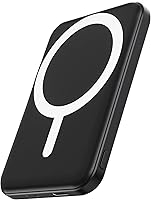
- How do you use a magnetic wireless power bank?
- What do wireless power bank lights mean?
- Why does wireless charging stop or start slowly?
- How should you charge and care for the bank?
- Which wireless power bank setup should you choose?
To use a wireless power bank, charge the bank, turn on wireless output if needed, and place your phone's charging coil over the bank's coil. Remove a thick or metal case, then confirm that the phone shows a charging symbol.
Wireless charging is simple once the two coils are aligned. A magnetic model can help center the phone, but magnetic attachment doesn't guarantee that every phone or case will charge wirelessly.
How do you use a wireless power bank step by step?
Charge the power bank, wake its wireless function, align the phone, and confirm the charging indicator. Keep the phone still for a moment after placement so you can check that power is flowing.
- Charge the power bank through its input port until it has enough stored energy.
- Place the power bank on a flat surface or hold it securely.
- Press its power button if wireless output doesn't start automatically.
- Put the back of the phone over the bank's wireless charging area.
- Move the phone slowly until the charging icon appears.
- Check the bank's lights or display for an active output signal.
- Leave the phone centered while it charges.
The exact button behavior varies by model. If the phone does not respond, lift it away, press the power button once, and try the alignment again.
How do you align a phone with a wireless power bank?
Center the phone's internal charging coil over the middle of the power bank's wireless pad. Start with the phone centered lengthwise, then move it a small amount until the phone displays its charging symbol.
The charging coil is inside the phone, so the visible center of the phone is a useful starting point but not a perfect guide for every model. Keep the phone and bank flat together while checking the connection.
If charging starts and stops, the coils may be close but not centered. A case, camera bump, grip, wallet, or uneven surface can also keep the two surfaces apart.
Wireless charging can be less efficient than wired charging. If you need the fastest available option, connect a suitable cable to the power bank instead.
How do you turn on wireless charging?
Press the power button when the bank does not begin charging automatically. Some wireless power banks detect a phone after contact, while others require a manual start.
Look for a light, battery display, or other output indicator on the bank. The phone's charging symbol is the more useful confirmation because it shows that the phone is receiving power.
If the indicator turns off quickly, the phone may not be aligned, the bank may be low, or the bank may have a timeout feature. Reposition the phone and press the button again before changing cables or settings.
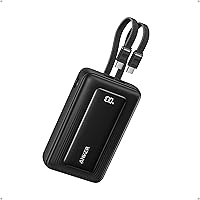
The BLAVOR Solar Power Bank suits readers who want a 10,000mAh bank with 10W wireless charging, USB-C output, built-in cables, and solar charging as an emergency backup.
BLAVOR gives this model a 5.91 x 3.07 x 0.87 in size and a 9.3 oz weight. Its solar panel has a maximum charging current of 0.23A, so cable charging is the practical primary method while solar charging is better treated as backup.
Can you use a wireless power bank with a phone case?
Use a thin, non-metal case only when it allows the phone and power bank to stay close and aligned. Remove thick, metal, wallet, or heavily textured cases if charging is weak or the bank will not attach.
Cases can create distance between the coils. Even when a phone supports wireless charging, the case may interfere with the connection or stop a magnetic bank from sitting in the right place.
Test the setup without the case first. If charging works bare but not with the case, the case is the likely cause.
A magnetic wireless power bank needs extra care. The phone, case, and bank must use compatible magnetic positioning, and the magnets must hold the phone firmly enough to keep the coils aligned.
For phone-specific choices, see our guides to the best wireless power bank for iPhone 11 and the best wireless power bank for iPhone 13.
How do you use a magnetic wireless power bank?
Place the magnetic power bank against the compatible charging area on the back of the phone or case, then confirm charging. Let the magnets center the bank instead of sliding it around while the phone is charging.
Magnetic attachment helps with alignment, but it does not make an incompatible phone compatible. Check whether your phone and case support the magnetic arrangement used by the bank.
The Anker 621 MagGo Power Bank suits iPhone users who want a small 5,000mAh magnetic charger with 7.5W maximum wireless charging.
This Anker model measures 4.13 x 2.62 x 0.45 in and weighs 4.41 oz. It includes a 23.6 in USB-C to USB-C cable, and its magnetic attachment is designed for the iPhone 15 and iPhone 14.
The UGREEN 10000mAh Magnetic Power Bank PD 20W suits compatible iPhone users who want 10,000mAh capacity, 7.5W wireless charging, and USB-C PD 20W wired charging.
UGREEN says a MagSafe-compatible case gives the best magnetic hold and wireless charging performance. Thick, metal, or non-MagSafe cases may stop the bank from attaching properly or disable wireless charging.
What do wireless power bank lights mean?
The phone's charging symbol confirms charging, while the power bank's lights usually show battery or output status. The meaning of a flashing, steady, or changing light depends on the model.
Check the power bank's instructions for the exact indicator pattern. Do not assume that a light means the phone is charging unless the phone also shows its charging icon.
A light that turns off can mean the phone is full, the connection timed out, the bank is empty, or the phone moved out of alignment. Press the power button and reposition the phone before troubleshooting further.
If the phone becomes unusually hot, stop charging and let both devices cool. Wireless charging naturally creates some warmth, but uncomfortable heat is a reason to disconnect and inspect the setup.
Why does wireless charging stop or start slowly?
Wireless charging usually stops because of poor alignment, case interference, low bank power, heat, or phone movement. Fix the simplest causes first by removing the case, centering the phone, and checking the bank's remaining charge.
Phone use can also slow charging because the phone is consuming power while receiving it. High-power apps, direct sunlight, and warm surroundings can make the process slower.
A wireless connection is less efficient than a wired one. If the phone must charge quickly, use the USB-C or other suitable wired output instead.
Capacity also affects how much energy reaches the phone. Read our power bank battery guide and what power bank capacity you need before choosing a larger bank.
How should you charge and care for the bank?
Recharge the power bank with the correct input connection, keep the charging surfaces clean, and store it in a cool, dry place. Avoid covering the bank or phone with materials that trap heat during charging.
Keep dust and debris away from the wireless charging area. A dirty or uneven surface can make alignment less reliable.
Do not use a cable, case, or adapter that is damaged. Stop using the bank if it becomes unusually hot, swollen, cracked, or damaged.
For outdoor use, choose features that match your conditions. The BLAVOR model has an IPX5 waterproof rating, while its solar charging is limited compared with cable charging, so plan your recharge method before leaving home.
Which wireless power bank setup should you choose?
Choose a magnetic model when your phone and case support its magnetic alignment. Choose a standard wireless bank when you want broader device flexibility, and choose wired output when speed matters most.
The Anker 621 is the compact 5,000mAh option for compatible iPhone use. The UGREEN model adds 10,000mAh capacity and USB-C PD 20W wired charging for compatible iPhone models.
The BLAVOR model fits outdoor use when you want 10,000mAh capacity, 10W wireless charging, built-in cables, and solar charging as a backup. For a larger wireless option, compare the best 20000mAh power bank with wireless charging.
Before choosing, check your phone model, case, charging standard, preferred capacity, and need for wired speed. Our best wireless power bank guide compares the main buying choices, while the best 10000mAh power bank guide focuses on that common capacity.
If you own an INIU bank, use our guide to check whether your INIU power bank is recalled before charging it.
The simple decision rule is: use a magnetic bank for a compatible magnetic phone and case, use a regular wireless bank for flexible placement, and switch to a cable when you need faster charging. For more general charging steps, see how to use a portable power bank.
Frequently asked questions
How do you turn on a wireless power bank?
Press the power button if the bank has one, then place the phone over the wireless charging area. Some banks begin charging when the phone is aligned, while others need a button press first.
Check for a charging icon or indicator light on the phone before leaving it unattended.
Can you use a wireless power bank with a phone case?
Yes, a thin case may work if it doesn't block the charging connection or magnetic attachment. Thick, metal, or non-MagSafe cases can prevent alignment and wireless charging on magnetic models.
Remove the case when charging stops, becomes intermittent, or the bank will not attach securely.
How do you use a magnetic wireless power bank?
Match the bank's magnetic ring with the phone's compatible charging area, then let the magnets center the bank. Confirm the phone shows charging before using it.
Magnetic attachment and wireless charging compatibility are separate, so check your phone and case before relying on the setup.
Is wired or wireless charging faster from a power bank?
Wired charging is usually the better choice when speed matters because the connection loses less energy than wireless charging. Wireless charging is useful when you want fewer cables, but alignment, case thickness, phone use, and temperature can affect charging speed.